Extended Domain Settings
The "Extended Domain Settings" plugin is an advanced tool for multi-domain management of the e-learning platform. It allows you to configure and manage multiple platform instances under different domains, each with their own customized settings.
The plugin extends the standard domain settings with most of the options you have for the global platform configuration, this way each domain will behave as an independent platform. For each of your client you will be able to setup different registration modes, home-page settings, SSO token, and much more
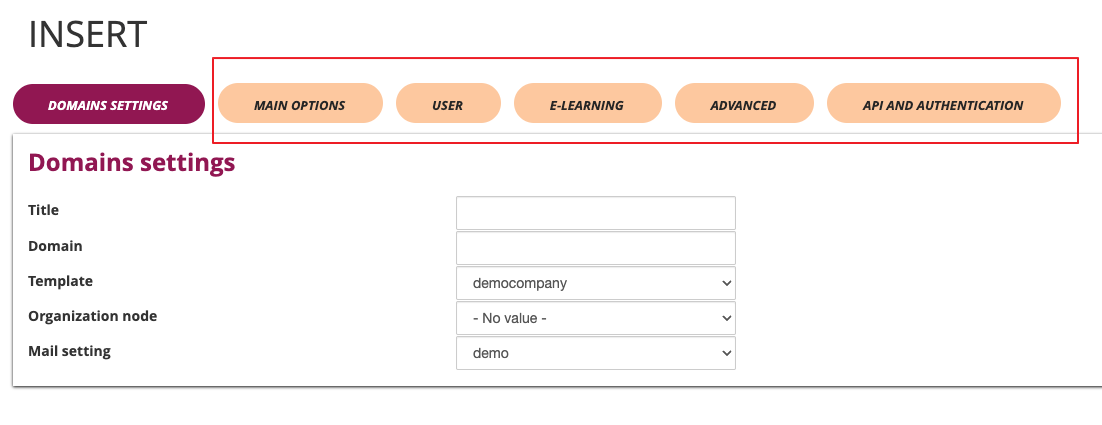
Plugin Configuration
Access to Configuration
The plugin is accessible through the administration panel:
-
Access the administrative panel
-
Navigate to the "System Configuration" section
-
Select "Domain Settings"

By default domains will inherit the global platform settings, and any configuration change made to a specific domain will override the default ones
Domain Profile Management
Creating New Domain Profile
To create a new domain profile:
-
Click on the "Insert" button (green)
-
Fill in the required fields:
- Title: Profile identifier
- Domain: Complete domain URL
- Template: Select the appropriate template for this domain
- Organizational node: Associate a specific orgchart node for the users that will self-register to this domain
- Mail Profile: Configure specific email settings for this domain


To add a new domain to your Forma Cloud check our Email & DNS settings documentation
Edit an Existing Domain Profile
To modify an existing profile:
-
Locate the profile in the list
-
Click on the "Edit" button (blue)
-
Update the necessary fields
-
Click "Save changes" to confirm

Profile Deletion
To delete a profile:
-
Locate the profile in the list
-
Click on the "Delete" button (red)
-
Confirm the operation

Advanced Configuration
Domain Settings
Title and Branding
- Title: Platform name customization
- Domain: Main URL configuration
- Template: Graphic layout selection
- Organizational node: Associated hierarchical structure
- Mail Profile: Specific email configuration

Main Options
Language and Localization
- Default language: Main language selection (e.g., Italian)
- Page title: Browser title customization
- Site properties: Copyright and property information

User Management
Access Configuration
- Required checkboxes: Definition of mandatory fields for the profile
- Profile edit URL: Configuration path for profile modifications
- Profile edit options:
- Allow complete modification
- Allow only password modification
- Disable profile modifications
- Redirect to external page

Password Management
- Password composition: Letters and numbers requirements
- Password history: Number of previous passwords to store
- Minimum length: Required minimum characters
- Password expiration: Days of validity (0 = no expiration)
- Mandatory password change: Force change at first login

User Registration
- Registration code: Code usage mode
- Required fields: Name and Surname mandatory
- Advanced mode: Use of advanced registration form
- Time limit: Available hours to confirm registration
- Registration type: Access control (Administrators only/Everyone)
- Privacy policy: Mandatory acceptance
- Registration code: Code activation for specific users

E-Learning
Course Configuration
- Course sorting: Display criteria in "My courses" area
- By Name
- By Company
- By Status
- Home page: Initial page selection (Dashboard / Course Catalog / MyCourses)
- Course list: Display a "Catalog" button on login page
- Send user to catalogue if not enrolled in any course: Redirect users from "MhyCourses" to "Catalog" if not enrolled in courses

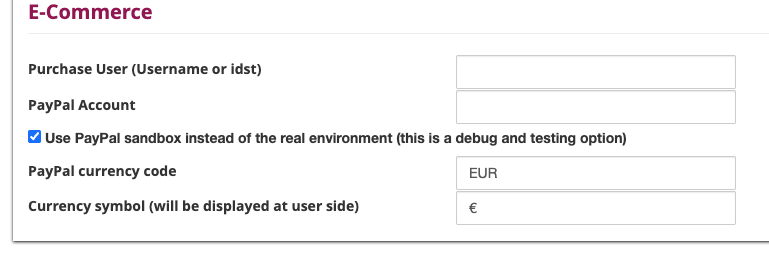
E-Commerce
- Purchase notifications: Username or ID configuration for notifications
- Currency symbol: Monetary symbol setting (e.g., €)
- PayPal environment: Sandbox mode for testing or real environment
- PayPal account: Account configuration for payments
- PayPal currency: Currency setting (e.g., EUR)
Advanced Configurations
Google Integration
- Google Analytics: Statistics tracking activation
- Google Code: Tracking code insertion

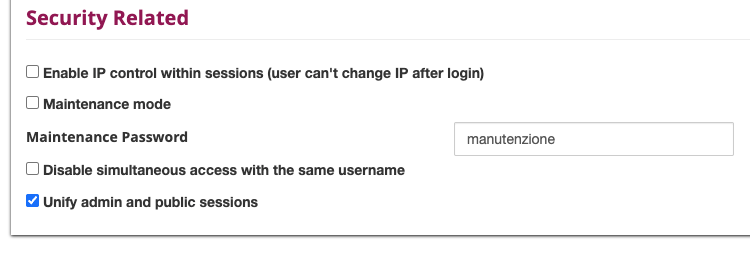
Security Configurations
- Simultaneous access: Disabling multiple access for same username
- IP control: IP consistency activation during session
- Maintenance password: Password setting for maintenance mode
- Site under maintenance: Maintenance mode activation
- Administration session: Public session sharing with administration
API and Authentication
SSO Configuration
IMPORTANT NOTICE: Unlike Forma's standard global configurations, in multidomain, users will be authenticated based on the email field, not the username. This allows the same person to be registered on the platform with different user accounts.
You will be able to create different SSO configurations for each domain:
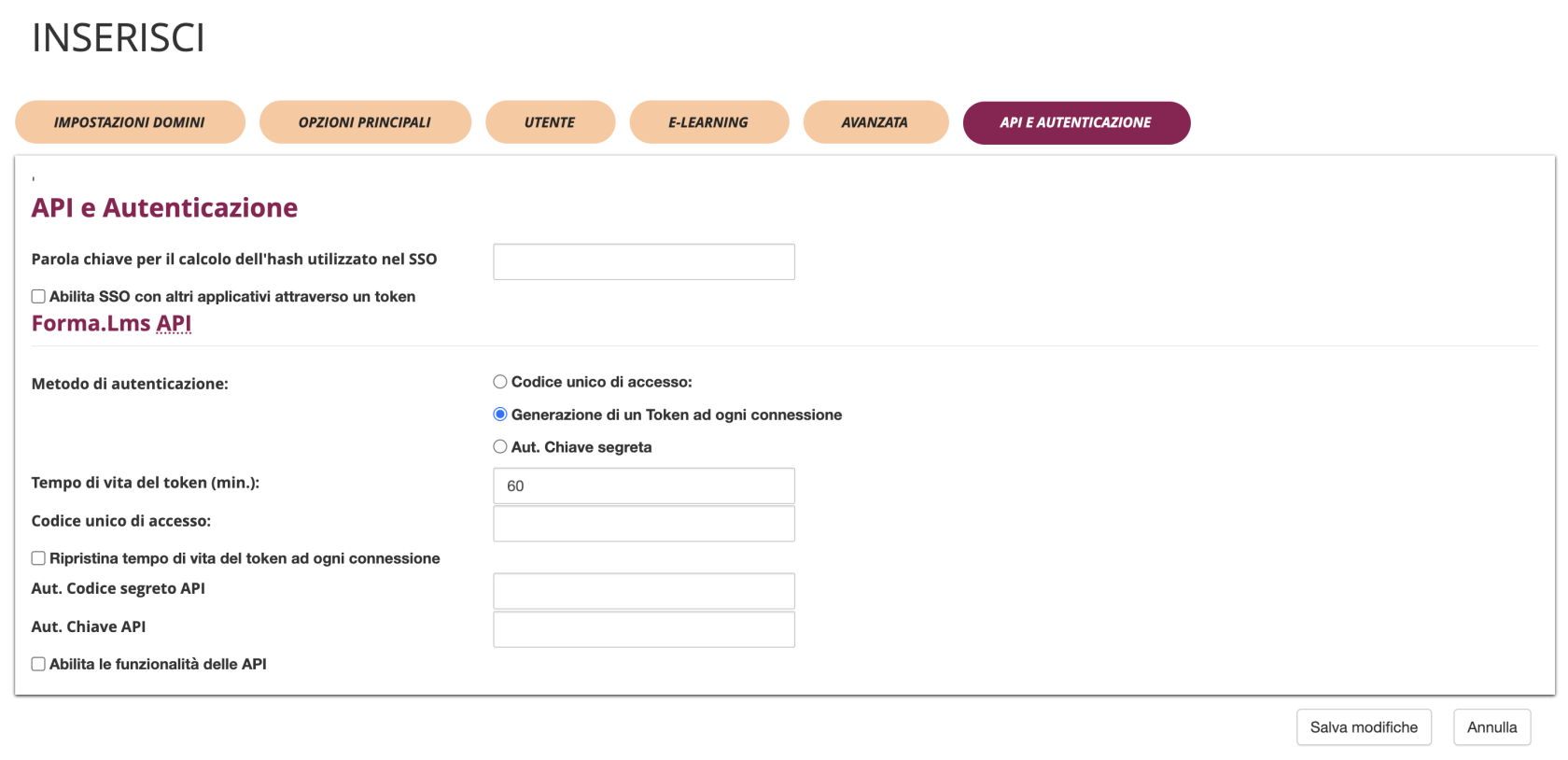
- SSO Password Key: Keyword for calculating the hash used in SSO
- Enable SSO with other applications through token: Checkbox to enable SSO functionality with external applications
Allowing SSO only for domain users
The plugin adds a new additional field, "Assigned Domain", to associate users to a domain. Note that:
- The dropdown list is automatically populated with the list of domains available on the platform.
- The SSO feature verifies that the user belongs to the corresponding domain, otherwise it prevents access.
Forma.LMS API
You will be able to create different configurations for API access for each domain
IMPORTANT NOTICE: Providing API access to different companies in multi-client platforms is strongly discouraged: the system is not able to filter data by domain with potential privacy risks
Authentication Method
The system supports three authentication methods:
- Single Access Code
- Uses a single code for all API access
- Simple but less secure option
- Token Generation on Each Connection (Default)
- Generates a new token for each API session
- More secure as tokens have limited lifespan
- Recommended for production environments
- Secret Key Authentication
- Uses a permanent secret key for authentication
- Balance between security and simplicity
API Configuration Options
- Token Lifetime (minutes): Set the duration for which tokens remain valid (default: 60 minutes)
- Single Access Code: Define a unique code for API access when using single code method
- Reset token lifetime on each connection: Checkbox to refresh token expiration time with each API call
- Secret API Code: Configuration field for secret key authentication
- API Key: Configuration field for API key authentication
- Enable API functionality: Master checkbox to activate all API features for the domain
Best Practices
Naming Convention
- Use descriptive names for profiles (e.g., "PROFILE-1")
- Maintain consistency in nomenclature
- Include client or project references
Template Management
- Use dedicated templates for each client
- Test templates before activation
- Maintain backups of custom templates
Security
- Set complex passwords for maintenance
- Configure IP controls when necessary
- Use sandbox environment for e-commerce testing
Troubleshooting
Domain Not Reachable
- Verify DNS configuration
- Check URL correctness in domain field
- Verify server accessibility
Template Not Displayed
- Check template existence in system
- Verify template file permissions
- Verify correct template-domain association
Email Problems
- Verify mail profile configuration
- Check SMTP parameters
- Test email sending from configured profile