Please note that since January 2025 Forma Cloud plugins are not available anymore for public download. This page is kept as a reference only for legacy users.
## Plugin installation You can install the plugin by uploading the installation zip package from the **Forma LMS plugin manager**. Log in your Forma installation as super-administrator and browse to: *admin > settings > plugin manager* 1. Select the zip file from your computer and click upload. The plugin will now be listed in the available plugins table. 2. Click “plugin Install” 3. Click on “plugin activate” [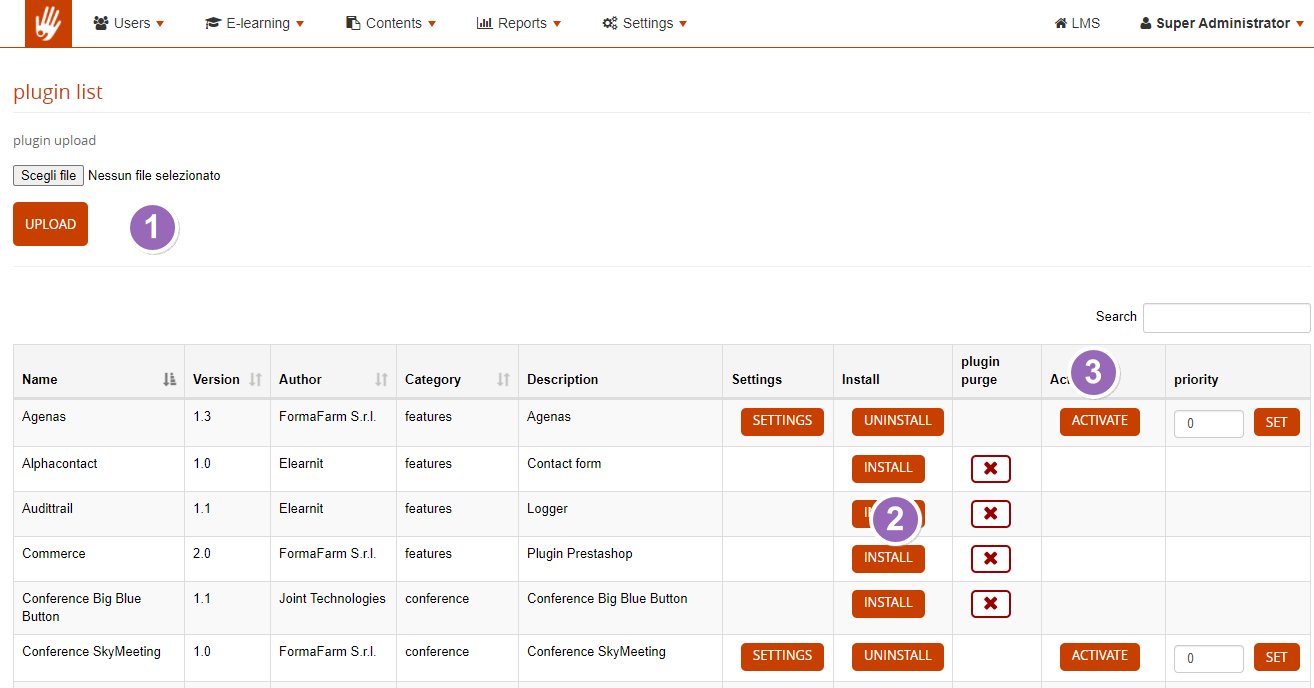](https://bookstackprod.s3.amazonaws.com/uploads/images/gallery/2024-05/5szaq7x7gwvXBwjI-image.png) ## Plugin removal To remove the plugin, go to settings > plugin manager and:: 1. Click “Deactivate” 2. Click “Uninstall” 3. Click “Plugin Purge” ## Plugin Update To update or reinstall the plugin: 1. Follow the uninstall procedure 2. Go to Settings > System Configuration > Advanced > click “Clear Twig Cache” ## What happens if I installed the wrong version and my Lms crashes? Never mind, you can always disable a plugin from your DB by setting to 0 the value of the “active” field in the core plugins table. This is the query you have to launch from the SQL panel of phpMyAdmin to modify the field: ```mysql UPDATE `core_plugin` SET `active` = 0 WHERE `name` = 'Coursealert'; ``` Of course this is an example based on Coursealert. Replace the value with the name of the plugin you want to disable. ## Translations Plugin translations can be edited and managed via the standard Forma [language manager](https://docs.formalms.org/reference-guide/configuration/languages.html#edit_existing_languages). Just search for some word or filter by the selected plugin, and translate as for any other Forma label.