# Retraining

# <span lang="it"> </span><span lang="EN-GB" style="mso-ansi-language: EN-GB;">Plugin Retraining</span>

<span lang="EN-GB" style="mso-ansi-language: EN-GB;">Courses that belong to mandatory training, such as all safety-related courses, have an expiry date. After that date, participants are required to complete the course again. Managing this process can be quite complex, but the Retraining plugin makes it simple and automated.</span>

<span lang="EN-GB" style="mso-ansi-language: EN-GB;">1.<span style="mso-spacerun: yes;"> </span>Sets the course validity period</span>

<span lang="EN-GB" style="mso-ansi-language: EN-GB;">2.<span style="mso-spacerun: yes;"> </span>Automatically checks conditions the validity of a course for each user has expired or is about to expire</span>

<span lang="EN-GB" style="mso-ansi-language: EN-GB;">3.<span style="mso-spacerun: yes;"> </span>Resets the user’s status on the course</span>

<span lang="EN-GB" style="mso-ansi-language: EN-GB;">4.<span style="mso-spacerun: yes;"> </span>Sends a reminder to users X days before the expiry date</span>

<span lang="EN-GB" style="mso-ansi-language: EN-GB;">5.<span style="mso-spacerun: yes;"> </span>Maintains the certificate history</span>

### <span lang="EN-GB" style="mso-ansi-language: EN-GB;">1.<span style="mso-spacerun: yes;"> </span>How to set the validity days of a course</span>

<span lang="EN-GB" style="mso-ansi-language: EN-GB;">Go to Administration/Elearning/Courses</span>

<span lang="EN-GB" style="mso-ansi-language: EN-GB;">and click the Edit icon for the course in which you want to set the validity days</span>

<span lang="EN-GB" style="mso-ansi-language: EN-GB;"><span style="mso-spacerun: yes;"> </span></span><span lang="it" style="mso-no-proof: yes;">![](https://bookstackprod.s3.amazonaws.com/uploads/images/gallery/2026-05/BJoKTNNYmkG7ZDbh-embedded-image-mpksmghr.png)</span>

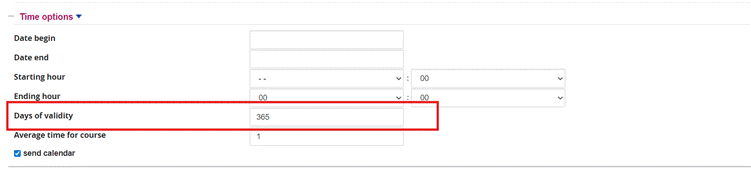
<span lang="EN-GB" style="mso-ansi-language: EN-GB;">In the “Time Options” section, enter the number of validity days. For example, if a course is valid for one year, enter 365.</span>

<span lang="it" style="mso-no-proof: yes;">![](https://bookstackprod.s3.amazonaws.com/uploads/images/gallery/2026-05/1qVRLPqB4FhNjdTs-embedded-image-fow9reeu.png)</span>

<span lang="it" style="mso-ansi-language: EN-GB;"><span style="mso-spacerun: yes;"> </span></span><span lang="EN-GB" style="mso-ansi-language: EN-GB;"><span style="mso-spacerun: yes;"> </span></span>

### <span lang="EN-GB" style="mso-ansi-language: EN-GB;">2.<span style="mso-spacerun: yes;"> </span>How to check course validity for each user from the reports.</span>**<span lang="EN-GB" style="mso-ansi-language: EN-GB;"><span style="mso-spacerun: yes;"> </span></span>**

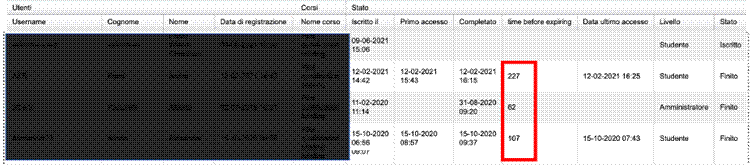
<span lang="EN-GB" style="mso-ansi-language: EN-GB;">When creating a report, simply add the “time before expiring” field  
</span><span lang="EN-GB" style="mso-ansi-language: EN-GB;">to the fields to be displayed in the table.</span><span lang="EN-GB" style="mso-ansi-language: EN-GB;"><span style="mso-spacerun: yes;"> </span></span>

<span lang="EN-GB" style="mso-ansi-language: EN-GB;">In the newly created report, a column will appear showing the days remaining until course expiry for each user</span>

<span lang="it" style="mso-no-proof: yes;">![](https://bookstackprod.s3.amazonaws.com/uploads/images/gallery/2026-05/UIIgIYsYwBUbahp3-embedded-image-yuqmzydl.png)</span>

<span lang="it" style="mso-ansi-language: EN-GB;"><span style="mso-spacerun: yes;"> </span></span>

### <span lang="EN-GB" style="mso-ansi-language: EN-GB;">3.<span style="mso-spacerun: yes;"> </span>How to reset the user’s status</span>

<span lang="EN-GB" style="mso-ansi-language: EN-GB;">When a user needs to retake the course, the administrator can manually reset their status by clicking the appropriate icon.</span>

<span lang="EN-GB" style="mso-ansi-language: EN-GB;">Go to Administration/Elearning/Courses</span>

<span lang="EN-GB" style="mso-ansi-language: EN-GB;">and click the enrolled users icon for the course whose users’ status you want to reset.</span>

<span lang="EN-GB" style="mso-ansi-language: EN-GB;">Click the “Reset” icon </span><span lang="it" style="mso-no-proof: yes;">![](https://bookstackprod.s3.amazonaws.com/uploads/images/gallery/2026-05/ES6nTO92t7EaSbGY-embedded-image-zdmduijp.png)</span>

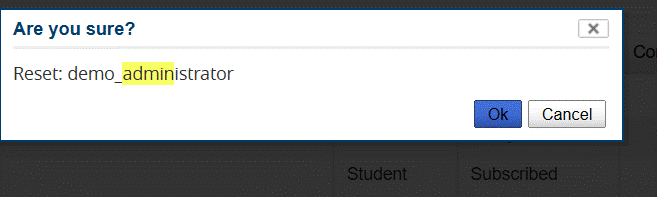
<span lang="EN-GB" style="mso-ansi-language: EN-GB;">When the pop-up opens, click the OK button</span>

<span lang="EN-GB" style="mso-ansi-language: EN-GB;">  
</span><span lang="it" style="mso-no-proof: yes;">![](https://bookstackprod.s3.amazonaws.com/uploads/images/gallery/2026-05/uIT3D1ebdTXJjss5-embedded-image-pb46yyv9.png)</span>

<span lang="EN-GB" style="mso-ansi-language: EN-GB;"><span style="mso-spacerun: yes;"> </span></span>

### <span lang="EN-GB" style="mso-ansi-language: EN-GB;">4.<span style="mso-spacerun: yes;"> </span>How to send a reminder to users X days before the course expiry date</span>

<span lang="EN-GB" style="background: yellow; mso-highlight: yellow; mso-ansi-language: EN-GB;">Retraining integrates with Course Alert to notify users by adding a dedicated reminder:</span>

#### <span lang="EN-GB" style="mso-ansi-language: EN-GB;">Enabling notifications:</span>

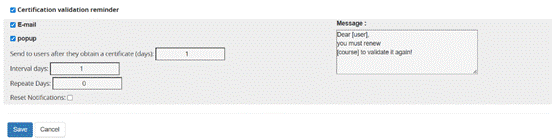
<span lang="EN-GB" style="mso-ansi-language: EN-GB;">The configuration panel of **Course Alert** (and the specific integration for **Retraining**) allows you to precisely define *how*, *when* and *how many times* a user should be prompted.  

</span><span lang="it" style="mso-no-proof: yes;">![](https://bookstackprod.s3.amazonaws.com/uploads/images/gallery/2026-05/ZFKpOeM3RXU3sd2I-embedded-image-5igu7wfv.png)</span>

#### <span lang="EN-GB" style="mso-ansi-language: EN-GB;">A. Selecting the Sending Mode</span>

<span lang="EN-GB" style="mso-ansi-language: EN-GB;">For each type of reminder (e.g. "Certificate validity reminder"), the administrator can choose one or both channels:</span>

<span lang="EN-GB" style="mso-ansi-language: EN-GB;">·</span><span lang="EN-GB" style="font-family: 'Times New Roman',serif; mso-fareast-font-family: 'Times New Roman'; mso-ansi-language: EN-GB;"><span style="mso-spacerun: yes;"> </span></span>**<span lang="EN-GB" style="mso-ansi-language: EN-GB;">E-mail</span>**<span lang="EN-GB" style="mso-ansi-language: EN-GB;">: Sends a message to the user's email inbox.</span>

<span lang="EN-GB" style="mso-ansi-language: EN-GB;">·</span><span lang="EN-GB" style="font-family: 'Times New Roman',serif; mso-fareast-font-family: 'Times New Roman'; mso-ansi-language: EN-GB;"><span style="mso-spacerun: yes;"> </span></span>**<span lang="EN-GB" style="mso-ansi-language: EN-GB;">Pop-up</span>**<span lang="EN-GB" style="mso-ansi-language: EN-GB;">: Activates a blocking alert within the platform at the time of login.</span>

<span lang="it" style="mso-no-proof: yes;">![](https://bookstackprod.s3.amazonaws.com/uploads/images/gallery/2026-05/tW9tpZroonKkH021-embedded-image-dqow1b8b.png)</span>

### **<span lang="EN-GB" style="font-size: 11.0pt; line-height: 115%; color: black; mso-ansi-language: EN-GB;">Defining Scheduling Fields</span>**

<span lang="EN-GB" style="mso-ansi-language: EN-GB;">The numeric fields determine the notification lifecycle:</span>

<span lang="EN-GB" style="mso-ansi-language: EN-GB;"><span style="mso-list: Ignore;">●<span style="font: 7.0pt 'Times New Roman';"> </span></span></span><span lang="EN-GB" style="mso-ansi-language: EN-GB;"><span style="mso-spacerun: yes;"> </span>**Send to users after X days**: Defines the timing of the first send relative to the triggering event (e.g. after receiving a certificate or after enrolment).</span>

<span lang="EN-GB" style="mso-ansi-language: EN-GB;"><span style="mso-list: Ignore;">●<span style="font: 7.0pt 'Times New Roman';"> </span></span></span><span lang="EN-GB" style="mso-ansi-language: EN-GB;"><span style="mso-spacerun: yes;"> </span>**Interval days**: Specifies how much time must pass between one send (or pop-up display) and the next. This avoids overwhelming the user if they do not act immediately.</span>

<span lang="EN-GB" style="mso-ansi-language: EN-GB;"><span style="mso-list: Ignore;">●<span style="font: 7.0pt 'Times New Roman';"> </span></span></span><span lang="EN-GB" style="mso-ansi-language: EN-GB;"><span style="mso-spacerun: yes;"> </span>**Repetition days (or Number of repetitions)**: Indicates how many times the system should re-present the alert.</span>

<span lang="EN-GB" style="font-family: 'Times New Roman',serif; mso-fareast-font-family: 'Times New Roman'; mso-ansi-language: EN-GB;"><span style="mso-spacerun: yes;"> </span></span>*<span lang="EN-GB" style="color: #666666; mso-ansi-language: EN-GB;">Technical note</span>*<span lang="EN-GB" style="color: #666666; mso-ansi-language: EN-GB;">: Setting this value to 0, the system will perform an **infinite send** until the user completes the required action</span><span lang="EN-GB" style="mso-ansi-language: EN-GB;">a.</span>

<span lang="EN-GB" style="mso-ansi-language: EN-GB;"><span style="mso-list: Ignore;">●<span style="font: 7.0pt 'Times New Roman';"> </span></span></span><span lang="EN-GB" style="mso-ansi-language: EN-GB;"><span style="mso-spacerun: yes;"> </span>**Reset Notifications**: If checked, allows the send cycle to be re-initialised for users who have already received reminders previously.</span>

**<span lang="EN-GB" style="mso-ansi-language: EN-GB;">Pop-up Notification</span>**

<span lang="EN-GB" style="mso-ansi-language: EN-GB;">The introduction of the pop-up system transforms a simple passive notification (email) into a guided and immediate action. This feature is designed to maximise the renewal rate of expiring courses.</span>

**<span lang="EN-GB" style="font-size: 11.0pt; line-height: 115%; color: black; mso-ansi-language: EN-GB;"> Display (Entry Phase)</span>**<span lang="EN-GB" style="mso-ansi-language: EN-GB;">:  
  
</span>

- <span lang="EN-GB" style="mso-ansi-language: EN-GB;">·</span><span lang="EN-GB" style="font-family: 'Times New Roman',serif; mso-fareast-font-family: 'Times New Roman'; mso-ansi-language: EN-GB;"><span style="mso-spacerun: yes;"> </span></span>**<span lang="EN-GB" style="mso-ansi-language: EN-GB;">Trigger Event</span>**<span lang="EN-GB" style="mso-ansi-language: EN-GB;">: The pop-up appears immediately after the user’s **Login** on the platform.  
      
    </span>
- <span lang="EN-GB" style="mso-ansi-language: EN-GB;">·</span><span lang="EN-GB" style="font-family: 'Times New Roman',serif; mso-fareast-font-family: 'Times New Roman'; mso-ansi-language: EN-GB;"><span style="mso-spacerun: yes;"> </span></span>**<span lang="EN-GB" style="mso-ansi-language: EN-GB;">Frequency</span>**<span lang="EN-GB" style="mso-ansi-language: EN-GB;">: If the user does not complete the required action, the pop-up will reappear on subsequent logins based on the "Interval days" and "Number of repetitions" settings configured in the Course Alert panel</span>

**<span lang="EN-GB" style="font-size: 11.0pt; line-height: 115%; color: black; mso-ansi-language: EN-GB;">Dynamic Interaction (Selection Phase)</span>**

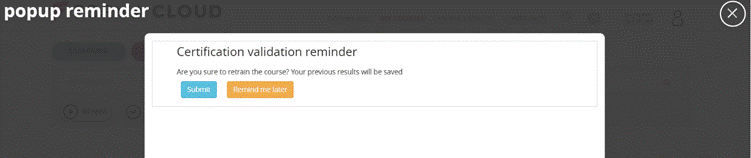
<span lang="EN-GB" style="mso-ansi-language: EN-GB;">Once the pop-up is displayed (e.g. "Certificate validity reminder"), the user has two main options:<span style="mso-no-proof: yes;"> ![](https://bookstackprod.s3.amazonaws.com/uploads/images/gallery/2026-05/D7XpO06q4GfQhzUw-embedded-image-j7z92ify.png)</span></span>

- <span lang="EN-GB" style="mso-ansi-language: EN-GB;">·</span><span lang="EN-GB" style="font-family: 'Times New Roman',serif; mso-fareast-font-family: 'Times New Roman'; mso-ansi-language: EN-GB;"><span style="mso-spacerun: yes;"> </span></span>**<span lang="EN-GB" style="mso-ansi-language: EN-GB;">Button "Remind me later"</span>**<span lang="EN-GB" style="mso-ansi-language: EN-GB;">: Temporarily closes the pop-up, allowing the user to continue with other activities on the platform. The alert will be shown again at the next login or according to the scheduled frequency.</span>
- <span lang="EN-GB" style="mso-ansi-language: EN-GB;">·</span><span lang="EN-GB" style="font-family: 'Times New Roman',serif; mso-fareast-font-family: 'Times New Roman'; mso-ansi-language: EN-GB;"><span style="mso-spacerun: yes;"> </span></span>**<span lang="EN-GB" style="mso-ansi-language: EN-GB;">Button "Retake the course"</span>**<span lang="EN-GB" style="mso-ansi-language: EN-GB;">: Starts the immediate renewal process. This is the key function that links the two plugins.  
      
      
    </span>

<span lang="EN-GB" style="mso-ansi-language: EN-GB;">By clicking **"Retake the course"**,  
  
</span>

<span lang="EN-GB" style="mso-ansi-language: EN-GB; mso-no-proof: yes;">![](https://bookstackprod.s3.amazonaws.com/uploads/images/gallery/2026-05/Al06tYUJUKFRUPBv-embedded-image-b1yzcdgc.png)</span><span lang="EN-GB" style="mso-ansi-language: EN-GB;">  
  
</span>

- <span lang="EN-GB" style="mso-ansi-language: EN-GB;">·</span><span lang="EN-GB" style="font-family: 'Times New Roman',serif; mso-fareast-font-family: 'Times New Roman'; mso-ansi-language: EN-GB;"><span style="mso-spacerun: yes;"> </span></span>**<span lang="EN-GB" style="mso-ansi-language: EN-GB;">Warning Message</span>**<span lang="EN-GB" style="mso-ansi-language: EN-GB;">: A second confirmation level appears: *"Do you confirm you want to retake the course? Your previous results will be saved"*. This reassures the user that their certificate history will be preserved.  
      
      
    </span>
- <span lang="EN-GB" style="mso-ansi-language: EN-GB;">·</span><span lang="EN-GB" style="font-family: 'Times New Roman',serif; mso-fareast-font-family: 'Times New Roman'; mso-ansi-language: EN-GB;"><span style="mso-spacerun: yes;"> </span></span>**<span lang="EN-GB" style="mso-ansi-language: EN-GB;">Automatic Reset</span>**<span lang="EN-GB" style="mso-ansi-language: EN-GB;">: Upon clicking **"Confirm"**, the plugin resets the user's completion status on the specific course.  


    </span>

<span lang="EN-GB" style="mso-ansi-language: EN-GB;">Once confirmed, the pop-up displays the final button:  

  
</span><span lang="it" style="mso-no-proof: yes;">![](https://bookstackprod.s3.amazonaws.com/uploads/images/gallery/2026-05/n8u6yvrrglAOQxmW-embedded-image-pal4xjdk.png)</span>

- <span lang="EN-GB" style="mso-ansi-language: EN-GB;">·</span><span lang="EN-GB" style="font-family: 'Times New Roman',serif; mso-fareast-font-family: 'Times New Roman'; mso-ansi-language: EN-GB;"><span style="mso-spacerun: yes;"> </span></span>**<span lang="EN-GB" style="mso-ansi-language: EN-GB;">Button "Enter the course"</span>**<span lang="EN-GB" style="mso-ansi-language: EN-GB;">: This button is a direct link that takes the user **directly into the course**.</span>

<span style="background-color: rgb(251, 238, 184);">**<span lang="EN-GB" style="mso-ansi-language: EN-GB;">Advantage</span>**<span lang="EN-GB" style="mso-ansi-language: EN-GB;">: The user goes from login to course access in just 3 clicks.</span></span>

### **<span lang="EN-GB" style="mso-ansi-language: EN-GB;"><span style="mso-spacerun: yes;"> </span></span>**<span lang="EN-GB" style="mso-ansi-language: EN-GB;">5.<span style="mso-spacerun: yes;"> </span>Certificate History</span>

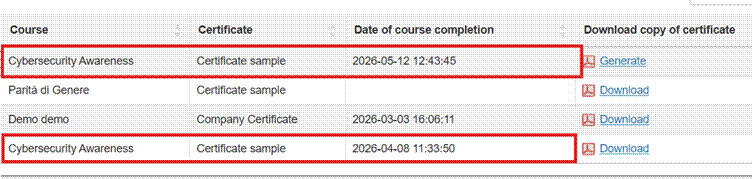
<span lang="EN-GB" style="mso-ansi-language: EN-GB;">Each user, in their own Certificate Area, will be able to generate and download all certificates obtained upon course completion (even when the previous year’s completion status has been reset) </span>
<span lang="EN-GB" style="mso-ansi-language: EN-GB;"><span style="mso-spacerun: yes;"> </span></span><span lang="it" style="mso-no-proof: yes;">![](https://bookstackprod.s3.amazonaws.com/uploads/images/gallery/2026-05/5B53xUiAPnE5a6Ik-embedded-image-krhms2yu.png)</span>