Forma Cloud Services
- Client Control Panel
- Infrastructure and Security Standards
- Email & DNS settings
- Fly-in: Migrating to Forma Cloud
Client Control Panel
Forma Factory
"Forma Factory" is a Client Control Panel to keep all your Forma Cloud platforms under control
Main Dashboard
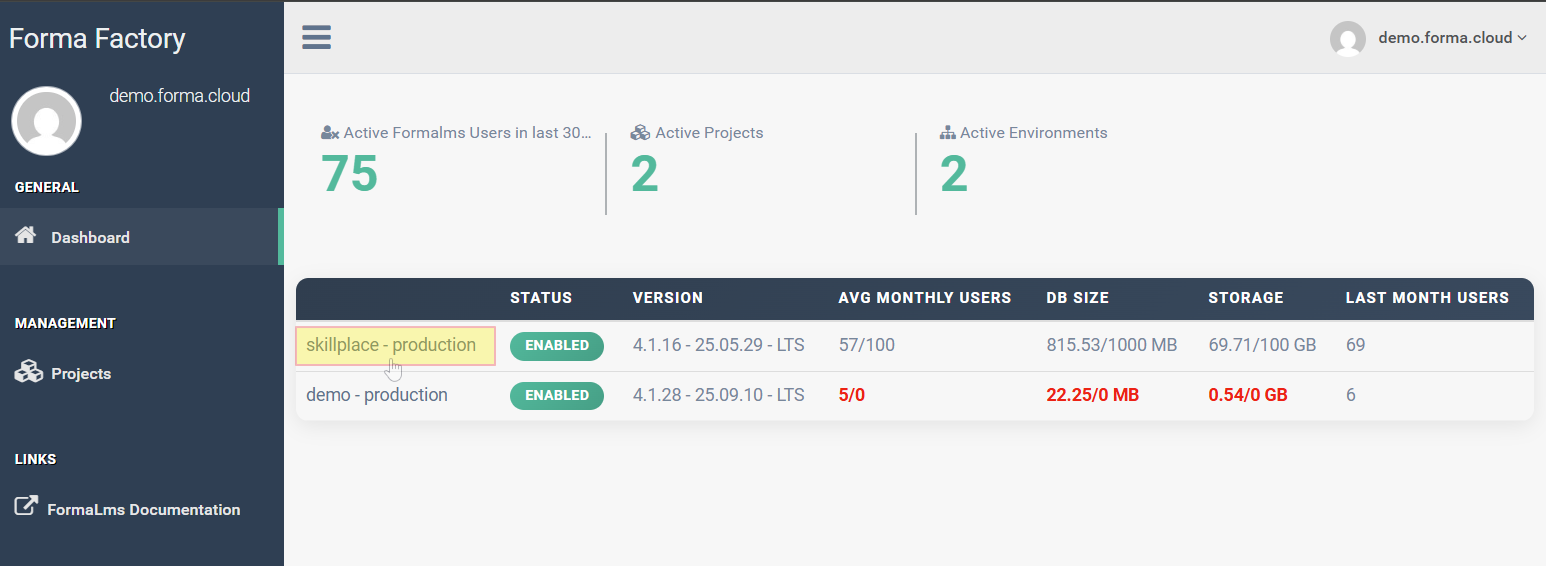
This page provides some basic information about your platforms status and main stats
Click on the project name to access a more datailed dashboard for a specific platform
Platform Dashboard
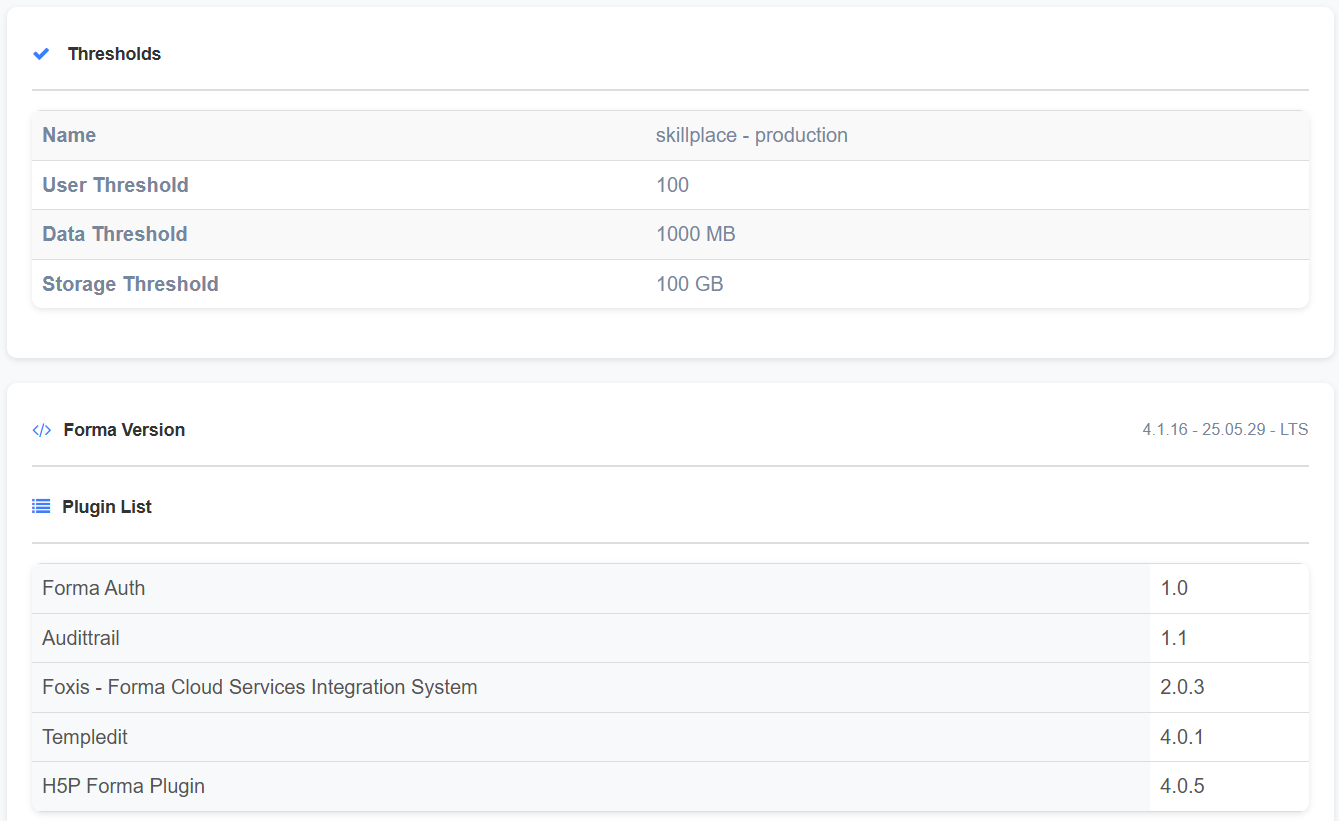
Thresholds, Version, Plugins
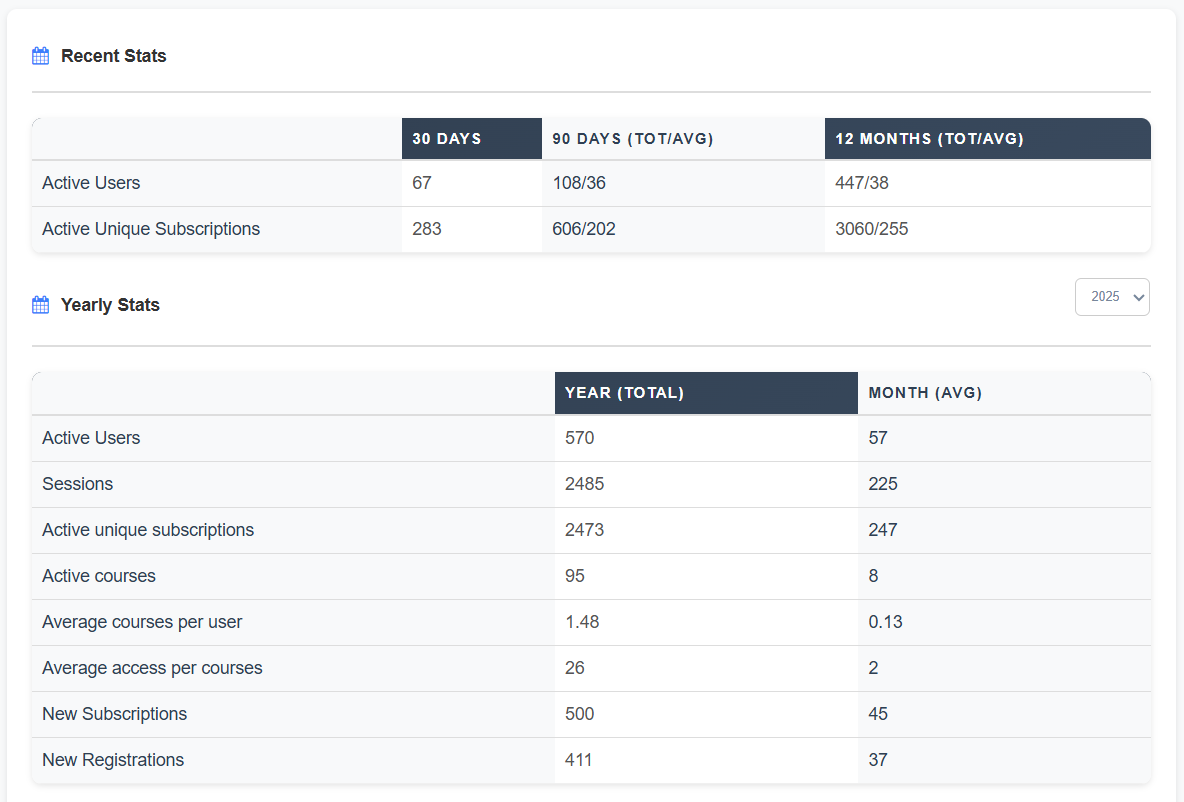
Recent and Yearly stats
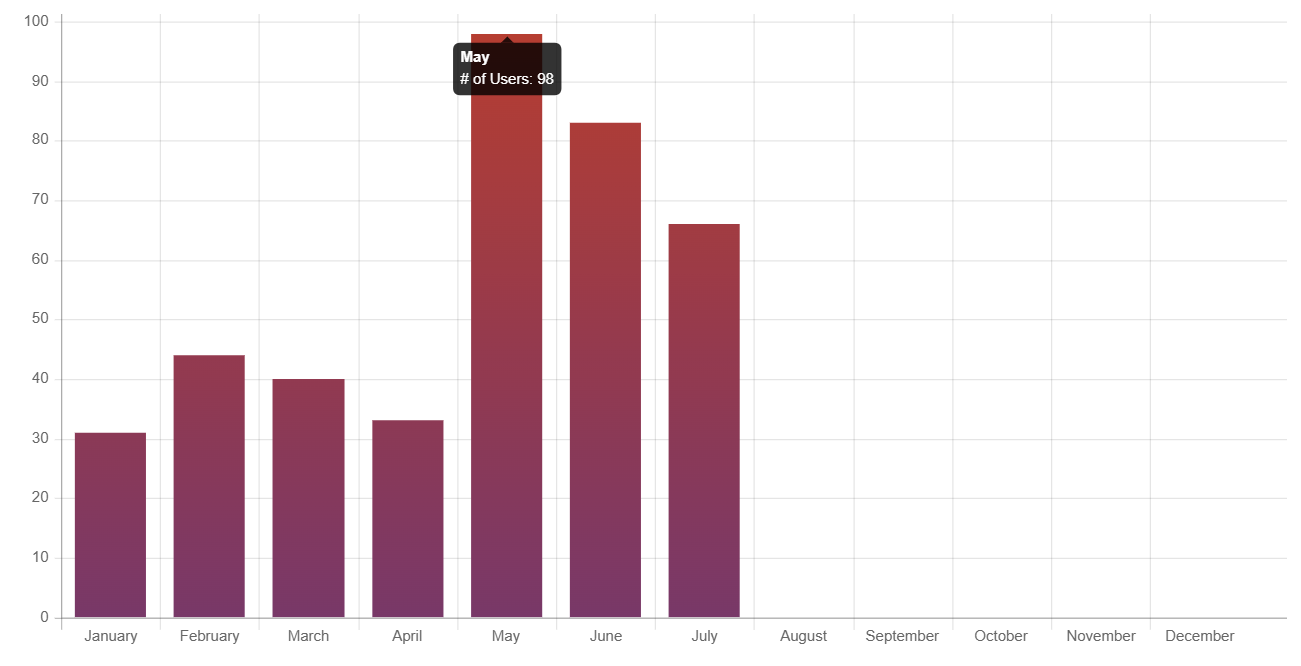
Monthly stats
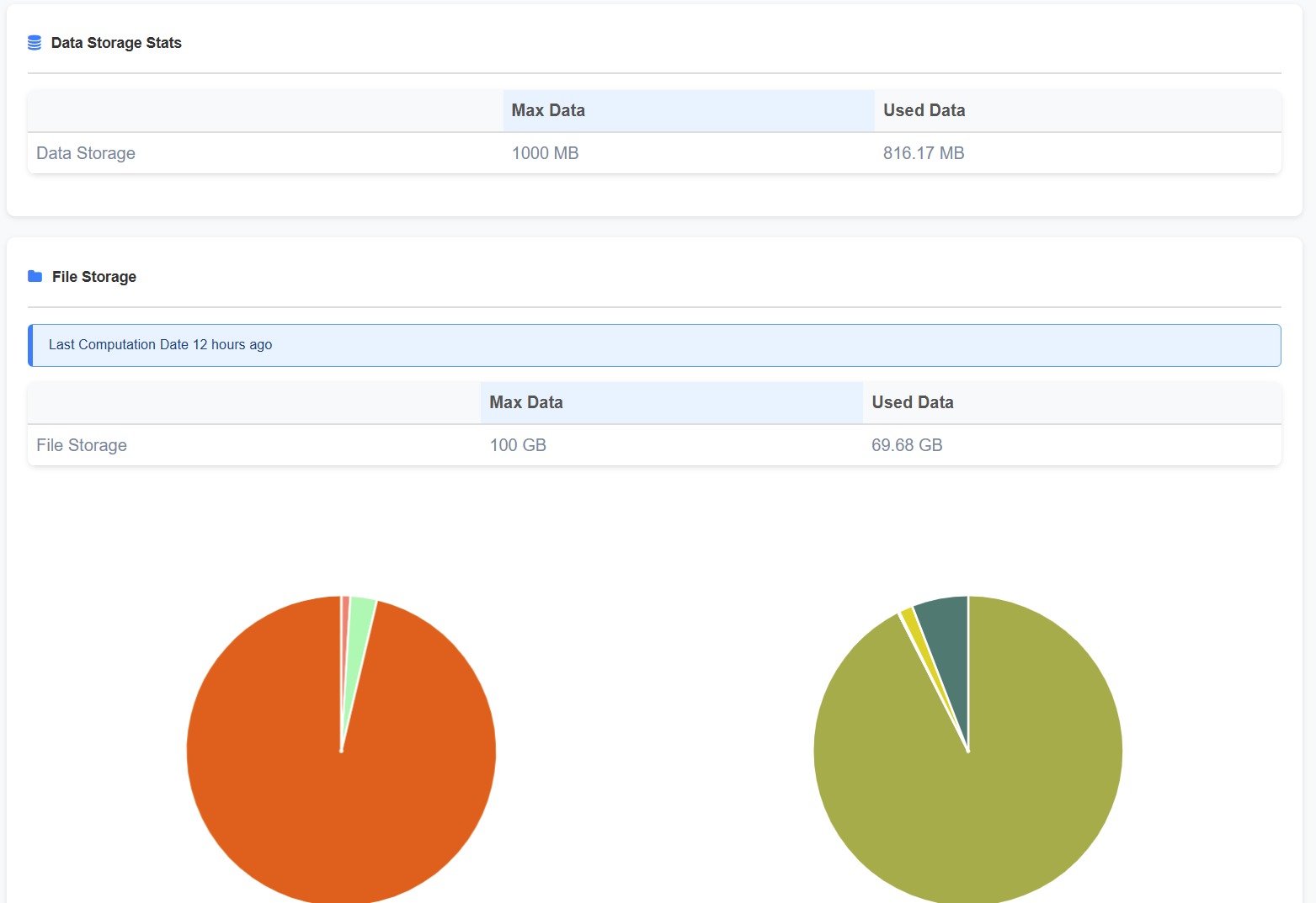
Data and file Storage
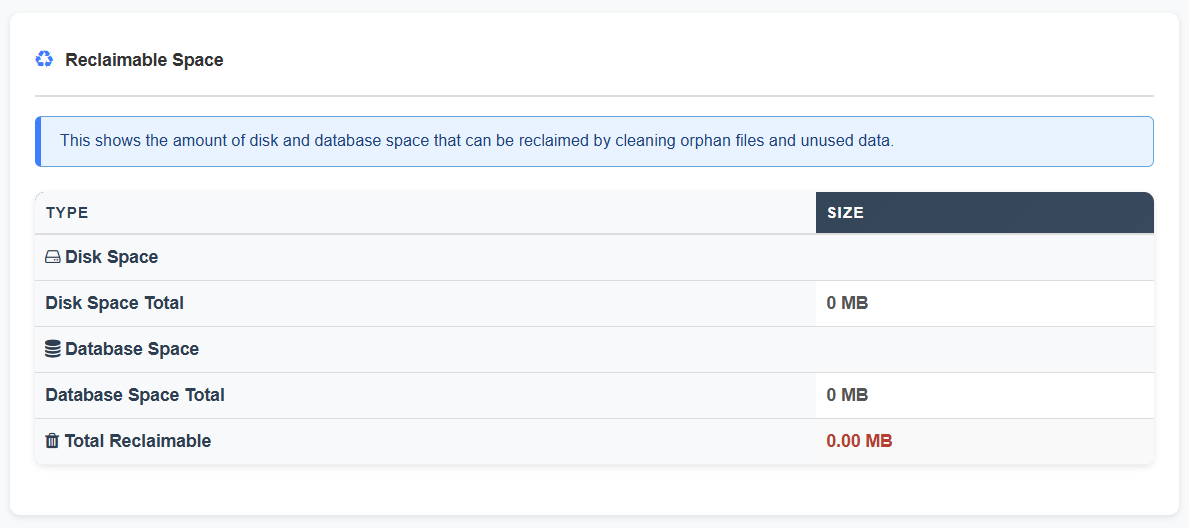
Reclaimable Space
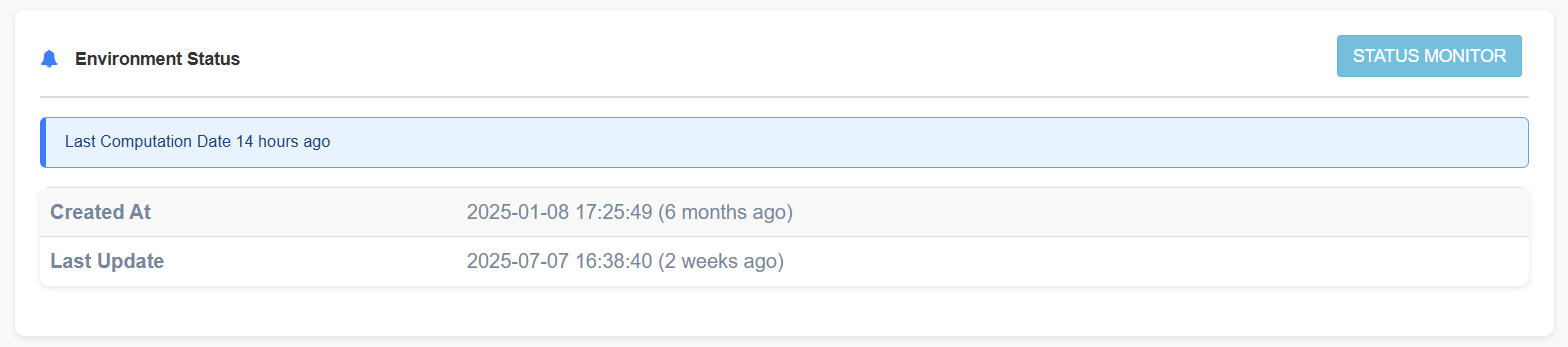
Environment Status
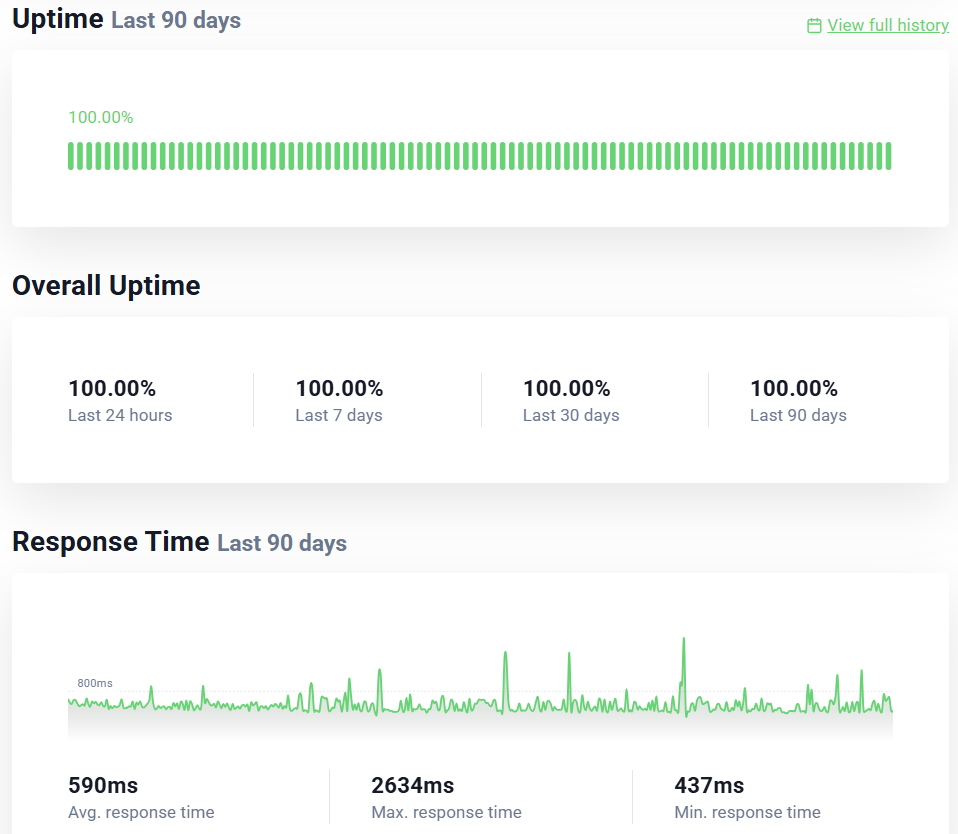
Click on the "Status Monitor" button for the service status of your platform:
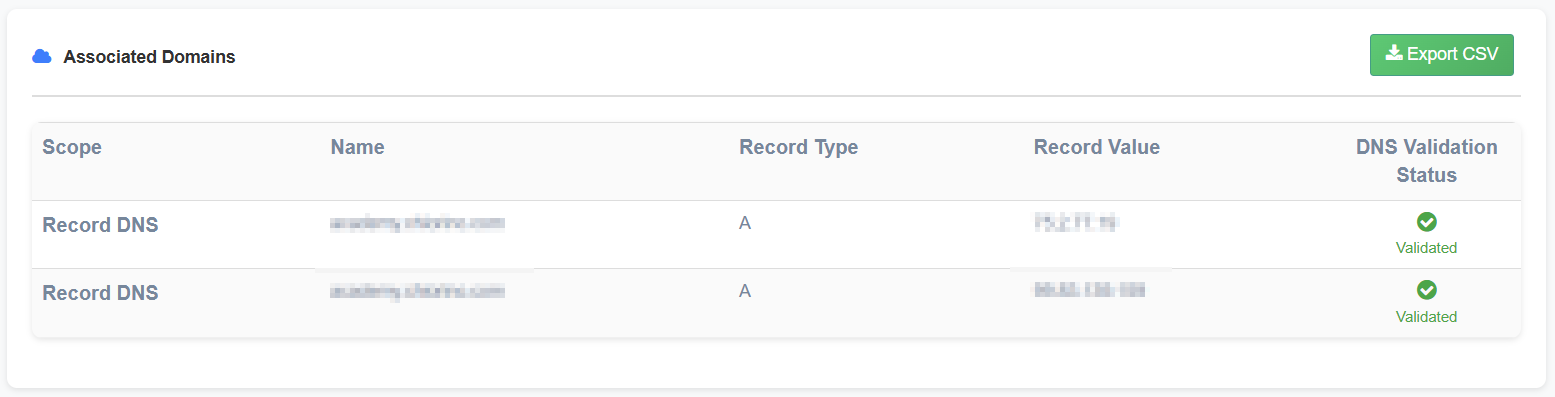
Associated Domains
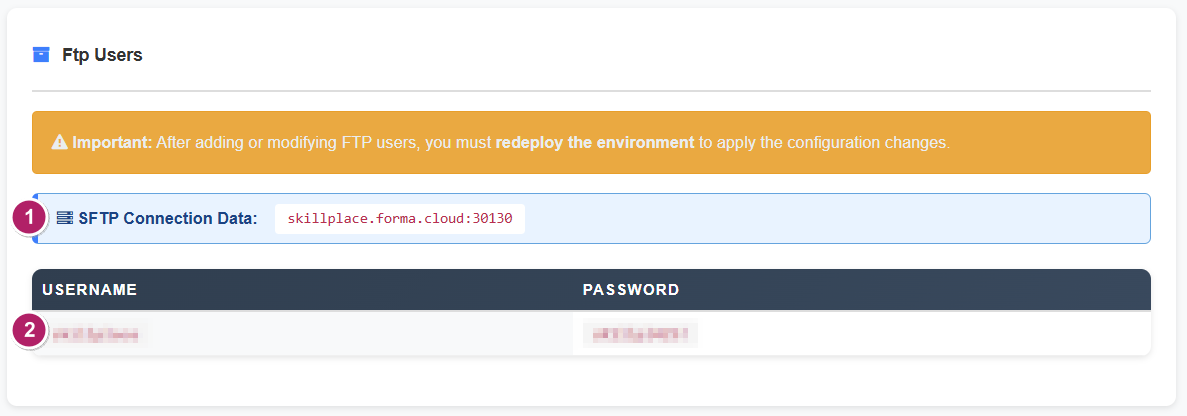
FTP Users
This block provides all the available SFTP data and user credentials:
- Host and port to be set for any of your SFTP users
- User and password for the available SFTP users
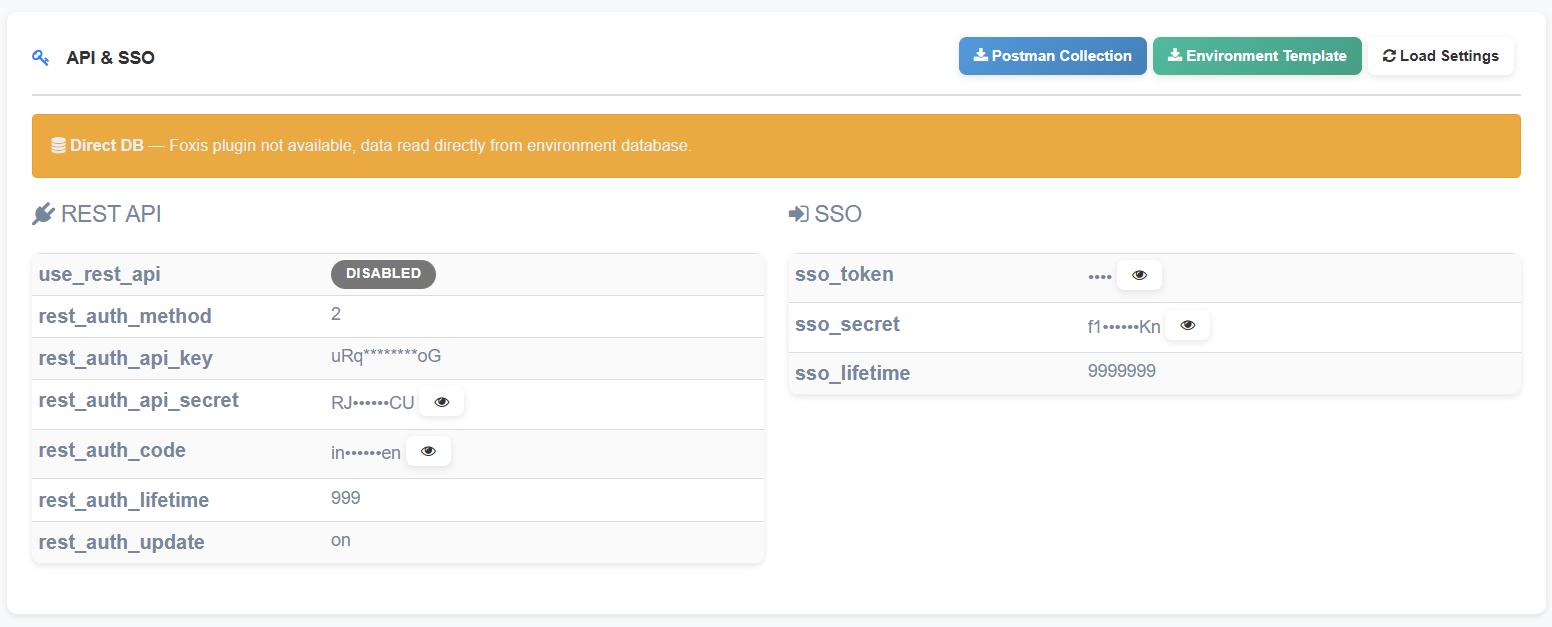
API & SSO
Infrastructure and Security Standards
Disclaimer: The information contained herein reflects the infrastructure and security standards in effect at the time of publication. Such standards are subject to change without prior notice in order to comply with evolving legal, regulatory, and security requirements. Accordingly, this documentation may be modified or updated at any time.
Infrastructure
Cloud Architecture
The Forma Cloud service is delivered through a modern, resilient, and fully managed cloud infrastructure built on Amazon Web Services (AWS). The platform is deployed in AWS data centers located within the European Union (Ireland), with optional database mirroring available in Italy when required.
- Our application layer runs on a Kubernetes-based architecture designed for high availability and elastic scalability. Workloads are distributed across multiple nodes that automatically scale up or down in response to real-time demand, ensuring consistent performance even during peak usage. All traffic is routed through AWS Global Accelerator to optimize connectivity and reduce latency for users worldwide.
- The entire environment is secured within an isolated Virtual Private Cloud (VPC), complemented by an AWS Web Application Firewall (WAF) that provides protection from common web threats such as SQL injection, cross-site scripting, and denial-of-service attempts.
- Load balancing mechanisms ensure even distribution of application requests across all active nodes. Two static IPs are exposed.
- Persistent data is stored in an encrypted Aurora MySQL (RDS) cluster in Multi-AZ configuration that provides automatic failover, multi-node read scalability.
- Application files are maintained in a durable and automatically scalable Amazon EFS shared file system, while Redis/Valkey is used as an in-memory datastore for session management and caching.
- The entire infrastructure is provisioned and managed through Terraform, following Infrastructure-as-Code (IaC) principles. This ensures repeatable deployments, strict version control, and a consistent configuration across environments.
- Continuous monitoring, automated alerting, backup procedures, and business continuity measures support the reliability of the service and help maintain guaranteed availability levels.
Physical Security
The Forma Cloud Services relies on AWS who is responsible, in accordance with the AWS Shared Responsibility Model (available at https://aws.amazon.com/compliance/shared-responsibility-model), for implementing controls for the physical security of data center facilities, backup media, and other physical systems, providing comprehensive and state-of-the-art security capabilities (available at https://aws.amazon.com/compliance/data-center/controls).
Information Protection and Security Standards
Backup
Infrastructure
- Hosting: Amazon Web Services (AWS) - Region eu-west-1 (Ireland, EU)
- Database: Amazon Aurora MySQL in Multi-AZ cluster configuration
- Backup Management: AWS Backup (AWS managed service)
Backup Policies
- Daily Backup (DailyBackups)
- Automatically runs at 5:00 AM UTC
- Retention: 7 days (1 week)
- Managed by AWS Backup plan
- Weekly Backup (WeeklyBackups)
- Automatically runs on Saturdays at 5:00 AM UTC
- Retention: 4 months (120 days)
- Managed by AWS Backup Long-term plan
- Monthly Backup (MonthlyBackups)
- Automatically runs on the first Saturday of the month at 5:00 AM UTC
- Retention: 12 months (365 days)
- Managed by AWS Backup Long-term plan
- EFS Automatic Backup
- Automatically runs daily at 5:00 AM UTC
- Retention: 2 weeks (14 days)
- Managed via aws/efs/automatic-backup-rule
- Cross-region copy to a dedicated backup vault in AWS eu-central-1 (Frankfurt, Germany), retention 14 days
Backup Status
- Last 30 daily backups: all completed successfully
- Active monitoring system with automatic failure notifications
- 58 Aurora snapshots available for the database cluster
- 180+ total recovery points available on AWS Backup (database)
- 30+ recovery points available on AWS Backup (EFS file system)
Access Control
- Backup access limited via specific IAM roles
- MFA required for critical operations
- Service Role: AWSBackupDefaultServiceRole with minimal permissions
- Full audit trail on AWS CloudTrail
Data Storage, Localization and Segregation
Geographic Location
- Primary Location: AWS eu-west-1 (Dublin, Ireland)
- Secondary backup location (disaster recovery): AWS eu-central-1 (Frankfurt, Germany)
- All data and backups remain within the European Union (GDPR compliant)
- No data transfer outside the EU
Redundancy
- Multi-AZ Architecture (3 independent Availability Zones)
- Backups are automatically replicated across multiple AZs
- Storage: AWS EFS and Amazon Aurora with synchronous replication
Backup Vault
- Dedicated vault with automated lifecycle management
- AWS default vault for Aurora snapshots
- Access controlled via IAM roles with the least privilege principle
- Immutable backups: backup vaults are protected by AWS Backup Vault Lock (WORM) in compliance mode. Recovery points cannot be modified or deleted before the end of their retention period, not even by privileged accounts, mitigating the risk of ransomware attacks and malicious or accidental deletion
Data Segregation
Forma Cloud implements logical tenant isolation across application, storage, and database layers.
- Each customer deployment is hosted as a dedicated project within the Kubernetes cluster.
- Each deployment is connected to customer-specific storage paths used to segregate application files.
- Customer data is stored using separate databases, database users, and credentials for each customer project.
- Application-level authorization controls and tenant-aware configuration prevent unauthorized cross-tenant access.
- Administrative access to production data is restricted to authorized personnel and subject to logging and monitoring.
Data Deletion and Disposal
Customer data is deleted or rendered inaccessible through controlled procedures aligned with AWS storage lifecycle and secure deletion mechanisms. Backup data is retained according to the applicable backup retention schedule and subsequently managed according to AWS service policies.
Post-contract retention and final deletion timelines are governed by the applicable contractual documentation and legal requirements.
Data Encryption
Encryption at Rest
- Algorithm: AES-256 via AWS Key Management Service (KMS)
- Encryption enabled by default on all Aurora databases
- Snapshots automatically encrypted with the same key as the source database
- Key rotation: encryption keys are managed in AWS KMS and automatically rotated every 365 days
- Key scope: a single platform-level encryption key is used for each service (database, file storage); encryption keys are not segregated per customer. Customer data segregation is enforced at the database, credential and storage-path level (see Data Segregation)
- Backup data encrypted at rest using AWS-native encryption controls
Encryption in Transit
- TLS 1.2+ for all application connections
- Database connections forced over SSL/TLS
- Backup transfer managed internally by AWS over an encrypted private network
TLS Certificates Management
To ensure secure communications, TLS certificates are fully provisioned, deployed, and managed through AWS Certificate Manager (ACM). This integration eliminates manual handling and human error during certificate generation and renewal.
- Supported Algorithms: ACM-managed public certificates comply with strict security requirements, supporting robust cryptographic standards including RSA (2048-bit or higher) and ECDSA (P-256 or P-384).
- Automated Lifecycle Management: Public certificates issued directly by ACM have a standard validity period of 198 days. ACM monitors and automatically initiates the renewal process well before the expiration date. This automated lifecycle guarantees that the 2-year maximum lifecycle limit for asymmetric certificates is consistently met without service interruption.
- Imported Certificates: Any third-party or custom certificates imported into ACM do not benefit from automated AWS renewal. These specific assets follow a dedicated, documented operational workflow for manual renewal and re-importation prior to their expiration.
- Symmetric Secrets and Application Credentials: Symmetric encryption keys, application-level credentials, and environment secrets are out of scope for ACM. They are managed and documented separately under explicit access control and rotation policies.
Monitoring & Uptime
The infrastructure is equipped with the following service monitoring procedures and mechanisms:
- Server log: All accesses and errors are logged on individual server machines (frontend and database) and the load balancer (aggregated across all machines connected to the service).
- Email pre-alerts when peak thresholds are exceeded (CPU usage, number of DB connections).
- Uptime Robot: Domain monitoring. If the site is unresponsive, the team is notified via email and internal communication channels (Slack).
- Automatic application error notification: Any errors generated by application functionality on the server are notified to the support team.
- Monitoring and multi-channel alert system: The difference between available and utilized resources (CPU and RAM) is continuously monitored. When preset thresholds are exceeded, the system triggers autoscaling and communicates the event via various channels to technical staff.
- AWS CloudWatch: AWS-native monitoring and logging services are used for managed infrastructure components where applicable.
- Log retention: Retention periods and storage destinations are defined according to the configuration applied to each service component and may vary depending on operational and compliance requirements.
Uptime SLA
| Metric | Value | Note |
|---|---|---|
| Granted Uptime | 99,9% | Excluding scheduled maintenance events |
Disaster Recovery
Data RPO (Recovery Point Objective): 5 minutes
- Database: Aurora maintains continuous incremental backups every 5 minutes for point-in-time recovery
- Maximum database data loss is limited to the last 5 minutes of operation
- Point-in-time restore available with second-level granularity
Filesystem RPO (Recovery Point Objective): 24 hours
- File System: 24 hours (automatic daily backups via AWS Backup)
- Maximum filesystem data loss is limited to the last 24 hours of operation
Data RTO (Recovery Time Objective): 72 hours
- Contractually guaranteed time for complete recovery in a full disaster recovery scenario
- Includes: database restore, instance startup, application integrity check
Disaster Recovery Assessment
Disaster recovery procedures are tested on an annual basis to ensure business continuity and validate the reliability of restoration procedures. These tests include restoring database snapshots to a temporary test environment, validating successful system recovery, and verifying data integrity.
The recovery assessment includes a full database restore, startup of a temporary Aurora test cluster, application connectivity checks, execution of queries on critical tables, and data consistency validation. These controls confirm that systems can be effectively recovered in the event of a failure and that the declared RTO/RPO objectives are supported by operational recovery procedures.
Last test performed
- Date: October 10, 2025
- Procedure: Aurora snapshot restore on a temporary test cluster
- Outcome: Positive - database restored successfully, data integrity verified
Verification steps performed
- Full database restore from snapshot
- Aurora test cluster startup
- Application connectivity verification
- Query testing on critical tables
- Data consistency check
Remote Administrative Access
Remote administrative access to systems processing customer data is restricted to authorized personnel only, protected by multi-factor authentication and conducted over encrypted channels.
- Database administrative access is performed through protected connectivity.
- Access to file storage resources is performed through controlled administrative channels.
- Administrative activities are logged and subject to monitoring and access review.
Secure SDLC and Change Management
FormaFarm applies a controlled software delivery lifecycle designed to govern software development, configuration, maintenance, and production changes.
- Development, test, staging, and production environments are separated.
- Code changes are subject to review before release.
- Testing is required before deployment to production.
- Secure coding practices are applied in line with recognized web application security principles.
- Significant production changes are documented and include rollback considerations.
Incident Management
FormaFarm maintains procedures for the identification, escalation, containment, resolution, and post-event analysis of incidents affecting service continuity, confidentiality, integrity, or availability of customer data.
Confirmed security breaches are notified without undue delay in accordance with applicable contractual commitments and legal requirements.
Vulnerability Assessment and Penetration Testing (VAPT)
Forma Cloud is subject to periodic Vulnerability Assessment and Penetration Testing (VAPT) activities conducted by qualified third-party security firms. These assessments are carried out in accordance with industry-standard methodologies (e.g., OWASP Testing Guide, PTES) and cover both the application layer and the underlying infrastructure.
VAPT Management Process
- Periodic assessments: VAPT activities are performed on a regular basis and upon significant platform changes (major releases, architectural modifications, or new integrations).
- Scope: Assessments cover the full attack surface, including web application interfaces, APIs, authentication flows, session management, and infrastructure-level exposure.
- Findings management: All identified vulnerabilities are classified by severity (Critical, High, Medium, Low, Informational) and tracked through a structured remediation workflow. Critical and High severity findings are prioritized for immediate remediation; Medium and Low findings are scheduled within subsequent release cycles.
- Retesting: After remediation, affected areas are retested to verify that fixes effectively resolve the identified vulnerabilities without introducing regressions.
Application Security Controls
Multiple layers of security controls are implemented at both infrastructure and application level to proactively mitigate common web vulnerabilities and address findings from VAPT assessments.
Web Application Firewall (WAF)
All incoming traffic passes through an AWS Web Application Firewall (WAF) that provides protection against common attack vectors, including:
- SQL injection (SQLi)
- Cross-Site Scripting (XSS)
- Cross-Site Request Forgery (CSRF)
- Denial-of-Service (DoS) attempts
- Malicious bot traffic and request rate abuse
WAF rules are regularly reviewed and updated in response to newly identified threats and VAPT findings.
Where appropriate based on the service profile and operational needs, additional AWS-native security services such as Amazon Inspector, AWS Security Hub, and Amazon GuardDuty may be evaluated or adopted to strengthen vulnerability management, posture monitoring, and threat detection capabilities.
Content Security Policy (CSP)
A comprehensive Content Security Policy is enforced via HTTP response headers at the Nginx reverse proxy level. The CSP configuration is dynamically generated at container startup based on environment variables managed through the deployment infrastructure (factory), enabling per-tenant customization without code changes.
- Directives enforced:
default-src,script-src,style-src,img-src,font-src,frame-src, andframe-ancestorsare all explicitly configured to restrict resource loading to authorized origins. - Domain whitelisting: Allowed origins include the tenant's own domain (via wildcard), explicitly configured external domains (identity providers, CDN services, embedded content providers such as YouTube and Vimeo), and a curated set of common third-party service domains.
- Frame embedding control: The
frame-ancestorsdirective restricts which domains may embed the application in iframes, preventing clickjacking attacks. Additional domains can be allowed on a per-tenant basis through dedicated configuration variables. - Extensibility: Tenant-specific CSP requirements (e.g., additional trusted domains for SSO integrations or embedded content) are supported through environment-level configuration, applied without redeployment.
- Header size management: An automated optimization pipeline deduplicates, consolidates, and groups CSP domains to ensure compliance with the Nginx maximum header size limit (8 KB). When the combined policy exceeds the limit, directives are automatically split across multiple header entries.
HTTP Security Headers
In addition to CSP, the following security headers are enforced on all responses:
| Header | Value | Purpose |
|---|---|---|
| `Strict-Transport-Security` | `max-age=31536000` | Enforces HTTPS connections for one year (HSTS) |
| `X-Content-Type-Options` | `nosniff` | Prevents MIME-type sniffing attacks |
| `Referrer-Policy` | `strict-origin-when-cross-origin` | Limits referrer information leakage |
| `Permissions-Policy` | Restrictive policy disabling geolocation, camera, microphone, payment, etc. | Reduces the browser API attack surface |
Server Fingerprint Mitigation
Server identification headers are actively suppressed to reduce the information available during reconnaissance:
- Nginx version disclosure is disabled (
server_tokens off) - The
ServerandX-Powered-Byresponse headers are removed - PHP version exposure is disabled (
expose_php = Off)
Sensitive File Protection
The web server is configured to deny access to files and paths that should never be publicly accessible, including:
These rules are enforced at the Nginx level, ensuring that even in case of misconfigurations or accidental file placement, sensitive content is not served to external clients.
Session Security
Session management is hardened through multiple mechanisms:
Brute-Force Protection
The platform includes application-level protection against brute-force login attacks:
- Configurable attempt threshold: Administrators can set the maximum number of allowed login failures before triggering a temporary account lockout.
- Timed lockout: After exceeding the threshold, further login attempts are temporarily blocked. The lockout duration is configurable and the remaining wait time is communicated to the user.
- Audit logging: Failed login attempts are logged with configurable granularity (all failures, only after threshold, or disabled), capturing username, timestamp, attempt count, and source IP address for forensic analysis and compliance reporting.
Email & DNS settings
Setup a custom domain on Forma Cloud
Forma Cloud platforms come with a default domain name like "myproject.forma.cloud", but you may want to use:
- one or more custom domains of your own. like myacademy.com, and point it to your platform
- one or more custom email addresses based on your domain, like "training@myacademy.com"
How to set a custom DOMAIN
To allow this you will need to configure some "DNS Records" with your domain registrar.
- Register the domain or subdomain with your service provider
- Open a ticket writing to helpdesk@formafarm.com, indicate the domain name you wish to use
- We will add the certificate, and send you the records to be configured on your domain provider service within 24 hours
- Insert the records and check with a tool like GoogleDig
- Let us know for a final check
Always backup your existing DNS settings before making any changes.
How to set a custom SUB-DOMAIN
Once your main domain is configured, it will be possible to add more subdomains like client1.myacademy.com, client2.myacademy.com
Since the main domain is already configured on both your DNS and our services, it will be way easier:
- Create the subdomain on your provider control panel
- Open a ticket writing to helpdesk@formafarm.com, indicate the subdomain domain name you wish to add
About DNS for Forma Cloud
What are DNS Records?
DNS records are like the internet's "phone book" that tells browsers and email services where to find your website and how to manage your email. Each record has a name, type, and value that indicates where to point.
Why Are These Records Needed?
Your web infrastructure is hosted on Amazon Web Services (AWS), one of the most secure and reliable clouds in the world. These DNS records are used to:
In essence, you're "telling" AWS, "Yes, I own this domain and I authorize you to manage it." Without this authorization, Amazon cannot activate the SSL certificate or email services for security reasons.
Required DNS Records
In order to have everything working fine with your custom domain and email addresses, you will need to configure the following DNS records on your domain service provider
1. SSL Certificate - For website security
What it does: Allows your site to have "the green padlock" (HTTPS protocol) in the browser address bar for security
Examples:
|
Record Name |
Type |
Value |
|
_bbb9ea10b0856de6ba586e6207dc19a2.yourproject.forma.cloud |
CNAME |
_5b1f9e0e8346d90ac6b87db19db7c2dc.xlfgrmvvlj.acm-validations.aws |
2. WEBSITE POINTING - Where Your Website Is Located
What it does: Tells browsers where to find your website when someone types in your domain.
Examples:
|
Record Name |
Tipo |
Valore |
|
yourdomain.com |
A |
75.2.77.19 |
|
yourdomain.com |
A |
99.83.139.159 |
Note: we are providing 2 different IP addresses to grant maximum service reliability through our balancer
3. EMAIL VALIDATION - To Send Authenticated Emails from your platform
What it does: Allows your system to send emails that don't end up in spam.
Examples:
|
Nome Record |
Tipo |
Valore |
|
kkctvw3mrh2v7h3gzaoqf34t3dl4xybh._domainkey.yourdomain.com |
CNAME |
kkctvw3mrh2v7h3gzaoqf34t3dl4xybh.dkim.amazonses.com |
|
j4qlk6qmjatfrrx2s2dvljosxleqs7wf._domainkey.yourdomain.com |
CNAME |
j4qlk6qmjatfrrx2s2dvljosxleqs7wf.dkim.amazonses.com |
|
sabrml264bh5b4map5crcjq327z7ifgk._domainkey.yourdomain.com |
CNAME |
sabrml264bh5b4map5crcjq327z7ifgk.dkim.amazonses.com |
Further (important) Information
Propagation and verification time
DNS changes can take 4 to 48 hours to take effect worldwide.
After 24 hours, verify that the site is reachable and displays the SSL padlock in the browser.
Recommended Configuration Order
This is the recommended order to follow when setting up Forma Cloud DNS records on your provider service:
- First A records (site points)
- Then CNAME records for SSL
- Finally DKIM records for email
Unavailability of the custom domain
In any case your custom domain should not work for some reason (issues with your provider, misconfigurations, expired domain) the default *.forma.cloud domain will always be available
Still having trouble with DNS records?
Most DNS providers (Aruba, Register, GoDaddy, OVH, etc.) offer free support for configuring DNS records. Open a support ticket from your control panel and attach this guide—they'll usually do it in minutes!
Migrating a domain to another provider
In case you are changing your domain registrant or hosting provider for an alias domain associated to Forma Cloud, nothing has to be changed on our side: just regongfigure the same DNS recods on the new provider.
You can always download your DNS records from your client control panel. We cannot provide direct assistance on your providers control panel.
Fly-in: Migrating to Forma Cloud
So you finally decided to move your existing Forma LMS to Forma Cloud! We're glad you've chosen our service to host your e-learning platform. To ensure a fast, secure, and seamless migration, we've prepared this guide to help you provide all the necessary information.
Migrating your platform to FormaCloud is a structured process that typically takes 2–5 business days, depending on the size and complexity of your installation.
Here's what will happen during the process:
- You provide us with the required data
- You configure the DNS records for SSL certificates and email (SES)
- You put your platform in maintenance mode
- We transfer files and databases
- We upgrade and test installation
- We validate and attach SSL certificates to our infrastructure
- We give you the green light to update DNS pointing records
- You perform final testing
Required Information
To proceed with the migration and activation of your platform, we ask you to send us the following data.
| **Required Data** | **Description** |
|---|---|
| Platform Name | Used as the project name and as part of the default domain (e.g., `https://[platformname].forma.cloud`). |
| URL Alias | The web address that will be used to access the platform (e.g., `learning.yourdomain.it`). Note: During the migration process, you will need to configure DNS records in two separate phases. See the **Migration Steps** section below for details. |
| Email Sender Address | The email used for notifications, confirmations, and password resets (e.g., `info@yourdomain.it`). It must belong to the same domain as the URL alias. |
| Superadmin Access to the Platform | An account with superadmin rights to access your current platform. |
| SSH/FTP Access to the Current Server | Required to transfer files. Include:
SSH transfer protocol is required for safer and faster data transfer, allowing direct transfer and avoiding the risk of data loss or corruption Warning: if only FTP is available, we won't be able to check and guarantee file integrity after the migration to Forma Cloud, and won't take any responsibility for possible data loss or corruption. Please ask your IT or provider for SSH access |
| Database Access | Host, Username, Password. Alternatively, you may send us the database file directly or provide a download link (e.g., via WeTransfer or similar services). |
---
Sending the Data
You can send us all the required information via email. For maximum security, you may:
- send passwords or credentials in a separate email
- use a secure file-sharing service
Migration Steps
The migration follows a precise sequence. Each step must be completed before moving to the next.
Step 1 — You configure DNS records for SSL certificates and email (SES)
Once we receive your data, we will provide you with a set of DNS records to add to your domain. These records serve two purposes:
- SSL certificate validation — required so we can issue and validate an SSL certificate for your alias domain (e.g.,
learning.yourdomain.it) on our infrastructure. - Email (SES) authentication — required so emails sent from your platform (notifications, password resets, etc.) are properly authenticated and not marked as spam. This typically includes DKIM, SPF, and domain verification records.
Important: At this stage, you must only ADD the new records we provide. Do NOT modify or remove any existing DNS records — your current platform must continue to work normally while we prepare the migration.
What you need to do: Add all the CNAME and TXT records we send you to your domain's DNS configuration. If you're unsure how, ask your IT team or domain provider for assistance. Check our full DNS documentation for further details.
Step 2 — You put your platform in maintenance mode
Once all DNS records from Step 1 have been added and propagated, set your current platform to maintenance mode. This ensures that no new data is generated while we transfer your content, guaranteeing an accurate and complete copy.
Plan the migration: to reduce inconvenience for your users, we can agree on specific dates for the intervention based on the availability of our team (during standard business hours, Monday to Friday).
Step 3 — We transfer data and database
With the platform in maintenance mode, our team will:
- Perform a preliminary check of the data you provided
- Transfer all files and the database from your servers to Forma Cloud
- Configure your instance in Forma Cloud
Step 4 — We upgrade and test the installation
After the transfer, our team will:
- Update Forma LMS to the latest available version
- Run technical validation and integrity checks
- Run preliminary functional tests
Step 5 — We validate and attach SSL certificates to our infrastructure
Once the installation is verified, our team will:
- Validate and activate the SSL certificates for your alias domain
- Configure your alias domain on our servers
We will notify you once everything is ready and your instance is live on our infrastructure.
Step 6 — You update DNS pointing records
Once we give you the green light, you need to modify your existing DNS pointing records (typically an A record or CNAME) so that your alias domain (e.g., learning.yourdomain.it) points to our infrastructure instead of your old server.
Important: Only proceed with this step after receiving explicit confirmation from our team. Changing the pointing records too early will result in downtime for your users.
What you need to do: EDIT the existing A or CNAME record for your alias domain to point to the address we provide. The certificate and SES records you added in Step 1 should remain in place. Check our full DNS documentation for the exact values.
Once DNS propagation is complete (usually a few minutes to a few hours), all traffic to your domain will be served by Forma Cloud.
Step 7 — Final testing
After updating the DNS, access your migrated platform and:
- Verify general functionality (login, courses, tracking data)
- Report any issues to our team
- Apply new configurations if needed
- Disable maintenance mode on the migrated platform
Important: Leave maintenance mode active on your old installation. This prevents users from accidentally accessing the old server during DNS propagation.
DNS Configuration Summary
Here's a quick reference of the DNS actions required during the migration:
| When | Action | Records | Purpose |
|---|---|---|---|
| Step 1 (before migration) | ADD new records | CNAME records for SSL certificate validation; TXT/CNAME records for SES (DKIM, SPF, domain verification) | Certificate issuance and email authentication |
| Step 6 (after our OK) | EDIT existing records | A record or CNAME for the alias domain (e.g., `learning.yourdomain.it`) | Point traffic to Forma Cloud |
Security and Data Protection
The security of your data is our priority. During the migration process:
- All data you provide is handled in compliance with the GDPR
- Credentials may be sent through secure channels or separate emails
- Data is used exclusively for the migration
- After the transfer is complete, credentials can be deleted or changed at your discretion
Plugins, Custom Modules, and Customizations
If your platform contains custom elements:
- Custom-developed plugins
- External modules
- Custom themes
- Integrations with third-party systems (SSO, API, etc.)
Please inform us when submitting your data. This will allow us to:
- Check compatibility with the new infrastructure
- Make any necessary adjustments or suggest alternatives
- Ensure correct functionality after the migration
Important: We cannot maintain unrecognized plugins or platform customizations, but we will work with you to find the best possible solution to ensure continuity with your current version.
After the Migration
Once the migration is complete and your platform is finally running on Forma Cloud, please keep your previous service active and maintain a backup of your files and database for at least 6 months.
FAQ – Frequently Asked Questions
Will the platform be offline during the migration?
It will be online but closed for user access (Maintenance Mode).
How long does the migration take?
On average, between 2 and 5 business days.
Can the migration be scheduled at specific days?
Yes, let us know and we'll find the most suitable time slot.
What happens if I don't have some of the required data?
We'll help you retrieve it and, if necessary, we can work with backups provided by you.
Will my data be deleted from the previous server?
No, unless you remove it manually. We copy the data; we do not delete it.
What happens with the login and tracking data of my users and courses?
Nothing! After the migration, your users will be able to log in again with the same credentials, all tracking data will be retained, and all your courses and their configurations will be maintained, compatible with the version of Forma implemented.
When should I change my DNS records?
DNS changes happen in two phases. Before the migration, you add the certificate and email (SES) records we provide — these don't affect your current platform. After the migration, once we confirm everything is ready, you update the pointing records (A or CNAME) so your domain points to Forma Cloud. Never change the pointing records before receiving our explicit confirmation.
How long does DNS propagation take?
Usually between a few minutes and a few hours, depending on your DNS provider and TTL settings. During this time, some users may still reach the old server — that's why we recommend leaving maintenance mode active on the old installation.
Support
If you have questions or difficulty retrieving the required information, our team is here to help. Don't hesitate to contact us!