Services
FAQ and Documentation about the Forma Cloud services
- FAQ - Billing and Presales
- Helpdesk Support
- Forma Cloud Services
- Client Control Panel
- Infrastructure and Security Standards
- Email & DNS settings
- Fly-in: Migrating to Forma Cloud
- Integrating Forma Cloud
- Privacy & GDPR
FAQ - Billing and Presales
Plans
What’s the difference between Forma Cloud and Forma LMS?
Forma Cloud is based on Forma Lms, with the same core functionalities, plus preinstalled community plugins, and our exclusive extra features.
With the Forma Cloud service we will take care of
- Server management: we take care of server dimensioning, performance, and security
- Upgrades:
- Bugfixes. Bugfixes and feature improvements added by our maintenance service will be included in the next community releases. Upgrades will be scheduled according to your training programs.
- Exclusive extra features and exclusiva plugins, not available to community users
How are Forma Cloud and Forma LMS integrated?
Forma Farm is a joint venture of two companies that founded the forma.lms project, and is now the major contributor in the Forma core development. Any bugfix and improvement developed on Forma Cloud will be added and released into forma.lms: by using Forma Cloud you'll be the first to benefit any forma.lms upgrade and improvement.
Can I move my Forma installation to Forma Cloud (FLY IN)?
Yes, any standard Forma LMS installation can be transfered to our dedicated cloud service, including courses, users, materials and tracking. We will take care of the migration from your hosting to our cloud infrastructure, including upgrade to the latest stable version. We can’t migrate or maintain any core code customization.
Can I upgrade or downgrade my plan?
Yes, in case of expected (or unexpected!) traffic peaks you can upgrade your plan even for a few months and then revert back to your original plan.
Can I add custom functionalities?
Yes, you can add any of the Forma Cloud extension, or approved third party plugins developed by the Forma LMS association partners.
We will take care of plugins inistallation and maintenance, direct installation of other plugins or customizations won't be allowed
What happens if I quit my cloud plan?
If you quit your Forma Cloud plan we can provide a copy of your platform database and you will be able to download all your user and course files. With these backups it will be possible to reinstall your platform with the same version of Forma LMS.
We won’t provide Forma Lms core files or any plugin code. Backups will be mantained for 60 days.
How do I estimate my active users before moving to Forma Cloud
If you are running an existing Forma LMS on your premises and wish to migrate to Forma Cloud, you can calculate your active users by running this query on your database:
SELECT
    COUNT(DISTINCT learning_tracksession.idUser) AS user_count,
    MONTH(enterTime) AS month,
    YEAR(enterTime) AS year
FROM
    learning_tracksession
GROUP BY
    YEAR(enterTime),
    MONTH(enterTime)
ORDER BY
    year,
    month;
The result will be a table showing a count of what we consider "active users" for each month/year in the whole history of your platform, so you will be able to choose the optimal plan for your needs
Users and Thresholds
What is an "ACTIVE USER"?
An active user is a unique user that enters a course in any given month. If the user just logs in to download the certificate but doesn’t enter a course, that user is not counted against the monthly threshold.
What's the cost for extra users?
The base cost for each billed extra user is 3,5 €. Discounts will be applied for large amounts of extra users.
What happens if I exceed my plan’s thresholds?
You will be notified if your platform exceeds your monthly active users threshold, then exceeding users will be billed quarterly. If your average monthly traffic over the previous 3 months will be higher than the plan threshold, all the users will be billed. If it will be lower, exceeding users won’t be billed.
Users will always be able to login and take courses.
Can I adjust plan thresholds?
Yes, you can increase any plan by steps of 25 users, to fit your exact training volumes. I.E., you could have a custom professional plan for 150 monthly active users, or a “Company” for 375 active users, and so on.
What are file and data storage?
- File storage is the amount of disk space available for your uploaded courses and user materials.
- Data storage is the disk space occupied by your database.
We place limits on these resources to keep prices lower, but you can add more anytime, just the resources you need, with small upgrades. If your platform exceedes your file and data storage limits we will get in touch for a plan upgrade. Your platform will keep working with no limitation in any case.
Customization
Can I use a custom domain for my platform?
Yes, you can point any domain (i.e myacademy.com) to your forma cloud platform and send authenticated emails from email accounts on the same domain (i.e. training@myacademy.com). Some notes:
- Authenticated email must be on the same domain
- You can use unlimited subdomains on the main custom domain (like client1.myacademy.com, client2.myacademy.com, etc)
- The first custom domain is included, but you can add more custom domains for an extra cost
Check our configuration guide for details
Can I customize logo and colors?
Yes, you can customize your platform appereance with the "Templedit" feature that comes preinstalled in your forma.cloud
Do you provide PhPMyadmin or any DB access?
NO, since Forma Cloud is a managed service we don't provide any direct access to the platform DB for security and mantainability reasons. Data reading and manipulating is possible with the provided API service. If direct access is required anyway we can provide a DB replica service at an extra yearly cost.
Helpdesk Support
Helpdesk & Maintenance
What's included
The assistance and maintenance service is provided through an exclusive versioning and deployment system (Forma DevOps), and includes the updating of the platform and the verification of all technical problems due to malfunctions of the services and applications offered.
- Tech Check: Analysis of any bugs or software malfunctions, and evaluation of possible corrective interventions. Support for changes to the standard application configuration, or provision of standard instructions and documentation for the reported needs
- Application Maintenance:
- Installation of release updates for standard features.
- Installing security patches and bugfixes available on community development repositories.
- BugFix: Functional bug fixes based on the chosen service level
Application update activities will always take place according to times and methods agreed with the customer, after checking any functional customizations developed for the customer.
Opening a support ticket
To open a support ticket just send an email to helpdesk@formafarm.com
This will automatically open a support ticket in our ticketing system, and our team will get back to you within 24/48hr (working days)
The following information, to the extent known and applicable, should be provided in any Support Request to address Incidents:
-
Be Clear and Specific
Provide a detailed description of the issue. Include what you were trying to do, what you expected to happen, and what actually occurred. -
Include Relevant URLs
Always include the exact URL(s) of the page(s) where the issue occurred. -
Mention details about affected users and courses
Specify (if applicable):-
the username and the role (e.g., administrator, teacher, learner) of the affected account
- the exact title, code, edition of the affected course
- the exact title of the affected learning object
-
-
Add Screenshots or Videos
Visuals help us understand the issue faster. Include clear screenshots or short screen recordings showing the problem. -
List the Steps to Reproduce the Issue
Outline the exact steps taken before encountering the issue. This helps us replicate and identify the problem. -
Note the Date and Time
Indicate when the issue occurred (date and time), especially for time-sensitive problems. -
Specify the Browser and Device
Tell us which browser (Chrome, Firefox, etc.) and device (PC, Mac, tablet, mobile) you were using. -
Report One Issue per Ticket
Submit separate tickets for different problems. This ensures each issue gets the proper attention. -
Avoid Urgency Tags Unless Critical
Use "urgent" or "high priority" only when the issue severely impacts access or functionality for multiple users. -
Check Before Submitting
If possible, verify whether other users can reproduce the issue or if it was a one-time occurrence.
Service Level Agreement
Definitions
Any malfunction reports will be verified according to a standard debugging procedure, classified and managed according to the following criteria and definitions.
Taking Charge: Registration of the Incident, assign the ticket number to the customer and saving the request in the help desk system.
Bug: a “bug” is considered an application error that generates an incorrect or unexpected result with respect to the expected behavior for any software functionality included and stable in the official releases of the forma.lms software.
Issue Types:
-
Not a bug: you do not find a technical bug, but a usage or process problem. Standard troubleshooting documentation or instructions will be provided, while customized support interventions can be requested by activating a helpdesk service.
-
Forma Lms Bug: native bug of the open source application. Fixes will be applied if already available on the community repository. If a fix is not available, the bug will be solved based on the priority of the problem and the activated service level.
-
Data Error: Errors or service requests on the DB, typically user-generated, which may require a restore from backup
-
Performance Issue: The software is slow or inaccessible due to problems in the cloud infrastructure.
-
Client Specific Bug: The error is specific to the client installation, it could be caused by:
-
infrastructure problems
-
errors in automatic deployment procedures
-
errors on third-party plugins or custom code
-
-
Change Request: the system is working correctly, functional or graphic customization is required
Severity and Priority
- Available Fix: The bug is known and a fix is already available on the community repository
- High: The error is blocking for fundamental operations of the platform, no manual or configuration alternative is available
- Medium: The error is blocking, but a workaround is available to achieve the expected result
- Low: the reported bug is not blocking
| Severity | First Response | Follow Up Response Time |
| Available Fix | 8 Business Hours | Upgrade scheduled with client |
| High | 8 Business Hours | As promptly as technically and commercially feasible. |
| Medium | 16 Business Hours | As promptly as technically and commercially feasible. |
| Low | 16 Business Hours | As determined by Forma Cloud Learning & Support Team. |
Support availability
Helpdesk and support service will be available with the following schedule:
9AM - 6PM CET Mon / Fri
9AM - 6PM EST Mon / Fri
Exclusions and conditions of service
The following are always excluded from the maintenance service:
-
Fixes for plugin errors, third-party custom code, and change requests, which may be assessed and quoted separately at the discretion of the vendor
-
Interventions related to native forma.lms features released at a “beta” or declared unstable development level
-
Custom interventions related to design and graphic customization of the template
-
Errors and problems related to the use and tracking of specific learning objects
-
Data recovery from backup for manual errors in application management (e.g. incorrect deletion of users, additional fields, courses, etc.)
These interventions can be carried out on a post-payment basis based on the current daily rate.
It is not possible to schedule upgrades in the last month of the contract, unless renewed.
Forma Cloud Services
Client Control Panel
Forma Factory
"Forma Factory" is a Client Control Panel to keep all your Forma Cloud platforms under control
Main Dashboard
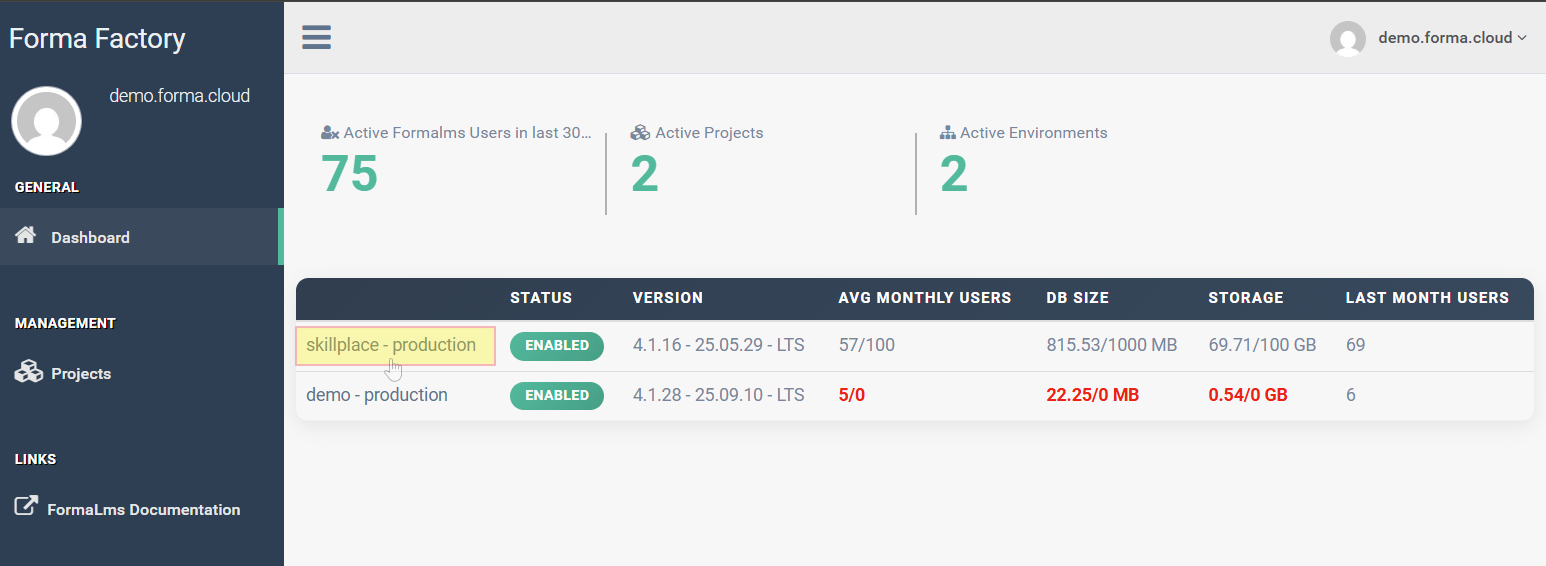
This page provides some basic information about your platforms status and main stats
Click on the project name to access a more datailed dashboard for a specific platform
Platform Dashboard
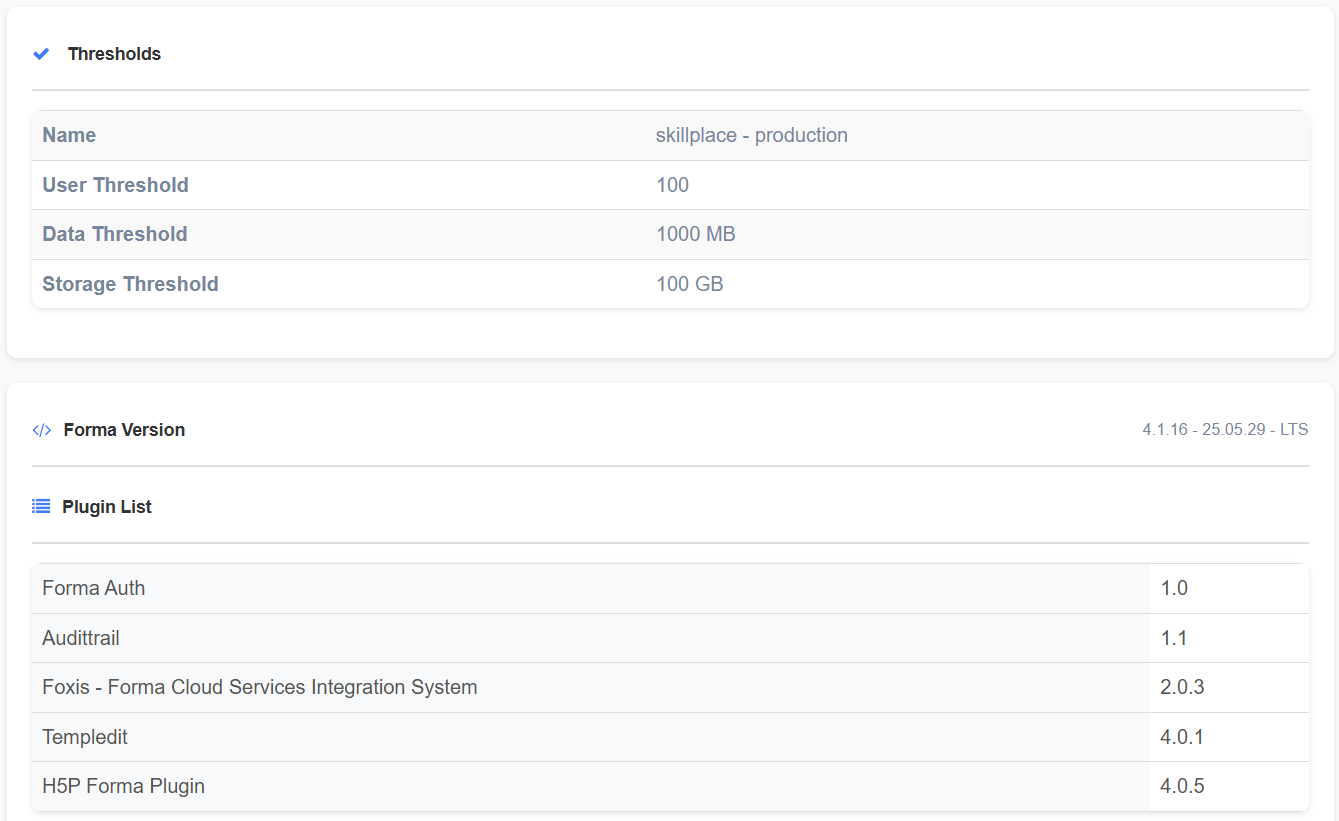
Thresholds, Version, Plugins
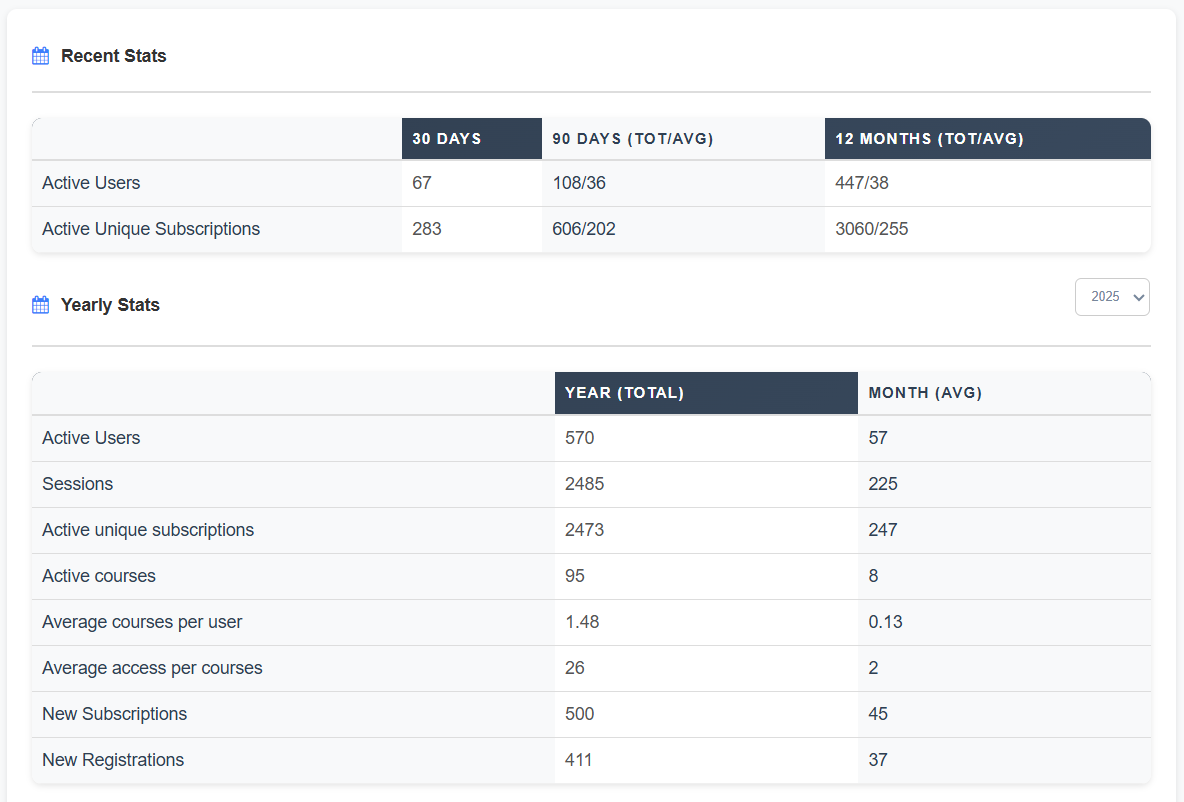
Recent and Yearly stats
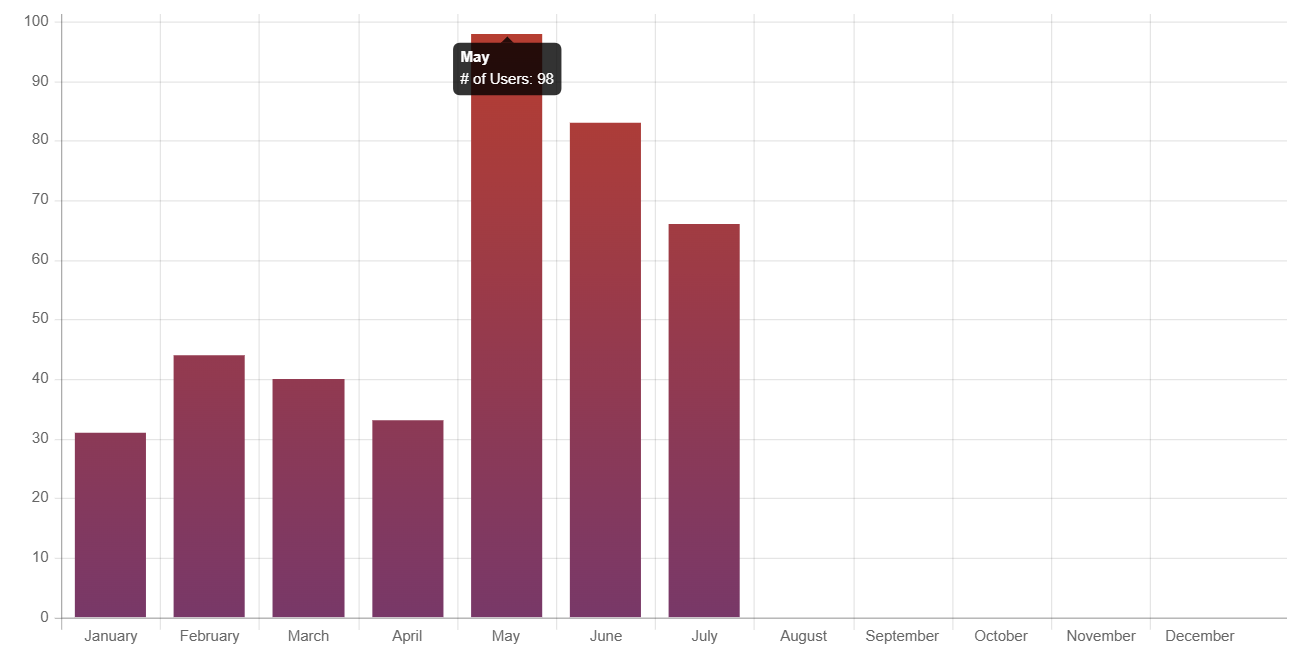
Monthly stats
Data and file Storage
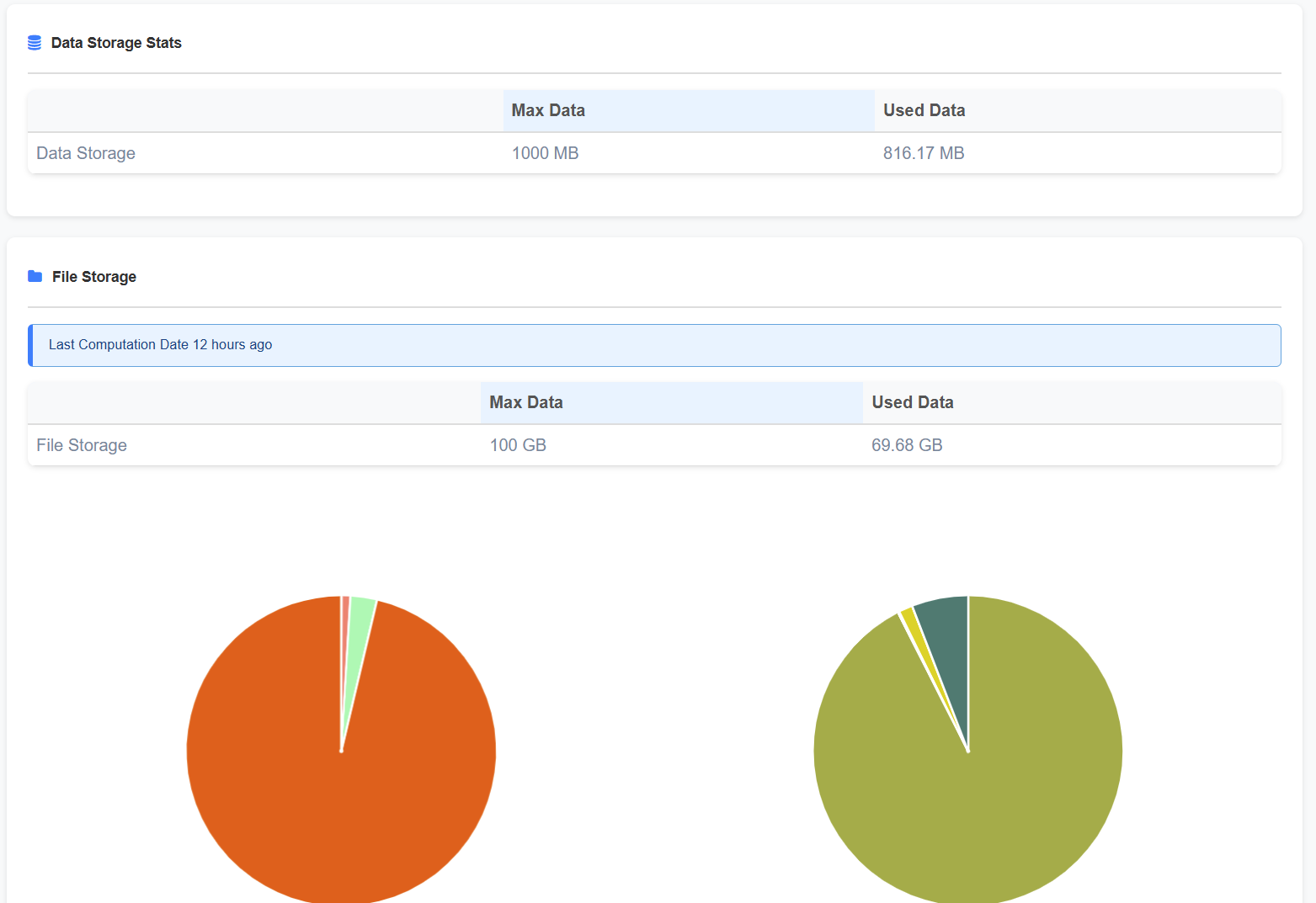
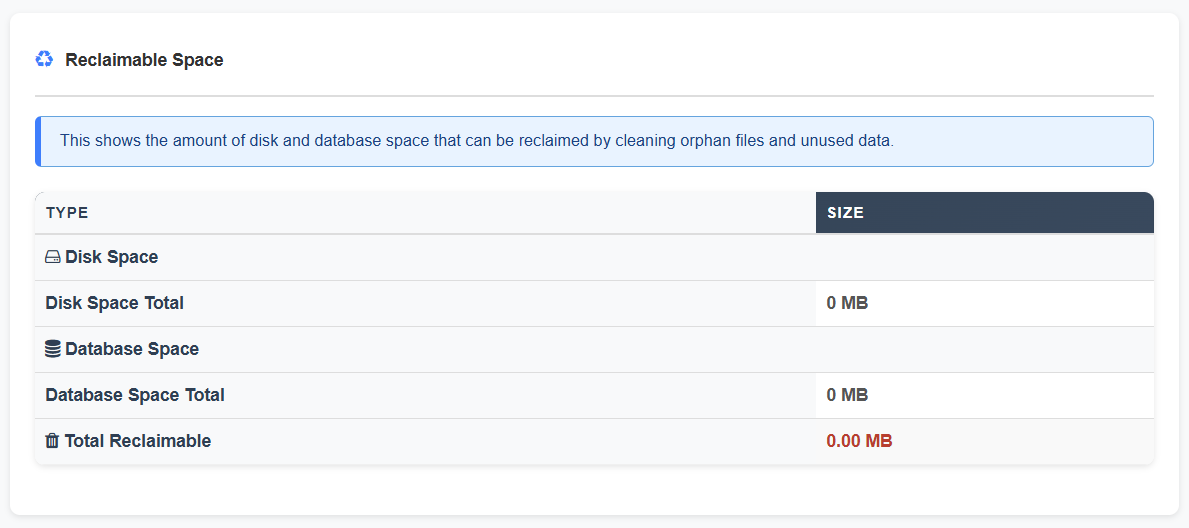
Reclaimable Space
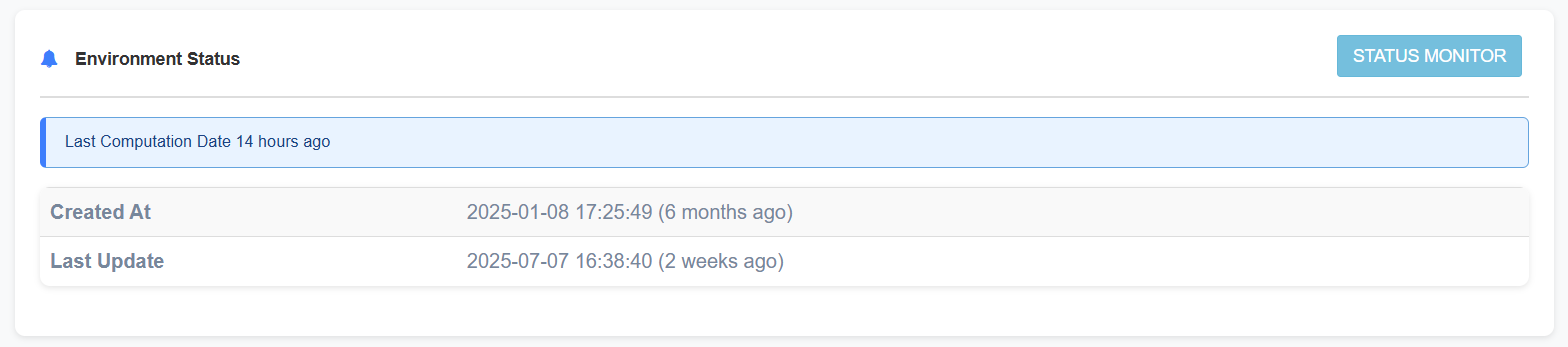
Environment Status
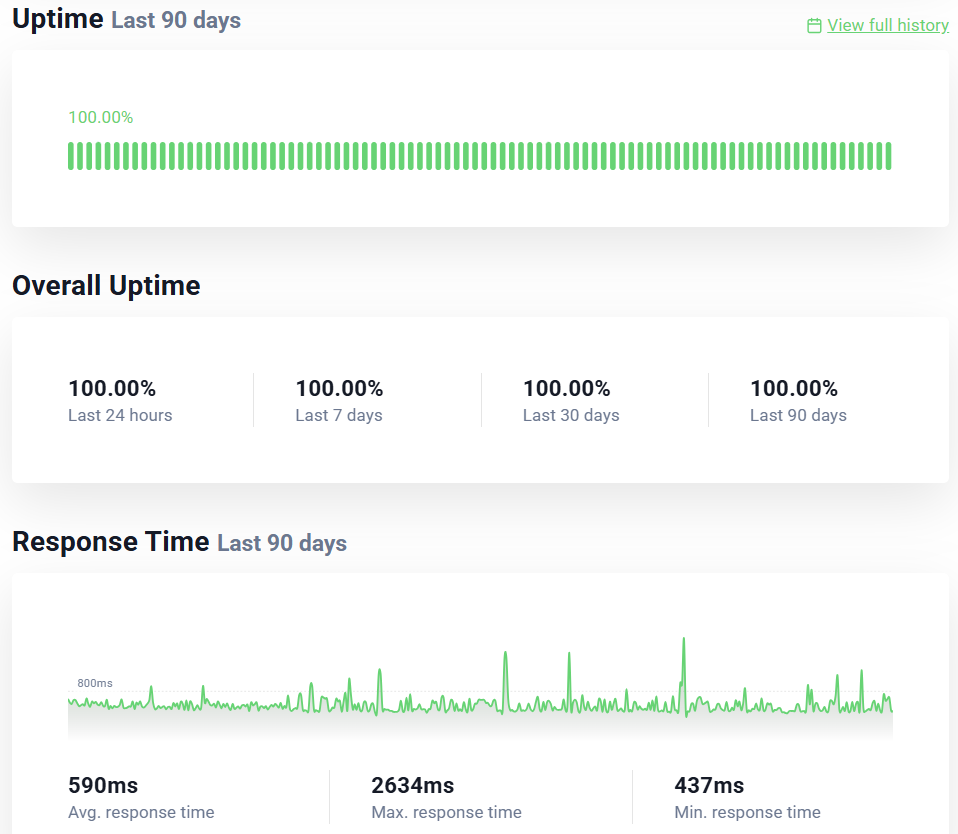
Click on the "Status Monitor" button for the service status of your platform:
Associated Domains
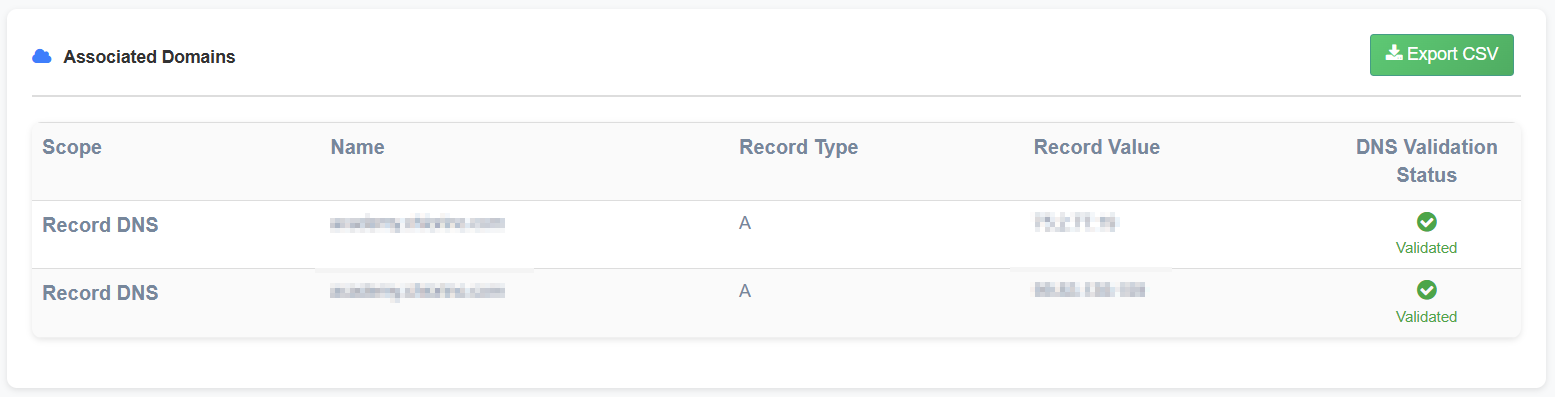
FTP Users
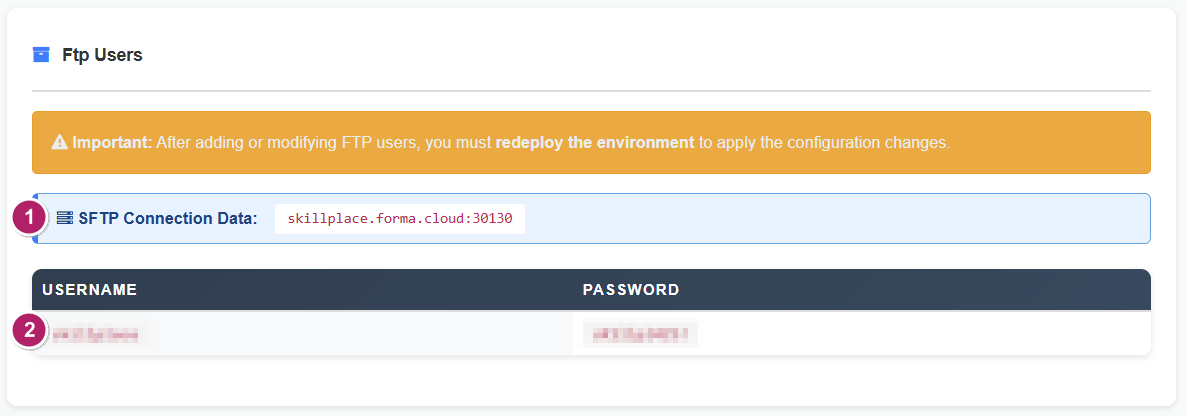
This block provides all the available SFTP data and user credentials:
- Host and port to be set for any of your SFTP users
- User and password for the available SFTP users
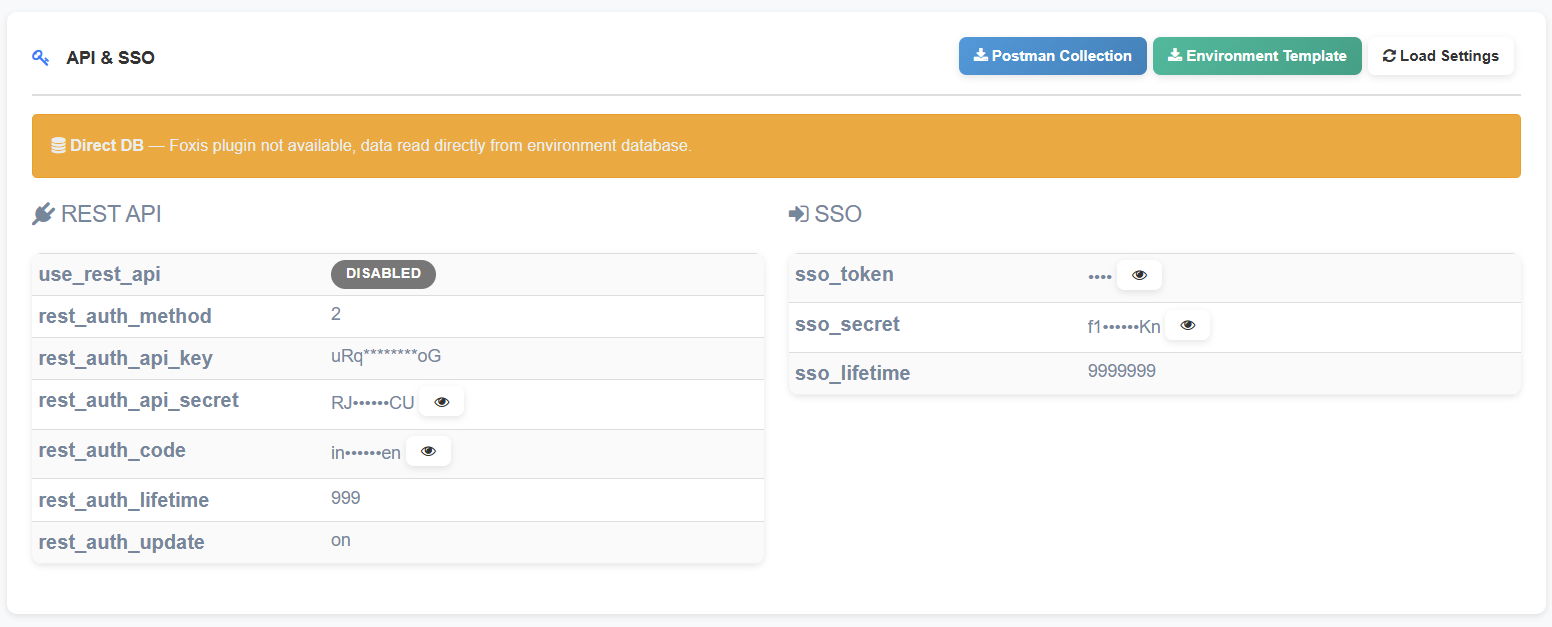
API & SSO
Infrastructure and Security Standards
Disclaimer: The information contained herein reflects the infrastructure and security standards in effect at the time of publication. Such standards are subject to change without prior notice in order to comply with evolving legal, regulatory, and security requirements. Accordingly, this documentation may be modified or updated at any time.
Infrastructure
Cloud Architecture
The Forma Cloud service is delivered through a modern, resilient, and fully managed cloud infrastructure built on Amazon Web Services (AWS). The platform is deployed in AWS data centers located within the European Union (Ireland), with optional database mirroring available in Italy when required.
- Our application layer runs on a Kubernetes-based architecture designed for high availability and elastic scalability. Workloads are distributed across multiple nodes that automatically scale up or down in response to real-time demand, ensuring consistent performance even during peak usage. All traffic is routed through AWS Global Accelerator to optimize connectivity and reduce latency for users worldwide.
- The entire environment is secured within an isolated Virtual Private Cloud (VPC), complemented by an AWS Web Application Firewall (WAF) that provides protection from common web threats such as SQL injection, cross-site scripting, and denial-of-service attempts.
- Load balancing mechanisms ensure even distribution of application requests across all active nodes. Two static IPs are exposed.
- Persistent data is stored in an encrypted Aurora MySQL (RDS) cluster in Multi-AZ configuration that provides automatic failover, multi-node read scalability.
- Application files are maintained in a durable and automatically scalable Amazon EFS shared file system, while Redis/Valkey is used as an in-memory datastore for session management and caching.
- The entire infrastructure is provisioned and managed through Terraform, following Infrastructure-as-Code (IaC) principles. This ensures repeatable deployments, strict version control, and a consistent configuration across environments.
- Continuous monitoring, automated alerting, backup procedures, and business continuity measures support the reliability of the service and help maintain guaranteed availability levels.
Physical Security
The Forma Cloud Services relies on AWS who is responsible, in accordance with the AWS Shared Responsibility Model (available at https://aws.amazon.com/compliance/shared-responsibility-model), for implementing controls for the physical security of data center facilities, backup media, and other physical systems, providing comprehensive and state-of-the-art security capabilities (available at https://aws.amazon.com/compliance/data-center/controls).
Information Protection and Security Standards
Backup
Infrastructure
- Hosting: Amazon Web Services (AWS) - Region eu-west-1 (Ireland, EU)
- Database: Amazon Aurora MySQL in Multi-AZ cluster configuration
- Backup Management: AWS Backup (AWS managed service)
Backup Policies
- Daily Backup (DailyBackups)
- Automatically runs at 5:00 AM UTC
- Retention: 7 days (1 week)
- Managed by AWS Backup plan
- Weekly Backup (WeeklyBackups)
- Automatically runs on Saturdays at 5:00 AM UTC
- Retention: 4 months (120 days)
- Managed by AWS Backup Long-term plan
- Monthly Backup (MonthlyBackups)
- Automatically runs on the first Saturday of the month at 5:00 AM UTC
- Retention: 12 months (365 days)
- Managed by AWS Backup Long-term plan
- EFS Automatic Backup
- Automatically runs daily at 5:00 AM UTC
- Retention: 2 weeks (14 days)
- Managed via aws/efs/automatic-backup-rule
- Cross-region copy to a dedicated backup vault in AWS eu-central-1 (Frankfurt, Germany), retention 14 days
Backup Status
- Last 30 daily backups: all completed successfully
- Active monitoring system with automatic failure notifications
- 58 Aurora snapshots available for the database cluster
- 180+ total recovery points available on AWS Backup (database)
- 30+ recovery points available on AWS Backup (EFS file system)
Access Control
- Backup access limited via specific IAM roles
- MFA required for critical operations
- Service Role: AWSBackupDefaultServiceRole with minimal permissions
- Full audit trail on AWS CloudTrail
Data Storage, Localization and Segregation
Geographic Location
- Primary Location: AWS eu-west-1 (Dublin, Ireland)
- Secondary backup location (disaster recovery): AWS eu-central-1 (Frankfurt, Germany)
- All data and backups remain within the European Union (GDPR compliant)
- No data transfer outside the EU
Redundancy
- Multi-AZ Architecture (3 independent Availability Zones)
- Backups are automatically replicated across multiple AZs
- Storage: AWS EFS and Amazon Aurora with synchronous replication
Backup Vault
- Dedicated vault with automated lifecycle management
- AWS default vault for Aurora snapshots
- Access controlled via IAM roles with the least privilege principle
- Immutable backups: backup vaults are protected by AWS Backup Vault Lock (WORM) in compliance mode. Recovery points cannot be modified or deleted before the end of their retention period, not even by privileged accounts, mitigating the risk of ransomware attacks and malicious or accidental deletion
Data Segregation
Forma Cloud implements logical tenant isolation across application, storage, and database layers.
- Each customer deployment is hosted as a dedicated project within the Kubernetes cluster.
- Each deployment is connected to customer-specific storage paths used to segregate application files.
- Customer data is stored using separate databases, database users, and credentials for each customer project.
- Application-level authorization controls and tenant-aware configuration prevent unauthorized cross-tenant access.
- Administrative access to production data is restricted to authorized personnel and subject to logging and monitoring.
Data Deletion and Disposal
Customer data is deleted or rendered inaccessible through controlled procedures aligned with AWS storage lifecycle and secure deletion mechanisms. Backup data is retained according to the applicable backup retention schedule and subsequently managed according to AWS service policies.
Post-contract retention and final deletion timelines are governed by the applicable contractual documentation and legal requirements.
Data Encryption
Encryption at Rest
- Algorithm: AES-256 via AWS Key Management Service (KMS)
- Encryption enabled by default on all Aurora databases
- Snapshots automatically encrypted with the same key as the source database
- Key rotation: encryption keys are managed in AWS KMS and automatically rotated every 365 days
- Key scope: a single platform-level encryption key is used for each service (database, file storage); encryption keys are not segregated per customer. Customer data segregation is enforced at the database, credential and storage-path level (see Data Segregation)
- Backup data encrypted at rest using AWS-native encryption controls
Encryption in Transit
- TLS 1.2+ for all application connections
- Database connections forced over SSL/TLS
- Backup transfer managed internally by AWS over an encrypted private network
TLS Certificates Management
To ensure secure communications, TLS certificates are fully provisioned, deployed, and managed through AWS Certificate Manager (ACM). This integration eliminates manual handling and human error during certificate generation and renewal.
- Supported Algorithms: ACM-managed public certificates comply with strict security requirements, supporting robust cryptographic standards including RSA (2048-bit or higher) and ECDSA (P-256 or P-384).
- Automated Lifecycle Management: Public certificates issued directly by ACM have a standard validity period of 198 days. ACM monitors and automatically initiates the renewal process well before the expiration date. This automated lifecycle guarantees that the 2-year maximum lifecycle limit for asymmetric certificates is consistently met without service interruption.
- Imported Certificates: Any third-party or custom certificates imported into ACM do not benefit from automated AWS renewal. These specific assets follow a dedicated, documented operational workflow for manual renewal and re-importation prior to their expiration.
- Symmetric Secrets and Application Credentials: Symmetric encryption keys, application-level credentials, and environment secrets are out of scope for ACM. They are managed and documented separately under explicit access control and rotation policies.
Monitoring & Uptime
The infrastructure is equipped with the following service monitoring procedures and mechanisms:
- Server log: All accesses and errors are logged on individual server machines (frontend and database) and the load balancer (aggregated across all machines connected to the service).
- Email pre-alerts when peak thresholds are exceeded (CPU usage, number of DB connections).
- Uptime Robot: Domain monitoring. If the site is unresponsive, the team is notified via email and internal communication channels (Slack).
- Automatic application error notification: Any errors generated by application functionality on the server are notified to the support team.
- Monitoring and multi-channel alert system: The difference between available and utilized resources (CPU and RAM) is continuously monitored. When preset thresholds are exceeded, the system triggers autoscaling and communicates the event via various channels to technical staff.
- AWS CloudWatch: AWS-native monitoring and logging services are used for managed infrastructure components where applicable.
- Log retention: Retention periods and storage destinations are defined according to the configuration applied to each service component and may vary depending on operational and compliance requirements.
Uptime SLA
| Metric | Value | Note |
|---|---|---|
| Granted Uptime | 99,9% | Excluding scheduled maintenance events |
Disaster Recovery
Data RPO (Recovery Point Objective): 5 minutes
- Database: Aurora maintains continuous incremental backups every 5 minutes for point-in-time recovery
- Maximum database data loss is limited to the last 5 minutes of operation
- Point-in-time restore available with second-level granularity
Filesystem RPO (Recovery Point Objective): 24 hours
- File System: 24 hours (automatic daily backups via AWS Backup)
- Maximum filesystem data loss is limited to the last 24 hours of operation
Data RTO (Recovery Time Objective): 72 hours
- Contractually guaranteed time for complete recovery in a full disaster recovery scenario
- Includes: database restore, instance startup, application integrity check
Disaster Recovery Assessment
Disaster recovery procedures are tested on an annual basis to ensure business continuity and validate the reliability of restoration procedures. These tests include restoring database snapshots to a temporary test environment, validating successful system recovery, and verifying data integrity.
The recovery assessment includes a full database restore, startup of a temporary Aurora test cluster, application connectivity checks, execution of queries on critical tables, and data consistency validation. These controls confirm that systems can be effectively recovered in the event of a failure and that the declared RTO/RPO objectives are supported by operational recovery procedures.
Last test performed
- Date: October 10, 2025
- Procedure: Aurora snapshot restore on a temporary test cluster
- Outcome: Positive - database restored successfully, data integrity verified
Verification steps performed
- Full database restore from snapshot
- Aurora test cluster startup
- Application connectivity verification
- Query testing on critical tables
- Data consistency check
Remote Administrative Access
Remote administrative access to systems processing customer data is restricted to authorized personnel only, protected by multi-factor authentication and conducted over encrypted channels.
- Database administrative access is performed through protected connectivity.
- Access to file storage resources is performed through controlled administrative channels.
- Administrative activities are logged and subject to monitoring and access review.
Secure SDLC and Change Management
FormaFarm applies a controlled software delivery lifecycle designed to govern software development, configuration, maintenance, and production changes.
- Development, test, staging, and production environments are separated.
- Code changes are subject to review before release.
- Testing is required before deployment to production.
- Secure coding practices are applied in line with recognized web application security principles.
- Significant production changes are documented and include rollback considerations.
Incident Management
FormaFarm maintains procedures for the identification, escalation, containment, resolution, and post-event analysis of incidents affecting service continuity, confidentiality, integrity, or availability of customer data.
Confirmed security breaches are notified without undue delay in accordance with applicable contractual commitments and legal requirements.
Vulnerability Assessment and Penetration Testing (VAPT)
Forma Cloud is subject to periodic Vulnerability Assessment and Penetration Testing (VAPT) activities conducted by qualified third-party security firms. These assessments are carried out in accordance with industry-standard methodologies (e.g., OWASP Testing Guide, PTES) and cover both the application layer and the underlying infrastructure.
VAPT Management Process
- Periodic assessments: VAPT activities are performed on a regular basis and upon significant platform changes (major releases, architectural modifications, or new integrations).
- Scope: Assessments cover the full attack surface, including web application interfaces, APIs, authentication flows, session management, and infrastructure-level exposure.
- Findings management: All identified vulnerabilities are classified by severity (Critical, High, Medium, Low, Informational) and tracked through a structured remediation workflow. Critical and High severity findings are prioritized for immediate remediation; Medium and Low findings are scheduled within subsequent release cycles.
- Retesting: After remediation, affected areas are retested to verify that fixes effectively resolve the identified vulnerabilities without introducing regressions.
Application Security Controls
Multiple layers of security controls are implemented at both infrastructure and application level to proactively mitigate common web vulnerabilities and address findings from VAPT assessments.
Web Application Firewall (WAF)
All incoming traffic passes through an AWS Web Application Firewall (WAF) that provides protection against common attack vectors, including:
- SQL injection (SQLi)
- Cross-Site Scripting (XSS)
- Cross-Site Request Forgery (CSRF)
- Denial-of-Service (DoS) attempts
- Malicious bot traffic and request rate abuse
WAF rules are regularly reviewed and updated in response to newly identified threats and VAPT findings.
Where appropriate based on the service profile and operational needs, additional AWS-native security services such as Amazon Inspector, AWS Security Hub, and Amazon GuardDuty may be evaluated or adopted to strengthen vulnerability management, posture monitoring, and threat detection capabilities.
Content Security Policy (CSP)
A comprehensive Content Security Policy is enforced via HTTP response headers at the Nginx reverse proxy level. The CSP configuration is dynamically generated at container startup based on environment variables managed through the deployment infrastructure (factory), enabling per-tenant customization without code changes.
- Directives enforced:
default-src,script-src,style-src,img-src,font-src,frame-src, andframe-ancestorsare all explicitly configured to restrict resource loading to authorized origins. - Domain whitelisting: Allowed origins include the tenant's own domain (via wildcard), explicitly configured external domains (identity providers, CDN services, embedded content providers such as YouTube and Vimeo), and a curated set of common third-party service domains.
- Frame embedding control: The
frame-ancestorsdirective restricts which domains may embed the application in iframes, preventing clickjacking attacks. Additional domains can be allowed on a per-tenant basis through dedicated configuration variables. - Extensibility: Tenant-specific CSP requirements (e.g., additional trusted domains for SSO integrations or embedded content) are supported through environment-level configuration, applied without redeployment.
- Header size management: An automated optimization pipeline deduplicates, consolidates, and groups CSP domains to ensure compliance with the Nginx maximum header size limit (8 KB). When the combined policy exceeds the limit, directives are automatically split across multiple header entries.
HTTP Security Headers
In addition to CSP, the following security headers are enforced on all responses:
| Header | Value | Purpose |
|---|---|---|
| `Strict-Transport-Security` | `max-age=31536000` | Enforces HTTPS connections for one year (HSTS) |
| `X-Content-Type-Options` | `nosniff` | Prevents MIME-type sniffing attacks |
| `Referrer-Policy` | `strict-origin-when-cross-origin` | Limits referrer information leakage |
| `Permissions-Policy` | Restrictive policy disabling geolocation, camera, microphone, payment, etc. | Reduces the browser API attack surface |
Server Fingerprint Mitigation
Server identification headers are actively suppressed to reduce the information available during reconnaissance:
- Nginx version disclosure is disabled (
server_tokens off) - The
ServerandX-Powered-Byresponse headers are removed - PHP version exposure is disabled (
expose_php = Off)
Sensitive File Protection
The web server is configured to deny access to files and paths that should never be publicly accessible, including:
These rules are enforced at the Nginx level, ensuring that even in case of misconfigurations or accidental file placement, sensitive content is not served to external clients.
Session Security
Session management is hardened through multiple mechanisms:
Brute-Force Protection
The platform includes application-level protection against brute-force login attacks:
- Configurable attempt threshold: Administrators can set the maximum number of allowed login failures before triggering a temporary account lockout.
- Timed lockout: After exceeding the threshold, further login attempts are temporarily blocked. The lockout duration is configurable and the remaining wait time is communicated to the user.
- Audit logging: Failed login attempts are logged with configurable granularity (all failures, only after threshold, or disabled), capturing username, timestamp, attempt count, and source IP address for forensic analysis and compliance reporting.
Email & DNS settings
Setup a custom domain on Forma Cloud
Forma Cloud platforms come with a default domain name like "myproject.forma.cloud", but you may want to use:
- one or more custom domains of your own. like myacademy.com, and point it to your platform
- one or more custom email addresses based on your domain, like "training@myacademy.com"
How to set a custom DOMAIN
To allow this you will need to configure some "DNS Records" with your domain registrar.
- Register the domain or subdomain with your service provider
- Open a ticket writing to helpdesk@formafarm.com, indicate the domain name you wish to use
- We will add the certificate, and send you the records to be configured on your domain provider service within 24 hours
- Insert the records and check with a tool like GoogleDig
- Let us know for a final check
Always backup your existing DNS settings before making any changes.
How to set a custom SUB-DOMAIN
Once your main domain is configured, it will be possible to add more subdomains like client1.myacademy.com, client2.myacademy.com
Since the main domain is already configured on both your DNS and our services, it will be way easier:
- Create the subdomain on your provider control panel
- Open a ticket writing to helpdesk@formafarm.com, indicate the subdomain domain name you wish to add
About DNS for Forma Cloud
What are DNS Records?
DNS records are like the internet's "phone book" that tells browsers and email services where to find your website and how to manage your email. Each record has a name, type, and value that indicates where to point.
Why Are These Records Needed?
Your web infrastructure is hosted on Amazon Web Services (AWS), one of the most secure and reliable clouds in the world. These DNS records are used to:
In essence, you're "telling" AWS, "Yes, I own this domain and I authorize you to manage it." Without this authorization, Amazon cannot activate the SSL certificate or email services for security reasons.
Required DNS Records
In order to have everything working fine with your custom domain and email addresses, you will need to configure the following DNS records on your domain service provider
1. SSL Certificate - For website security
What it does: Allows your site to have "the green padlock" (HTTPS protocol) in the browser address bar for security
Examples:
|
Record Name |
Type |
Value |
|
_bbb9ea10b0856de6ba586e6207dc19a2.yourproject.forma.cloud |
CNAME |
_5b1f9e0e8346d90ac6b87db19db7c2dc.xlfgrmvvlj.acm-validations.aws |
2. WEBSITE POINTING - Where Your Website Is Located
What it does: Tells browsers where to find your website when someone types in your domain.
Examples:
|
Record Name |
Tipo |
Valore |
|
yourdomain.com |
A |
75.2.77.19 |
|
yourdomain.com |
A |
99.83.139.159 |
Note: we are providing 2 different IP addresses to grant maximum service reliability through our balancer
3. EMAIL VALIDATION - To Send Authenticated Emails from your platform
What it does: Allows your system to send emails that don't end up in spam.
Examples:
|
Nome Record |
Tipo |
Valore |
|
kkctvw3mrh2v7h3gzaoqf34t3dl4xybh._domainkey.yourdomain.com |
CNAME |
kkctvw3mrh2v7h3gzaoqf34t3dl4xybh.dkim.amazonses.com |
|
j4qlk6qmjatfrrx2s2dvljosxleqs7wf._domainkey.yourdomain.com |
CNAME |
j4qlk6qmjatfrrx2s2dvljosxleqs7wf.dkim.amazonses.com |
|
sabrml264bh5b4map5crcjq327z7ifgk._domainkey.yourdomain.com |
CNAME |
sabrml264bh5b4map5crcjq327z7ifgk.dkim.amazonses.com |
Further (important) Information
Propagation and verification time
DNS changes can take 4 to 48 hours to take effect worldwide.
After 24 hours, verify that the site is reachable and displays the SSL padlock in the browser.
Recommended Configuration Order
This is the recommended order to follow when setting up Forma Cloud DNS records on your provider service:
- First A records (site points)
- Then CNAME records for SSL
- Finally DKIM records for email
Unavailability of the custom domain
In any case your custom domain should not work for some reason (issues with your provider, misconfigurations, expired domain) the default *.forma.cloud domain will always be available
Still having trouble with DNS records?
Most DNS providers (Aruba, Register, GoDaddy, OVH, etc.) offer free support for configuring DNS records. Open a support ticket from your control panel and attach this guide—they'll usually do it in minutes!
Migrating a domain to another provider
In case you are changing your domain registrant or hosting provider for an alias domain associated to Forma Cloud, nothing has to be changed on our side: just regongfigure the same DNS recods on the new provider.
You can always download your DNS records from your client control panel. We cannot provide direct assistance on your providers control panel.
Fly-in: Migrating to Forma Cloud
So you finally decided to move your existing Forma LMS to Forma Cloud! We're glad you've chosen our service to host your e-learning platform. To ensure a fast, secure, and seamless migration, we've prepared this guide to help you provide all the necessary information.
Migrating your platform to FormaCloud is a structured process that typically takes 2–5 business days, depending on the size and complexity of your installation.
Here's what will happen during the process:
- You provide us with the required data
- You configure the DNS records for SSL certificates and email (SES)
- You put your platform in maintenance mode
- We transfer files and databases
- We upgrade and test installation
- We validate and attach SSL certificates to our infrastructure
- We give you the green light to update DNS pointing records
- You perform final testing
Required Information
To proceed with the migration and activation of your platform, we ask you to send us the following data.
| **Required Data** | **Description** |
|---|---|
| Platform Name | Used as the project name and as part of the default domain (e.g., `https://[platformname].forma.cloud`). |
| URL Alias | The web address that will be used to access the platform (e.g., `learning.yourdomain.it`). Note: During the migration process, you will need to configure DNS records in two separate phases. See the **Migration Steps** section below for details. |
| Email Sender Address | The email used for notifications, confirmations, and password resets (e.g., `info@yourdomain.it`). It must belong to the same domain as the URL alias. |
| Superadmin Access to the Platform | An account with superadmin rights to access your current platform. |
| SSH/FTP Access to the Current Server | Required to transfer files. Include:
SSH transfer protocol is required for safer and faster data transfer, allowing direct transfer and avoiding the risk of data loss or corruption Warning: if only FTP is available, we won't be able to check and guarantee file integrity after the migration to Forma Cloud, and won't take any responsibility for possible data loss or corruption. Please ask your IT or provider for SSH access |
| Database Access | Host, Username, Password. Alternatively, you may send us the database file directly or provide a download link (e.g., via WeTransfer or similar services). |
---
Sending the Data
You can send us all the required information via email. For maximum security, you may:
- send passwords or credentials in a separate email
- use a secure file-sharing service
Migration Steps
The migration follows a precise sequence. Each step must be completed before moving to the next.
Step 1 — You configure DNS records for SSL certificates and email (SES)
Once we receive your data, we will provide you with a set of DNS records to add to your domain. These records serve two purposes:
- SSL certificate validation — required so we can issue and validate an SSL certificate for your alias domain (e.g.,
learning.yourdomain.it) on our infrastructure. - Email (SES) authentication — required so emails sent from your platform (notifications, password resets, etc.) are properly authenticated and not marked as spam. This typically includes DKIM, SPF, and domain verification records.
Important: At this stage, you must only ADD the new records we provide. Do NOT modify or remove any existing DNS records — your current platform must continue to work normally while we prepare the migration.
What you need to do: Add all the CNAME and TXT records we send you to your domain's DNS configuration. If you're unsure how, ask your IT team or domain provider for assistance. Check our full DNS documentation for further details.
Step 2 — You put your platform in maintenance mode
Once all DNS records from Step 1 have been added and propagated, set your current platform to maintenance mode. This ensures that no new data is generated while we transfer your content, guaranteeing an accurate and complete copy.
Plan the migration: to reduce inconvenience for your users, we can agree on specific dates for the intervention based on the availability of our team (during standard business hours, Monday to Friday).
Step 3 — We transfer data and database
With the platform in maintenance mode, our team will:
- Perform a preliminary check of the data you provided
- Transfer all files and the database from your servers to Forma Cloud
- Configure your instance in Forma Cloud
Step 4 — We upgrade and test the installation
After the transfer, our team will:
- Update Forma LMS to the latest available version
- Run technical validation and integrity checks
- Run preliminary functional tests
Step 5 — We validate and attach SSL certificates to our infrastructure
Once the installation is verified, our team will:
- Validate and activate the SSL certificates for your alias domain
- Configure your alias domain on our servers
We will notify you once everything is ready and your instance is live on our infrastructure.
Step 6 — You update DNS pointing records
Once we give you the green light, you need to modify your existing DNS pointing records (typically an A record or CNAME) so that your alias domain (e.g., learning.yourdomain.it) points to our infrastructure instead of your old server.
Important: Only proceed with this step after receiving explicit confirmation from our team. Changing the pointing records too early will result in downtime for your users.
What you need to do: EDIT the existing A or CNAME record for your alias domain to point to the address we provide. The certificate and SES records you added in Step 1 should remain in place. Check our full DNS documentation for the exact values.
Once DNS propagation is complete (usually a few minutes to a few hours), all traffic to your domain will be served by Forma Cloud.
Step 7 — Final testing
After updating the DNS, access your migrated platform and:
- Verify general functionality (login, courses, tracking data)
- Report any issues to our team
- Apply new configurations if needed
- Disable maintenance mode on the migrated platform
Important: Leave maintenance mode active on your old installation. This prevents users from accidentally accessing the old server during DNS propagation.
DNS Configuration Summary
Here's a quick reference of the DNS actions required during the migration:
| When | Action | Records | Purpose |
|---|---|---|---|
| Step 1 (before migration) | ADD new records | CNAME records for SSL certificate validation; TXT/CNAME records for SES (DKIM, SPF, domain verification) | Certificate issuance and email authentication |
| Step 6 (after our OK) | EDIT existing records | A record or CNAME for the alias domain (e.g., `learning.yourdomain.it`) | Point traffic to Forma Cloud |
Security and Data Protection
The security of your data is our priority. During the migration process:
- All data you provide is handled in compliance with the GDPR
- Credentials may be sent through secure channels or separate emails
- Data is used exclusively for the migration
- After the transfer is complete, credentials can be deleted or changed at your discretion
Plugins, Custom Modules, and Customizations
If your platform contains custom elements:
- Custom-developed plugins
- External modules
- Custom themes
- Integrations with third-party systems (SSO, API, etc.)
Please inform us when submitting your data. This will allow us to:
- Check compatibility with the new infrastructure
- Make any necessary adjustments or suggest alternatives
- Ensure correct functionality after the migration
Important: We cannot maintain unrecognized plugins or platform customizations, but we will work with you to find the best possible solution to ensure continuity with your current version.
After the Migration
Once the migration is complete and your platform is finally running on Forma Cloud, please keep your previous service active and maintain a backup of your files and database for at least 6 months.
FAQ – Frequently Asked Questions
Will the platform be offline during the migration?
It will be online but closed for user access (Maintenance Mode).
How long does the migration take?
On average, between 2 and 5 business days.
Can the migration be scheduled at specific days?
Yes, let us know and we'll find the most suitable time slot.
What happens if I don't have some of the required data?
We'll help you retrieve it and, if necessary, we can work with backups provided by you.
Will my data be deleted from the previous server?
No, unless you remove it manually. We copy the data; we do not delete it.
What happens with the login and tracking data of my users and courses?
Nothing! After the migration, your users will be able to log in again with the same credentials, all tracking data will be retained, and all your courses and their configurations will be maintained, compatible with the version of Forma implemented.
When should I change my DNS records?
DNS changes happen in two phases. Before the migration, you add the certificate and email (SES) records we provide — these don't affect your current platform. After the migration, once we confirm everything is ready, you update the pointing records (A or CNAME) so your domain points to Forma Cloud. Never change the pointing records before receiving our explicit confirmation.
How long does DNS propagation take?
Usually between a few minutes and a few hours, depending on your DNS provider and TTL settings. During this time, some users may still reach the old server — that's why we recommend leaving maintenance mode active on the old installation.
Support
If you have questions or difficulty retrieving the required information, our team is here to help. Don't hesitate to contact us!
Integrating Forma Cloud
Integrate with other applications and automate users maintennce
I/O Task Integration
When to use IO Task Integration
IO Task Integration is designed to connect Forma LMS with external business systems through asynchronous file exchange (e.g., CSV, XML) on a shared SFTP folder.
This approach is particularly suitable when:
- The external system does not expose APIs or only provides limited ones
- The integration needs to be simple, robust, and batch-based
- Real-time data synchronization is not required
- Large volumes of data need to be processed on a scheduled basis
When real-time interaction or event-driven logic is required, API-based integrations are recommended instead.
Use Cases
Typical use cases for IO Task Integration include:
- Automatic user import from HR systems,
- Automate user status and profiles update
- Bulk enrollment into courses or learning plans
- Data exchange with external systems (e.g., training completion records)
Check the official documentation for a full guide to the available connectors
Custom I/O activities may be analyzed and implemented upon request
Integration Flow
The typical IO Task integration flow works as follows:
- The external business system generates a data file
- The file is placed in a shared folder
- Forma LMS processes the file through the configured IO Task
- Data is imported or updated within the platform
File Management and Shared Folders
Shared Folder
File Upload to Forma Cloud
All files used for data exchange must be placed in a shared SFTP folder provided by Forma Cloud with the following path: html/files/common/iofiles
Your SFTP credentials are published in your client area, or you can ask our helpdesk team
Please verify that your systems can:
- automatically generate files in the required format
- transfer them to the shared folder (e.g., via SFTP or similar services)
File Retrieval from client system
If your system cannot automatically send files to the Forma Cloud shared folder, it is possible to:
- expose the files on a customer-managed shared folder (e.g., you company SFTP)
- request an additional service from the Forma team to automatically retrieve the files
⚠️ This additional service involves extra cost.
File format
The data file must comply with the following requirements:
- The file format must be .csv (mandatory)
- There are no strict constraints on the column separator (e.g., comma, semicolon, etc.), as long as it is consistent within the file
- Additional columns are allowed and will be ignored if not mapped in the IO Task configuration
- The column order is not strictly required during the initial setup
Once the integration procedure has been configured and activated, separator type and column structure must remain consistent over time. Changes to separators, column order or structure may cause errors in data processing.
Scheduling
The I/O task cron job is usually processed nightly at 2 am
Data Specifications
Users import and update
Creating and updating users
- Username: The username is the user's primary identifier and must be unique (e.g., the employee ID number, tax code, etc) and remain consistent over time, even if the user changes roles within the company. All automated operations will be based on this data, so it must be consistent and stable across all applications involved in the integration. It is also important that it is easy for users to remember, for example using the same username as other applications (this will also allow for SSO solutions)
- Email: Use email as forma username only if strictly required, i.e. you need it for SAML/OIDC integration and you still need it to be different from the email used for communications.
- Folder Identifier: define a field to be used to assign users to an org-chart node. Data should match exactly the org-chart code, and won't be saved to the user profile.
- Language: If no language is specified, imported users will use the default language and will see the platform in their default language when they log in. In international contexts, it's a good idea to also import the user's language and ensure the required languages are installed on the platform so they can see the platform in their native language when they log in.
- Password: the procedure can either import a password for each user from the file, or set a default password for all the users (in this case we recommend configuring mandatory password change upon first login). It is possible to send credentials to the newly imported users via email.
- Other user data: define if the system should import other data to user custom fields
Managing Node assignment
- Users can be associated to one or multiple orgchart nodes, based on a code identifying a specific orgchart. One record must be provided for each user-node association
- At every import all the orgchart association for each user will be reset and recreated, thus all users will be constantly added to the current nod association
- Missing Orgchart code: if the code for the imported user is not related to an orgchart code, the user will be placed in the root folder
Suspending users
- Suspension: users removed from the imported file will be suspended on the platform
The IO Task feature will only suspend and won't remove any user
The update procedure can't reactivate suspended users: this is to avoid conflicts with manual users management
Export of users status on courses
This connector will generate a CSV file containing a list of users and their status on courses, and can be integrated with other user information from custom fields.
Enroll users to courses
Upload a CSV file containing a list of users and course codes to automatically enroll users
API Integration
Integrating with Forma Cloud APIs and Postman
Overview
Forma Cloud provides a complete set of REST APIs that allow you to perform the most common operations on users, courses, enrollments, certificates, and reporting.
Forma Cloud uses the standard APIs of Forma LMS.
Official Forma LMS API Documentation:
https://docs.google.com/document/d/1bbNL7AR_2gbescLkgBIL3Cu7BZ9tZLky9spM3bfkZjA/edit?tab=t.0
Common Use Cases
The APIs can be used to integrate the platform with other corporate systems.
HR System Synchronization
- Automatic user creation in the platform
- User profile updates
- Deactivation of terminated employees
HSE Management Integration
- Export of course completion certificates
- Monitoring mandatory training expiration dates
- Synchronization of compliance training status
Business Intelligence & Reporting
- Extraction of course completion data
- Monitoring training KPIs
- Integration with external analytics tools
Corporate Portal Integration
- Single Sign-On (SSO)
- Display of training status in company intranet
- Custom dashboards
In multi-tenant installations, it is strongly discouraged to grant API access to individual sub-clients. Doing so may expose sensitive data across different tenants, increasing the risk of privacy breaches and unauthorized access. To ensure proper data isolation and security, API usage should be restricted to controlled and centralized contexts.
Enabling the APIs in Forma Cloud
APIs can be enabled and configured directly from your platform.
Configuration Path:
Admin > System Configuration > Settings > API & SSO
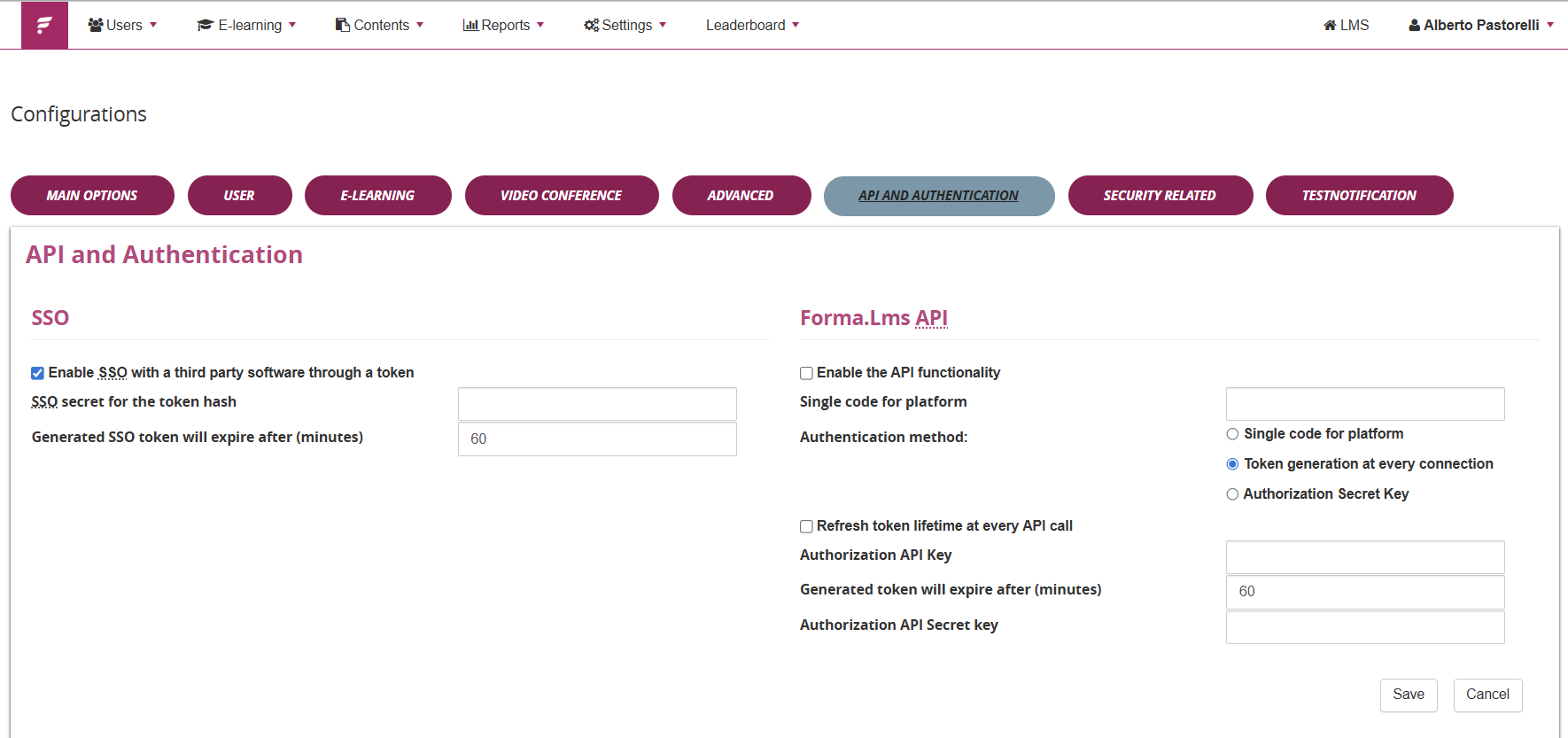
Here you can:
- Enable API access
- Configure security parameters
- Manage authentication and tokens
- Configure SSO if required (Check the Forma Cloud SSO documentation)
Forma LMS official system configuration guide: https://docs2.formalms.org/books/reference-guide/page/system-configuration
Exporting the Postman Collection from Forma Factory
Once your platform's API are activated and configured, From your Client Control Panel you can:
- Export a ready-to-use Postman Collection
- Download the related connection JSON files
- Quickly import API calls into Postman
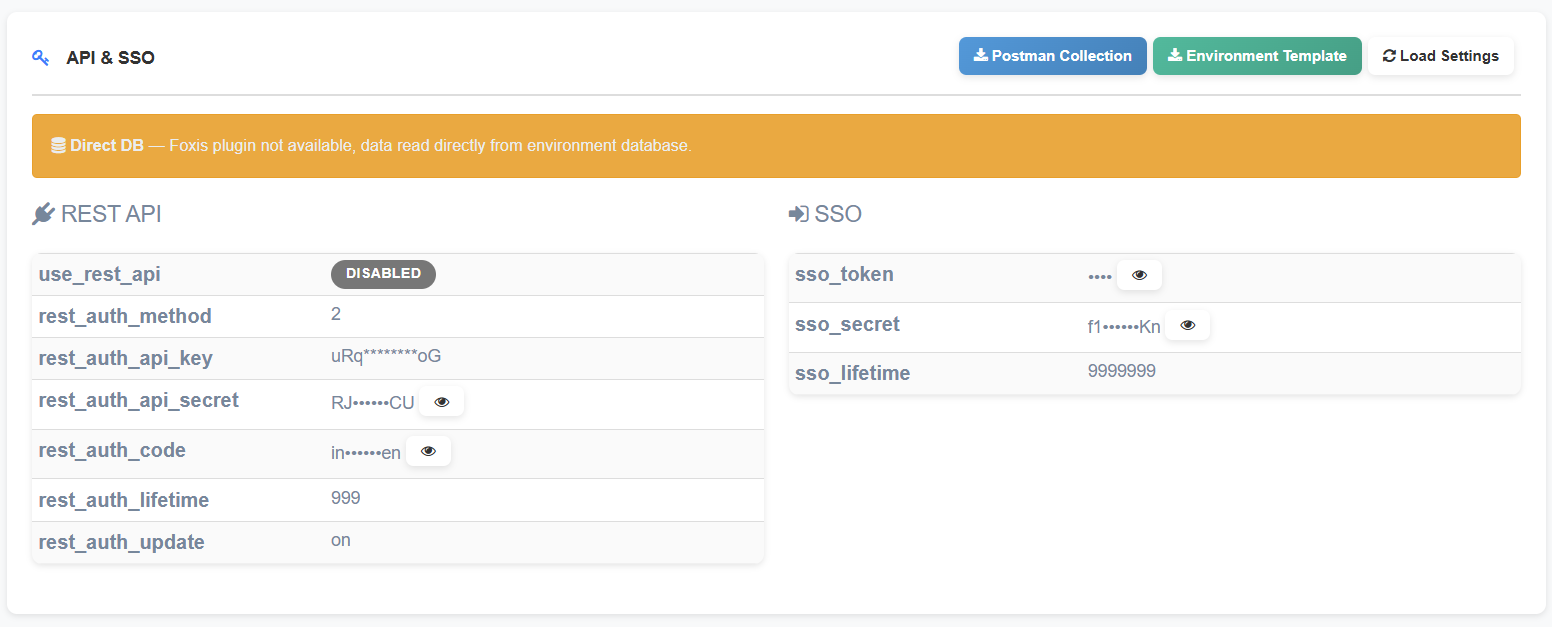
This avoids manual configuration and speeds up testing.
What is Postman?
Postman is a popular tool for testing and developing APIs in a simple and visual way.
- Send HTTP requests (GET, POST, PUT, DELETE)
- Add headers and authentication tokens
- Manage environments (e.g., production / staging)
- Save collections of API calls
- Write automated tests on responses
It is available as a desktop application and as a web application.
How to Use Postman with Forma Cloud
1. Import the Collection
- Open Postman
- Click Import
- Select the .json file exported from Forma Factory
2. Configure the Environment
Set the main variables:
- base_url
- client_id (if required)
- client_secret or token
3. Authenticate
Use the authentication endpoint to obtain an access token as described in the official documentation.
Execute API Calls
Select the desired endpoint (e.g., users, courses, enrollments) and send the request.
API response standard: the mantained format is JSON. Most API still provide also the legacy XML format, but is now deprecated and will be removed in future releases.
Security & Best Practices
- Always test you API calls on the provided sandbox environment (if not active, just ask the helpdesk ;) ).
- Never share tokens or credentials
- Use separate environments for testing and production
- Limit API user permissions
- Monitor API usage through system logs
Official Resources
- Forma LMS API Documentation:
https://docs.google.com/document/d/1bbNL7AR_2gbescLkgBIL3Cu7BZ9tZLky9spM3bfkZjA/edit?tab=t.0 - System Configuration Guide:
https://docs2.formalms.org/books/reference-guide/page/system-configuration
SSO Features
SSO Integration with Forma Cloud
1. What is Forma Cloud SSO?
The FormaLMS SSO system allows the generation of automatic login links that authenticate the user securely through a temporary cryptographic token. This is a common solution for:
-
Automatic redirect from a web application
-
SSO login links in HTML pages
-
API endpoint returning an SSO URL
This guide explains how to correctly implement Single Sign-On (SSO) authentication with FormaLMS, allowing users to access the platform directly from external systems without entering their credentials.
2. How SSO Works
The SSO login process is based on three elements:
-
login_user – The username of the user who must be authenticated
-
time – A Unix timestamp representing when the link was generated
-
token – An MD5 hash that validates the authenticity of the request
The token is calculated using the username, timestamp, and a shared secret key (SSO Secret).
3. SSO URL Structure
A valid SSO URL follows this structure:
https://PLATFORM/index.php?r=adm/homepage/sso&login_user=USERNAME&time=TIMESTAMP&token=TOKEN
Parameters
-
r=adm/homepage/sso – FormaLMS SSO endpoint
-
login_user – User’s username (URL-encoded)
-
time – Current Unix timestamp
-
token – Uppercase MD5 hash
Example
https://forma.example.com/index.php?r=adm/homepage/sso&login_user=mario.rossi&time=1729681425&token=A1B2C3D4E5F6G7H8I9J0K1L2M3N4O5P6
4. Generating the SSO Token
Step 1: Generate the Unix Timestamp
The Unix timestamp represents the number of seconds elapsed since Jan 1st, 1970 (UTC).
Examples:
-
PHP:
time() -
Node.js:
Math.floor(Date.now() / 1000) -
Python:
int(time.time()) -
C# (.NET):
DateTimeOffset.UtcNow.ToUnixTimeSeconds() - Java: System.currentTimeMillis() / 1000
Important: The timestamp must be generated dynamically at the moment of the SSO request.
Step 2: Calculate the Token
The token is an uppercase MD5 hash of a specific concatenated string:
token = MD5_UPPERCASE(login_user + "," + time + "," + sso_secret)
Where:
-
login_user = the username
-
time = timestamp from Step 1
-
sso_secret = secret key configured in FormaLMS
Example (PHP)
$loginUser = "mario.rossi";
$time = 1729681425;
$ssoSecret = "mia_chiave_segreta_123";
// Build the string
$stringToHash = $loginUser . ',' . $time . ',' . $ssoSecret;
// Result: "mario.rossi,1729681425,mia_chiave_segreta_123"
// Calculate MD5 and convert to UPPERCASE
$token = strtoupper(md5($stringToHash));
// result: "A1B2C3D4E5F6G7H8I9J0K1L2M3N4O5P6"
Requirements:
- Commas must match exactly
- No extra spaces
- Final hash must be uppercase
Step 3: Build the Final URL
Once the timestamp and token are ready, construct the final SSO URL:
Example (PHP):
$platformUrl = "https://forma.example.com";

$ssoUrl = $platformUrl . "/index.php"
    . "?r=adm/homepage/sso"
    . "&login_user=" . urlencode($loginUser)
    . "&time=" . $time
    . "&token=" . $token;
5. Configuration in FormaLMS
Before using SSO, configure the secret key inside FormaLMS:
6. Link Validity
SSO links are time-limited for security reasons.
Characteristics:
-
Typical validity: 5–10 minutes
-
The link must be used immediately
-
Past or future timestamps are not accepted
-
Expired links require regeneration
Best practices:
-
Generate the link just before redirecting
-
Do not store SSO URLs for future use
-
Implement automatic regeneration if needed
7. Implementation Checklist
Configuration
-
Secret key configured in FormaLMS
-
Secret matches the one used in external system
-
HTTPS enabled
Token Generation
-
Timestamp is a Unix timestamp
-
Timestamp generated per request
-
String format:
username,time,secret(commas required) -
MD5 hash converted to uppercase
-
No extra spaces
URL
-
r=adm/homepage/ssois present -
Username is URL-encoded
-
All required parameters included
8. Testing and Verification
Manual Token Test
Verify the token by hashing a test string in the exact format:
username,timestamp,secret
Use any MD5 generator to confirm the result.
Access Test
-
Generate a valid SSO URL
-
Open it in a browser within 5 minutes
-
Confirm the user is logged in
-
Confirm redirection to the homepage
9. Troubleshooting
"Invalid token" or "Access denied"
Check:
-
Matching SSO secret
-
Uppercase MD5 token
-
Correct format (username,timestamp,secret)
-
Existing username in FormaLMS
"Link expired"
Check:
-
Link used within validity window
-
Server clocks synchronized (NTP recommended)
-
Timestamp generated at request time
Redirects to login page
Check:
-
Correct endpoint (
adm/homepage/sso) -
Username properly URL-encoded
-
All parameters present
10. Security
Protecting the SSO Secret
-
Keep the secret strictly confidential
-
Never store it in logs, public repos, or client-side code
-
Use environment variables or secret-management systems
-
Rotate the key every 6–12 months
Protect SSO Links
-
Always use HTTPS
-
Do not send SSO URLs through insecure channels
-
Avoid logging full SSO URLs
-
Implement rate limiting
Monitoring
-
Monitor failed SSO attempts
-
Implement alerts for suspicious activity
-
Periodically audit SSO access logs
11. SSO Variants
FormaLMS supports two SSO endpoints:
1. Standard SSO (username-based)
?r=adm/homepage/sso&login_user=USERNAME&time=TIME&token=TOKEN
Token: MD5(username,time,secret)
2. Custom SSO (email-based)
?r=adm/ssologin/show&email=EMAIL&time=TIME&token=TOKEN
Token: MD5(email,time,secret)
Check which one your installation uses.
12. Full Implementation examples
PHP
<?php

/**
 * Generates a valid SSO URL for FormaLMS
 *
 * @param string $loginUser   The username of the user
 * @param string $ssoSecret   Secret key configured in FormaLMS
 * @param string $platformUrl Base platform URL
 * @return array              Generated SSO data
 */
function generateSSOUrl($loginUser, $ssoSecret, $platformUrl)
{
    // STEP 1: Generate current Unix timestamp
    $time = time();

    // STEP 2: Calculate the token
    $stringToHash = $loginUser . ',' . $time . ',' . $ssoSecret;
    $token = strtoupper(md5($stringToHash));

    // STEP 3: Build the URL
    $url = rtrim($platformUrl, '/') . "/index.php"
         . "?r=adm/homepage/sso"
         . "&login_user=" . urlencode($loginUser)
         . "&time=" . $time
         . "&token=" . $token;

    return [
        'url' => $url,
        'login_user' => $loginUser,
        'time' => $time,
        'token' => $token,
        'valid_until' => date('Y-m-d H:i:s', $time + 300)
    ];
}

// Example usage
$ssoData = generateSSOUrl(
    'mario.rossi',                    // Username
    'my_secret_key_123',              // SSO Secret
    'https://forma.example.com'       // Platform URL
);

echo "SSO URL: " . $ssoData['url'] . "\n";
echo "Valid until: " . $ssoData['valid_until'] . "\n";
?>
JavaScript (Node.js)
const crypto = require('crypto');

/**
 * Generates a valid SSO URL for FormaLMS
 */
function generateSSOUrl(loginUser, ssoSecret, platformUrl) {

    // STEP 1: Unix timestamp
    const time = Math.floor(Date.now() / 1000);

    // STEP 2: Calculate token
    const stringToHash = `${loginUser},${time},${ssoSecret}`;
    const token = crypto
        .createHash('md5')
        .update(stringToHash)
        .digest('hex')
        .toUpperCase();

    // STEP 3: Build URL
    const baseUrl = platformUrl.replace(/\/$/, '');
    const url = `${baseUrl}/index.php?r=adm/homepage/sso`
              + `&login_user=${encodeURIComponent(loginUser)}`
              + `&time=${time}`
              + `&token=${token}`;

    return {
        url: url,
        login_user: loginUser,
        time: time,
        token: token
    };
}

// Example usage
const ssoData = generateSSOUrl(
    'mario.rossi',
    'my_secret_key_123',
    'https://forma.example.com'
);

console.log('SSO URL:', ssoData.url);
console.log('Token:', ssoData.token);
Python
import hashlib
import time
from urllib.parse import quote

def generate_sso_url(login_user, sso_secret, platform_url):
    """
    Generates a valid SSO URL for FormaLMS
    """

    # STEP 1: Unix timestamp
    current_time = int(time.time())

    # STEP 2: Calculate token
    string_to_hash = f"{login_user},{current_time},{sso_secret}"
    token = hashlib.md5(string_to_hash.encode()).hexdigest().upper()

    # STEP 3: Build URL
    base_url = platform_url.rstrip('/')
    url = (f"{base_url}/index.php?r=adm/homepage/sso"
           f"&login_user={quote(login_user)}"
           f"&time={current_time}"
           f"&token={token}")

    return {
        'url': url,
        'login_user': login_user,
        'time': current_time,
        'token': token
    }

# Example usage
sso_data = generate_sso_url(
    'mario.rossi',
    'my_secret_key_123',
    'https://forma.example.com'
)

print('SSO URL:', sso_data['url'])
print('Token:', sso_data['token'])
C# (.NET)
using System;
using System.Security.Cryptography;
using System.Text;
using System.Web;

public class FormaSSO
{
    public static string GenerateSSOUrl(string loginUser, string ssoSecret, string platformUrl)
    {
        // STEP 1: Unix timestamp
        long time = DateTimeOffset.UtcNow.ToUnixTimeSeconds();

        // STEP 2: Calculate token
        string stringToHash = $"{loginUser},{time},{ssoSecret}";
        using (MD5 md5 = MD5.Create())
        {
            byte[] hashBytes = md5.ComputeHash(Encoding.UTF8.GetBytes(stringToHash));
            string token = BitConverter.ToString(hashBytes).Replace("-", "").ToUpper();

            // STEP 3: Build URL
            string baseUrl = platformUrl.TrimEnd('/');
            string url = $"{baseUrl}/index.php?r=adm/homepage/sso"
                        + $"&login_user={HttpUtility.UrlEncode(loginUser)}"
                        + $"&time={time}"
                        + $"&token={token}";

            return url;
        }
    }
}

// Example usage
string ssoUrl = FormaSSO.GenerateSSOUrl(
    "mario.rossi",
    "my_secret_key_123",
    "https://forma.example.com"
);

Console.WriteLine($"SSO URL: {ssoUrl}");
SAML/OIDC Integration
Integration Between Azure Active Directory and Forma Cloud via SAML or OIDC
1. Introduction
The integration between Forma LMS and MS Entra (Formerly Azure Active Directory - AAD) allows users to authenticate into the learning platform using their corporate Office 365 credentials.
Access is managed through standard federation protocols — SAML 2.0 or OpenID Connect (OIDC) — ensuring security, centralized user management, and Single Sign-On (SSO).
2. Prerequisites
-
An active Entra/AAD (Microsoft 365 / Office 365) instance.
-
Administrator access to the MS Entra portal to create and configure enterprise applications.
-
Administrator access to the Forma LMS instance.
-
The SAML or OIDC authentication plugin installed and enabled in Forma LMS.
3. Choosing the Authentication Protocol
| Protocol | Description | Typical Supported IdPs |
|---|---|---|
| SAML 2.0 | XML-based standard protocol widely used for enterprise Single Sign-On. | Azure Active Directory, Microsoft ADFS, Google Identity, Auth0, SimpleSAMLphp |
| OIDC (OpenID Connect) | OAuth 2.0–based protocol, more lightweight and modern, ideal for cloud integrations. | Azure Active Directory, Salesforce, Auth0 |
Note: For Microsoft 365 environments, either SAML or OIDC may be used depending on corporate security policies. Both protocols are supported by the Forma LMS authentication plugin.
4. Configuration via SAML
4.1 Creating the Application in Azure AD
-
Log in to the Azure portal with an administrator account.
-
Navigate to Azure Active Directory → Enterprise Applications → New Application.
-
Select Create your own application → Non-gallery application.
-
Enter a name, e.g., “Forma LMS SAML.”
-
Once created, go to the Single Sign-On section and select SAML as the authentication method.
4.2 SAML Configuration
Within the SAML configuration page, set the following parameters:
-
Identifier (Entity ID): The Entity ID URL provided by Forma LMS (e.g.,
https://yourportal/formalms/saml/metadata.php). -
Reply URL (Assertion Consumer Service URL): The endpoint where SAML assertions are sent (e.g.,
https://yourportal/formalms/saml/acs.php). -
Logout URL (optional):
https://yourportal/formalms/saml/logout.php.
User Attributes Mapping
In the Azure AD application, configure the following attribute mappings:
| SAML Attribute Name | Azure AD Source Attribute | Description |
|---|---|---|
username |
user.userprincipalname |
Unique username |
givenName |
user.givenname |
First name |
surname |
user.surname |
Last name |
email |
user.mail |
Email address |
Additional attributes can be sent, but only those listed above are natively managed by the Forma LMS plugin.
4.3 User Management
-
Automatic Account Creation: Forma LMS can automatically create a user account upon first SAML login if the option is enabled in the plugin settings.
-
Data Synchronization: User data (name, surname, email) can be updated automatically at every login.
-
Access Restriction by Organization Node: SAML login can be restricted to users belonging to a specific organization node or sub-node.
4.4 Assigning Users or Groups
In the Azure portal, within the SAML application:
-
You can enable all Entra/Azure AD users or limit access to specific groups or subgroups.
-
This configuration is managed from the Users and Groups section of the Azure application.
5. Configuration via OIDC
5.1 Creating the OIDC Application in Azure AD
-
Log in to the Azure portal.
-
Go to Entra/Azure Active Directory → App Registrations → New Registration.
-
Configure:
-
Name: “Forma LMS OIDC”
-
Supported account types: “Accounts in this organizational directory only.”
-
Redirect URI:
https://yourportal/formalms/oidc/callback.php.
-
-
After creation, note the following values:
-
Client ID
-
Tenant ID
-
Client Secret (generated under Certificates & Secrets)
-
5.2 Configuration in Forma LMS
In the Forma LMS OIDC plugin, enter the following parameters:
| Parameter | Example Value |
|---|---|
| Client ID | xxxxxxxx-xxxx-xxxx-xxxx-xxxxxxxxxxxx |
| Client Secret | **************** |
| Issuer URL | https://login.microsoftonline.com/<tenant-id>/v2.0 |
| Redirect URL | https://yourportal/formalms/oidc/callback.php |
| Scopes | openid profile email |
As with SAML, automatic account creation and user data synchronization can be enabled at login.
6. Compatibility
| Protocol | Identity Providers Tested with Forma LMS |
|---|---|
| SAML | Microsoft Azure AD, Microsoft ADFS, Google Identity, Auth0, SimpleSAMLphp |
| OIDC | Microsoft Azure AD, Salesforce, Auth0 |
7. Useful Resources
Privacy & GDPR
Data Processing Agreement (DPA) (IT)
Accordo e Nomina a Responsabile per il trattamento dei dati personali (versione standard)
1. Ruolo delle parti
Il Cliente agisce in qualità di Titolare del trattamento dei dati personali.
Il Fornitore agisce in qualità di Responsabile del trattamento ai sensi dell’art. 28 del Regolamento (UE) 2016/679 (GDPR), limitatamente ai dati trattati nell’ambito dell’erogazione del servizio.
1.1 Dati del responsabile
Forma Farm S.r.l. Indirizzo: via Raffaello Barbiera 12 - 20153 Milano Nome, qualifica e dati di contatto del referente: Alberto Pastorelli, Amministratore Delegato Indirizzo mail amministrazione@formafarm.com
1.2 Data Protection Officer (DPO)
Forma Farm non è soggetta all’obbligo di nomina del Data Protection Officer (DPO) ai sensi dell’art. 37 del Regolamento (UE) 2016/679 (GDPR) e non ha proceduto alla sua designazione.
1.3 Modello organizzativo e governance della sicurezza
Forma Farm adotta un assetto organizzativo interno per la gestione della sicurezza delle informazioni e della protezione dei dati personali. Tale assetto include la definizione di ruoli, responsabilità e processi operativi finalizzati a garantire la conformità al Regolamento (UE) 2016/679 (GDPR) e la gestione sicura dei servizi erogati.
In particolare, il Fornitore ha implementato un insieme strutturato di procedure e controlli organizzativi che disciplinano:
- la gestione degli accessi ai sistemi e ai dati
- lo sviluppo e la manutenzione sicura delle piattaforme
- la gestione delle vulnerabilità e degli aggiornamenti di sicurezza
- la gestione degli incidenti di sicurezza e dei data breach
- i processi di backup e business continuity
Tali misure costituiscono il framework organizzativo interno di sicurezza del Fornitore e sono documentate nel presente DPA e nella documentazione tecnica “Infrastructure & Security Standards”.
1.4 Conformità art. 40–42 GDPR
Forma Farm non aderisce attualmente a un codice di condotta ai sensi dell'art. 40 del GDPR né dispone di una certificazione ai sensi dell'art. 42.
2. Personale autorizzato al trattamento
Il Fornitore si avvale di personale interno e collaboratori esterni autorizzati al trattamento dei dati personali ai sensi dell’art. 29 del GDPR.
Tali soggetti:
- operano sotto la diretta autorità del Fornitore
- sono vincolati da obblighi di riservatezza contrattuali
- ricevono istruzioni documentate in materia di protezione dei dati personali
- accedono ai dati esclusivamente per finalità tecniche connesse all’erogazione, manutenzione e sviluppo del servizio
L’accesso ai dati è limitato ai soli soggetti autorizzati e avviene secondo il principio di minimizzazione.
L’elenco aggiornato dei soggetti autorizzati è mantenuto internamente dal Fornitore ed è reso disponibile al Titolare su richiesta.
2.1 Assistenza al Titolare del trattamento
Il Responsabile presta al Titolare, tenuto conto della natura del trattamento e delle informazioni a sua disposizione, l’assistenza ragionevolmente necessaria per consentire l’adempimento degli obblighi previsti dagli articoli da 32 a 36 del GDPR, nonché per la gestione delle richieste degli interessati ai sensi degli articoli 15–22 del GDPR.
In particolare, il Responsabile supporta il Titolare nella gestione di:
sicurezza del trattamento e misure tecniche e organizzative (art. 32) notifiche di violazioni dei dati personali all’autorità di controllo (art. 33) comunicazioni di data breach agli interessati (art. 34) valutazioni di impatto sulla protezione dei dati (DPIA) (art. 35) consultazioni preventive con l’autorità di controllo (art. 36) richieste di esercizio dei diritti da parte degli interessati
3. Sub-responsabili del trattamento
Per l’erogazione dei servizi, il Fornitore può avvalersi di sub-responsabili del trattamento ai sensi dell’art. 28 GDPR.
3.1 Sub-responsabili principali
- Provider cloud: Amazon Web Services (AWS)
- Localizzazione: Unione Europea (data center primario: Dublino, Irlanda)
- Servizio: infrastruttura cloud e hosting applicativo
- Trattamento: conservazione e gestione dei dati su infrastruttura
Il Fornitore garantisce che i sub-responsabili:
- siano vincolati da accordi conformi all’art. 28 GDPR
- adottino misure tecniche e organizzative adeguate alla protezione dei dati personali
Il Fornitore si impegna a mantenere aggiornato l’elenco dei sub-responsabili e a comunicarne eventuali modifiche al Titolare su richiesta o tramite pubblicazione nella presente documentazione.
4. Misure tecniche e organizzative (Art. 32 GDPR)
Il Fornitore adotta un insieme di procedure e misure tecniche e organizzative per la gestione della sicurezza delle informazioni e della protezione dei dati personali.
Tali misure disciplinano ruoli e responsabilità, gestione degli accessi, sviluppo sicuro, gestione delle vulnerabilità, incident response, backup, business continuity e controllo dei fornitori.
Nel dettaglio, il Fornitore adotta misure adeguate per garantire un livello di sicurezza proporzionato al rischio, tra cui:
- Controllo accessi e autenticazione: Accesso ai sistemi consentito esclusivamente a personale autorizzato tramite credenziali individuali, con profilazione degli accessi e, per gli account amministrativi, autenticazione a più fattori.
- Tracciamento e logging: Sono implementati sistemi di logging e monitoraggio degli accessi e delle attività sui sistemi, con conservazione dei log per un periodo definito e protezione da accessi non autorizzati.
- Cifratura dei dati: I dati personali sono protetti mediante protocolli di cifratura durante la trasmissione (TLS) e, ove applicabile, tramite cifratura dei dati a riposo o dei sistemi di backup.
- Backup e disaster recovery: Sono effettuati backup periodici dei dati con procedure di verifica del ripristino, al fine di garantire la disponibilità e la resilienza dei sistemi.
- Gestione delle vulnerabilità e aggiornamenti: Sono adottate procedure per l’aggiornamento periodico dei sistemi e per la gestione delle vulnerabilità, al fine di garantire un livello di sicurezza adeguato.
- Protezione dell’infrastruttura mediante firewall e controlli di sicurezza • Segregazione degli ambienti (produzione, test, sviluppo ove applicabile)
Per maggiori dettagli sulle misure tecniche implementate si può fare riferimento al documento apposito: Infrastructure & Security Standards
5. Gestione degli incidenti e data breach
Il Fornitore adotta procedure interne per la gestione degli incidenti di sicurezza e delle violazioni dei dati personali.
In caso di violazione dei dati personali, il Fornitore:
- ne dà comunicazione al Titolare senza ingiustificato ritardo
- fornisce le informazioni necessarie per consentire al Titolare di adempiere agli obblighi previsti dagli artt. 33 e 34 del GDPR
6. Trasferimenti di dati
I dati personali sono trattati all’interno dello Spazio Economico Europeo.
Eventuali trasferimenti verso paesi terzi avvengono nel rispetto del Capo V del GDPR e mediante adeguate garanzie (es. clausole contrattuali standard), ove applicabili.
7. Durata del trattamento
Il trattamento dei dati personali è limitato alla durata del servizio erogato dal Fornitore.
Al termine del rapporto contrattuale i dati saranno restituiti al Titolare su richiesta, o cancellati secondo i tempi di retention dichiarati nella documentazione di "Infrastructure & Security Standards", salvo obblighi di legge.
8. Descrizione del trattamento dei dati personali
8.1 Tipologia di servizio
Il servizio consiste nell’erogazione di una piattaforma LMS (Learning Management System) in modalità SaaS, comprensiva di hosting, manutenzione applicativa e supporto tecnico.
8.2 Categorie di interessati
I dati personali trattati possono riguardare:
- utenti della piattaforma LMS (discenti)
- docenti / formatori
- amministratori della piattaforma lato Cliente
- referenti aziendali del Cliente
8.3 Categorie di dati personali
A seconda della configurazione del Cliente, possono essere trattati:
- dati anagrafici (nome, cognome)
- dati di contatto (email)
- credenziali di accesso (username, password cifrata)
- dati di utilizzo della piattaforma (log di accesso, attività svolte)
- dati relativi alla formazione (corsi frequentati, risultati, progressi)
8.4 Dati particolari (se presenti)
Il servizio non è progettato per il trattamento di categorie particolari di dati personali.
Tuttavia, il Cliente può caricare contenuti che includano dati particolari. In tal caso:
- il trattamento avviene sotto la responsabilità del Cliente
- il Fornitore applica misure tecniche adeguate alla protezione dei dati
8.5 Natura del trattamento
Il trattamento consiste in:
- raccolta e registrazione dei dati
- organizzazione e conservazione
- consultazione e utilizzo
- eventuale cancellazione o anonimizzazione
Il trattamento è effettuato esclusivamente per finalità tecniche e operative connesse all’erogazione del servizio.
8.6 Finalità del trattamento
I dati personali sono trattati per:
- erogazione e gestione della piattaforma LMS
- autenticazione e gestione degli utenti
- tracciamento delle attività formative
- assistenza tecnica e supporto
- sicurezza e monitoraggio dei sistemi
8.7 Conservazione e cancellazione dei dati
I dati sono trattati per tutta la durata del rapporto contrattuale con il Cliente.
Alla cessazione del servizio:
- i dati vengono cancellati o restituiti su richiesta
- possono essere conservati temporaneamente nei sistemi di backup secondo le politiche tecniche del Fornitore
8.8 Ambito del trattamento da parte dei sub-responsabili
I sub-responsabili del trattamento trattano i dati esclusivamente per:
- ospitare l’infrastruttura
- garantire disponibilità e sicurezza dei sistemi
Non effettuano trattamenti per finalità proprie.
9. Audit e verifiche
Il Fornitore mette a disposizione del Titolare le informazioni necessarie per dimostrare il rispetto degli obblighi previsti dal GDPR.
Il Titolare può richiedere verifiche o attività di audit, che saranno concordate preventivamente tra le parti e svolte secondo modalità tali da non compromettere la sicurezza dei sistemi e la riservatezza di altri clienti.
In particolare:
- gli audit devono essere notificati con un preavviso ragionevole
- devono essere limitati agli aspetti rilevanti per il trattamento dei dati personali
- possono essere effettuati direttamente dal Titolare o tramite soggetti terzi incaricati
- non devono comportare accesso diretto ai sistemi produttivi, salvo diverso accordo
Il Fornitore si impegna a collaborare in buona fede e a fornire evidenze documentali delle misure tecniche e organizzative adottate.
Data Processing Agreement (DPA) (EN)
Agreement and Appointment as Data Processor for Personal Data Processing (Standard Version)
1. Role of the parties
The Client acts as Data Controller of the personal data.
The Provider acts as Data Processor pursuant to Art. 28 of Regulation (EU) 2016/679 (GDPR), limited to the data processed in the context of service delivery.
1.1 Processor details
Forma Farm S.r.l. Address: via Raffaello Barbiera 12 – 20153 Milan
Referent Name, Title and Contact: Alberto Pastorelli, CEO
Administration Email: amministrazione@formafarm.com
1.2 Data Protection Officer (DPO)
Forma Farm is not subject to the obligation to appoint a Data Protection Officer (DPO) pursuant to Art. 37 of Regulation (EU) 2016/679 (GDPR) and has not appointed one.
1.3 Organizational model and security governance
Forma Farm adopts an internal organizational structure for the management of information security and personal data protection. This structure includes the definition of roles, responsibilities, and operational processes aimed at ensuring compliance with Regulation (EU) 2016/679 (GDPR) and the secure delivery of services.
In particular, the Provider has implemented a structured set of procedures and organizational controls governing:
- access management to systems and data
- secure development and maintenance of platforms
- vulnerability management and security updates
- security incident and data breach management
- backup and business continuity processes
These measures constitute the Provider’s internal security organizational framework and are documented in this DPA and in the technical documentation “Infrastructure & Security Standards”.
1.4 Compliance with Arts. 40–42 GDPR
Forma Farm does not currently adhere to any code of conduct pursuant to Art. 40 GDPR nor holds any certification pursuant to Art. 42.
2. Personnel authorized to process data
The Provider uses internal personnel and external collaborators authorized to process personal data pursuant to Art. 29 GDPR.
Such subjects:
- operate under the direct authority of the Provider
- are bound by contractual confidentiality obligations
- receive documented instructions on personal data protection
- access data exclusively for technical purposes related to service delivery, maintenance, and development
Access to data is restricted to authorized personnel only and is granted according to the principle of data minimization.
An updated list of authorized personnel is maintained internally by the Provider and made available to the Data Controller upon request.
2.1 Assistance to the Data Controller
The Processor shall provide the Controller, taking into account the nature of the processing and the information available to it, with reasonably necessary assistance to enable compliance with obligations under Articles 32 to 36 of the GDPR, as well as to handle data subject requests pursuant to Articles 15–22 of the GDPR.
In particular, the Processor supports the Controller in managing:
- security of processing and technical and organizational measures (Art. 32)
- notification of personal data breaches to the supervisory authority (Art. 33)
- communication of data breaches to data subjects (Art. 34)
- data protection impact assessments (DPIA) (Art. 35)
- prior consultations with the supervisory authority (Art. 36)
- requests for the exercise of data subject rights
3. Sub-processors
For service delivery, the Provider may engage sub-processors pursuant to Art. 28 GDPR.
3.1 Main sub-processors
- Cloud provider: Amazon Web Services (AWS)
- Location: European Union (primary data center: Dublin, Ireland)
- Service: cloud infrastructure and application hosting
- Processing: storage and management of data on infrastructure
The Provider ensures that sub-processors:
- are bound by agreements compliant with Art. 28 GDPR
- implement appropriate technical and organizational measures for personal data protection
The Provider undertakes to keep the list of sub-processors updated and to communicate any changes to the Data Controller upon request or through publication within this documentation.
4. Technical and organizational measures (Art. 32 GDPR)
The Provider adopts a set of procedures and technical and organizational measures for information security and personal data protection management.
These measures govern roles and responsibilities, access management, secure development, vulnerability management, incident response, backup, business continuity, and supplier control.
In detail, the Provider implements appropriate measures to ensure a level of security proportional to the risk, including:
- Access control and authentication: Access to systems is granted exclusively to authorized personnel through individual credentials, with access profiling and, for administrative accounts, multi-factor authentication.
- Tracking and logging: Logging and monitoring systems are implemented for access and system activities, with logs retained for a defined period and protected from unauthorized access.
- Data encryption: Personal data is protected through encryption protocols during transmission (TLS) and, where applicable, through encryption of data at rest or backup systems.
- Backup and disaster recovery: Periodic backups are performed with restore verification procedures to ensure system availability and resilience.
- Vulnerability and update management: Procedures are in place for regular system updates and vulnerability management to ensure an adequate security level.
- Infrastructure protection through firewalls and security controls
- Segregation of environments (production, testing, development where applicable)
For further details on implemented technical measures, please refer to the dedicated document: Infrastructure & Security Standards
5. Incident and data breach management
The Provider adopts internal procedures for managing security incidents and personal data breaches.
In the event of a personal data breach, the Provider:
- notifies the Data Controller without undue delay
- provides the information necessary to allow the Controller to comply with obligations under Arts. 33 and 34 GDPR
6. Data transfers
Personal data are processed within the European Economic Area (EEA).
Any transfers to third countries are carried out in compliance with Chapter V of the GDPR and subject to appropriate safeguards (e.g. Standard Contractual Clauses), where applicable.
7. Duration of processing
Personal data processing is limited to the duration of the service provided by the Provider.
Upon termination of the contractual relationship, data will be returned to the Controller upon request or deleted according to the retention periods stated in the “Infrastructure & Security Standards” documentation, unless otherwise required by law.
8. Description of personal data processing
8.1 Type of service
The service consists of providing an LMS (Learning Management System) platform in SaaS mode, including hosting, application maintenance, and technical support.
8.2 Categories of data subjects
The personal data processed may relate to:
- LMS platform users (learners)
- teachers / trainers
- platform administrators on the Client side
- Client company contacts
8.3 Categories of personal data
Depending on the Client’s configuration, the following may be processed:
- personal data (name, surname)
- contact data (email)
- access credentials (username, encrypted password)
- platform usage data (access logs, performed activities)
- training-related data (courses attended, results, progress)
8.4 Special categories of data (if any)
The service is not designed to process special categories of personal data.
However, the Client may upload content including special categories of data. In such cases:
- processing is carried out under the Client’s responsibility
- the Provider applies appropriate technical measures for data protection
8.5 Nature of processing
Processing consists of:
- collection and recording of data
- organization and storage
- consultation and use
- possible deletion or anonymization
Processing is carried out exclusively for technical and operational purposes related to service delivery.
8.6 Purposes of processing
Personal data are processed for:
- provision and management of the LMS platform
- user authentication and management
- tracking of training activities
- technical assistance and support
- system security and monitoring
8.7 Data retention and deletion
Data are processed for the entire duration of the contractual relationship with the Client.
Upon termination of the service:
- data are deleted or returned upon request
- they may be temporarily retained in backup systems according to the Provider’s technical policies
8.8 Scope of processing by sub-processors
Sub-processors process data exclusively for:
- hosting the infrastructure
- ensuring system availability and security
They do not carry out processing for their own purposes.
9. Audit and verification
The Provider makes available to the Data Controller the information necessary to demonstrate compliance with GDPR obligations.
The Controller may request audits or verification activities, which shall be agreed in advance between the parties and carried out in such a way as not to compromise system security and the confidentiality of other clients.
In particular:
- audits must be notified with reasonable advance notice
- they must be limited to aspects relevant to personal data processing
- they may be conducted directly by the Controller or by appointed third parties
- they must not involve direct access to production systems, unless otherwise agreed
The Provider undertakes to cooperate in good faith and to provide documentary evidence of the technical and organizational measures implemented.
Default Cookie Policy
Cookie Policy – Forma Cloud
By default Forma Cloud uses exclusively technical and functional first-party cookies, and may use analytics cookies if optionally set by an administrator. The platform does not use third-party cookies, advertising cookies, or profiling technologies.
Types of Cookies Used
Forma Cloud uses three categories of technical cookies:
Session Cookies
Functional Cookies
Optional Tracking Cookies (Google Analytics)
The platform allows administrators to optionally integrate Google Analytics for usage analysis and reporting. This feature is provided as an optional tool and is not required for the core operation of the service.
- Manual Activation: Tracking cookies are not active by default. They are only triggered if the administrator explicitly enters a Tracking ID or configures the integration within the platform's administrative settings.
- User Consent & Responsibility: By enabling these features, the administrator acknowledges the responsibility to inform end-users and ensure that such processing aligns with their specific privacy governance. The acceptance of this Cookie Policy, in conjunction with the Privacy Policy, covers the optional use of these tools when configured.
- Data Usage: If activated, Google Analytics cookies (such as
_gaand_gid) collect site traffic data. This information is transmitted to and stored by Google on servers that may be located outside the European Economic Area (EEA). - Opt-Out: Users who wish to avoid tracking, even when enabled by the administrator, can do so by adjusting their browser settings or by installing the Google Analytics Opt-out Browser Add-on.
Default Cookies Used by Forma Cloud
| # | Cookie Name | Purpose | Duration | HttpOnly | Secure | SameSite |
|---|---|---|---|---|---|---|
| 1 | FORMALMS |
User session management over HTTP connections | 2 hours (configurable) | Yes | No | Lax |
| 2 | __Secure-FORMALMS |
User session management over HTTPS connections | 2 hours (configurable) | Yes | Yes | Lax |
| 3 | docebo_cookie_data[high_accessibility] |
Stores advanced accessibility preference during login | 365 days | No | No | – |
| 4 | high_contrast |
Stores high contrast accessibility preference | Session | No | No | – |
| 5 | {userId}.my_course.category |
Stores selected course category filter in “My Courses” page | 365 days | No | No | – |
Additional Notes
Managing Cookies
Users can manage cookie preferences through their browser settings. Typical options include:
- viewing stored cookies
- deleting cookies
- blocking specific cookies
- disabling all cookies
Disabling technical cookies may prevent parts of the platform from functioning correctly.
Browser-specific documentation is available from:
- Google Chrome
- Mozilla Firefox
- Microsoft Edge
- Safari
- Opera
Updates to This Policy
The latest version published on the platform is always considered the current one.
For more information about personal data processing, please refer to the Forma Cloud Privacy Policy.