
Learn Compete
The LearnCompete plugin is an advanced gamification system for the e-learning platform that introduces competitive and ranking elements to increase user engagement. The plugin allows the creation of global and per-course leaderboards, stimulating active participation through mechanisms of competition and recognition.
Main Features
Leaderboard System
-
Global Leaderboard: A general ranking of all users on the platform, calculated based on the total points and the number of courses completed.
-
Course Leaderboard: A specific ranking for a single course, based on user performance within it.
-
User Ranking: A detailed view showing the list of courses a single user has completed, along with their scores and rankings.
Technical Features
-
Score calculation based on performance and course difficulty.
-
Display of a single user's results history.
-
Data visualization through clear and intuitive tables.
-
Integration with the user dashboard via a dedicated widget.
Leaderboard Types
1. LearnCompete Global Ranking
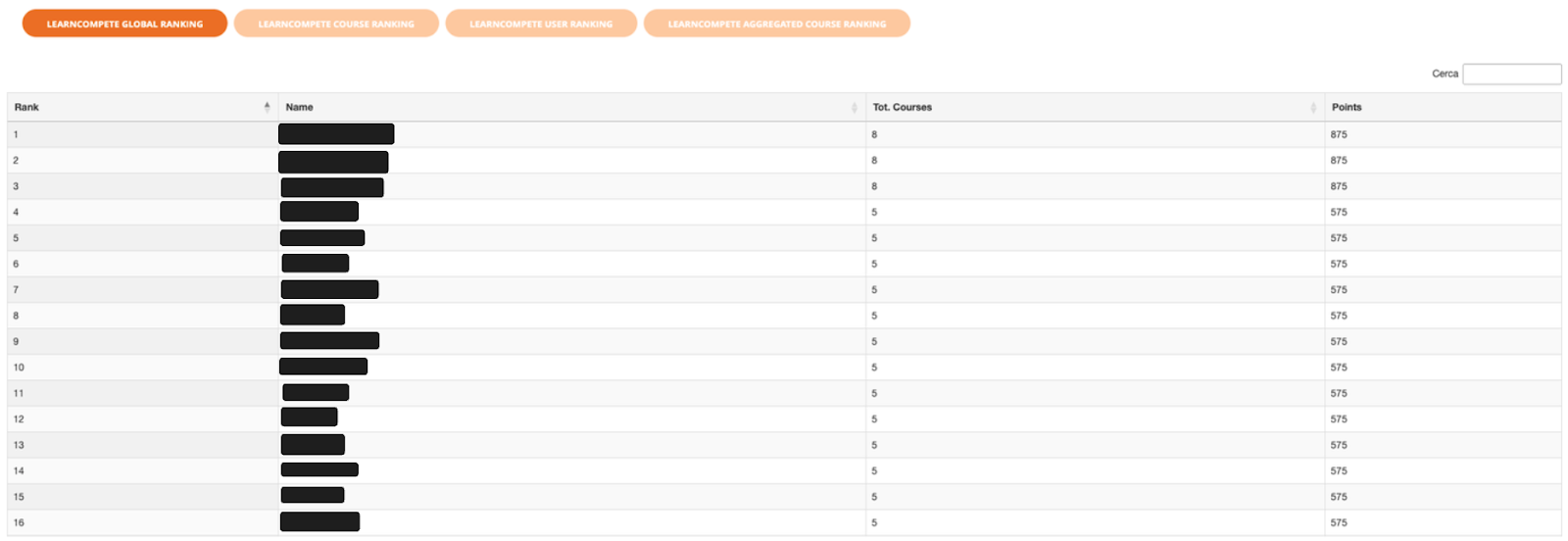
The global leaderboard shows the general ranking of all active users on the platform.
Features:
-
Displays rank, username, total completed courses, and points.
-
Sorted by total score. In case of a tie, the user who has completed more courses is ranked higher.
-
Ability to search for specific users.
-
Clicking on a user's name allows you to view their course history.
Metrics displayed:
-
Rank: Position in the leaderboard.
-
Name: User's name.
-
Tot. Courses: Total number of completed courses.
-
Points: Total accumulated score.
2. LearnCompete Course Ranking
A specific leaderboard for a single course, showing users who have completed or are currently taking a specific course.
Features:
-
Displays the participant leaderboard for a single course.
-
Displays completion time (Tracking Time).
-
Shows specific points earned in the course.
-
Identifies the course leader.
Metrics displayed:
-
Rank: Position in the course leaderboard.
-
Name: User's name.
-
Tracking Time: Time taken to complete the course.
-
Points: Points earned in the specific course.

3. LearnCompete User Ranking
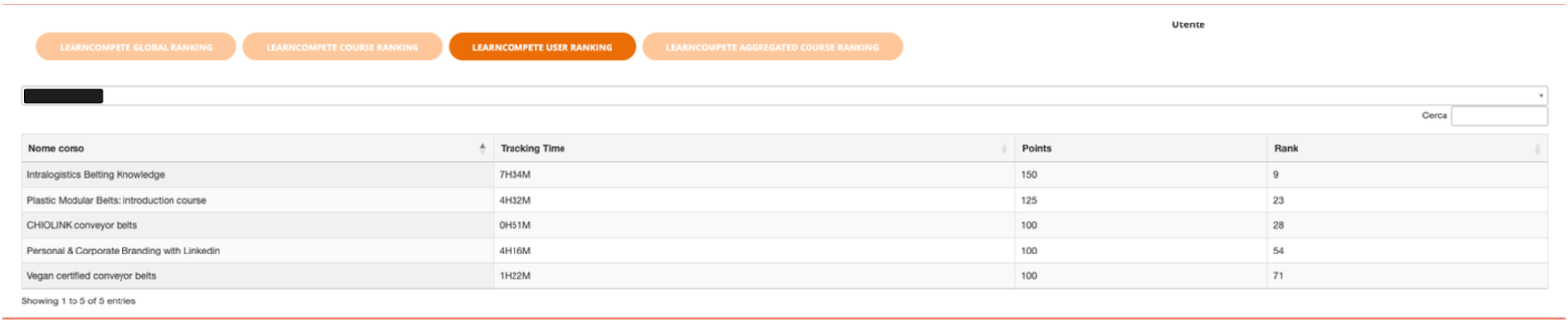
This view shows the individual performance of the logged-in user, with a history of their performance and progress over time. It lists the courses the user has completed and the results achieved in each.
Features:
-
Lists the courses completed by the user.
-
Details of the score, completion date, and rank obtained for each course.
-
Access the specific course leaderboard by clicking on the corresponding row.
Metrics displayed:
-
Course Name: The name of the completed course.
-
Tracking Time: The time taken to complete the course.
-
Points: The score obtained in the single course.
-
Rank: The leaderboard position achieved in that course.
4. LearnCompete Aggregated Course Ranking (Course List)
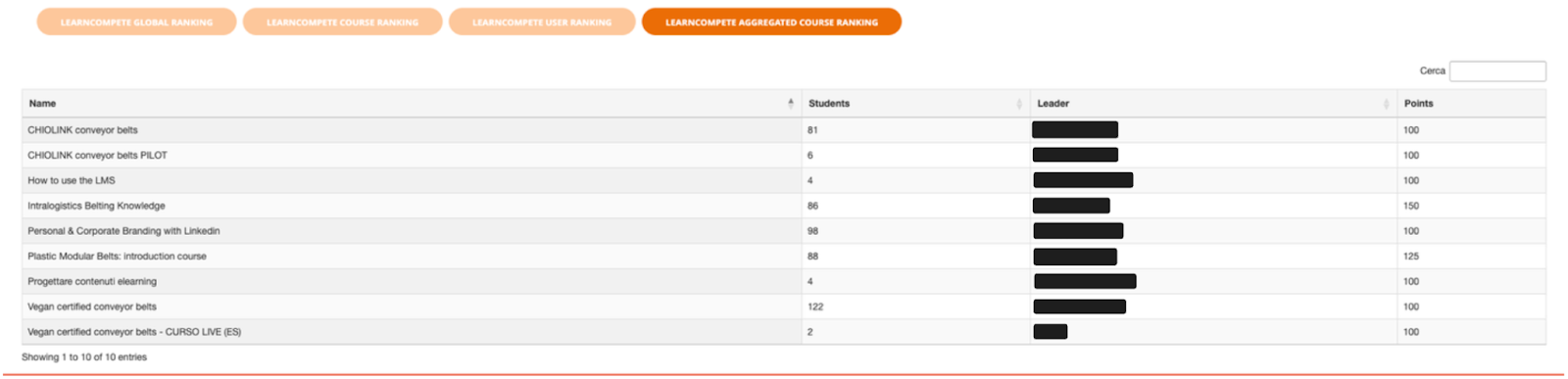
This section displays an aggregated list of all courses that contribute to the general leaderboard, providing an at-a-glance view of which courses are included in the ranking system.
Features:
-
A list of all courses active in the gamification system.
-
Displays the number of enrolled students per course.
-
Identifies the leader of each course.
-
Displays the maximum achievable score for each course.
Metrics displayed:
-
Name: Course name.
-
Students: Number of enrolled students.
-
Leader: The user with the best performance.
-
Points: The maximum score achievable in the course.
Scoring System
The plugin uses a scoring system to calculate user ranks, based on the following factors.
Calculation Factors:
-
Course Score: Each course assigns a variable score based on the user's performance (result and completion time) and is weighted by the course's difficulty.
-
Global Ranking: The platform's global ranking is calculated based on the total points acquired by each user across all courses and the total number of courses completed.
Example of Scoring Parameters:
-
Base Score: A score assigned by each course for the purpose of the global leaderboard.
-
Difficulty Index: The impact of course difficulty can be configured in two ways:
-
Through a multiplier applied based on the course's difficulty level.
-
By assigning a different base score for each difficulty threshold.
User Dashboard Integration
The plugin integrates natively with the user dashboard, providing an immediate overview of performance.
Graphical Display
-
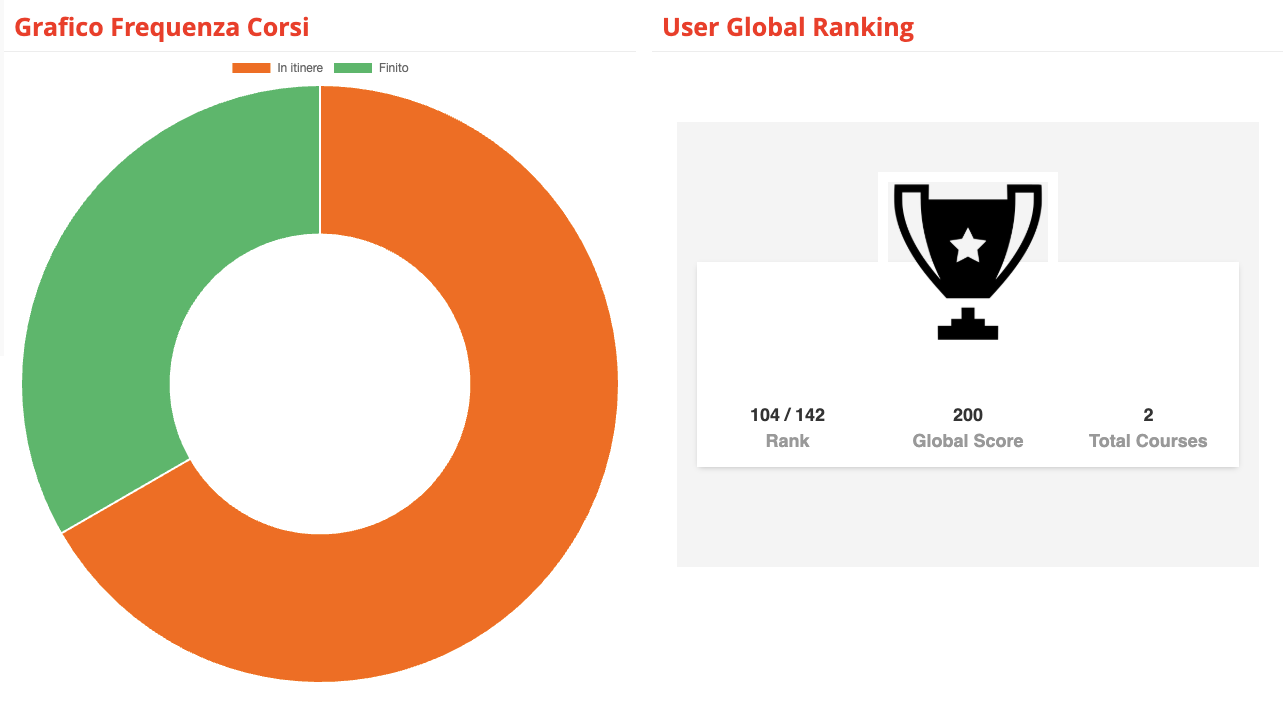
Course Frequency Chart: A pie chart shows the proportion of completed courses (Green) to in-progress courses (Orange), with their respective percentages.
-
User Global Ranking Widget: A dedicated widget displays the user's position in the global leaderboard, their total score (Global Score), and the number of completed courses. A trophy icon provides immediate visual identification of their rank.
Suggested Courses Section
The dashboard can include personalized suggestions for the user, such as:
-
Available courses with direct links.
-
References to the F.A.Q. section for support.
-
Access to the helpdesk for technical assistance.
-
Motivational messages (e.g., "Happy Learning!").
Customization and Configuration
Accessing the Configuration
The plugin is accessible through the administration panel:
-
Access the admin panel.
-
Navigate to the "Leaderboard" menu item.
Score Settings
The administrator can configure parameters to customize the scoring algorithm.
Weight Configuration:
-
Course score weight.
-
Completion time weight.
-
Difficulty index configuration.
Thresholds and Bonuses:
-
Maximum score per course: Set a cap on the achievable score.
Graphic Customization
Options are available to adapt the plugin's visual appearance.
Available Themes:
-
Classic (default)
-
Modern
-
Custom Corporate
-
High Contrast
Customizable Elements:
-
Leaderboard colors.
-
Icons and symbols.
-
Text fonts and sizes.
-
Table layouts.
Monitoring and Analytics
Engagement Metrics
The system allows for monitoring the impact of gamification on user engagement.
Main KPIs:
-
Course completion rate.
-
Average completion time.
-
Leaderboard participation rate.
-
User retention rate.
Competitive Analysis
-
Analysis of score distribution.
-
Identification of user clusters based on performance.
Automatic Reports
The system can generate periodic reports to monitor trends.
Daily Reports:
-
New completions.
-
Changes in leaderboards.
-
Most active users.
Weekly Reports:
-
Engagement trends.
-
Comparative performance.
-
Completion analysis.
Troubleshooting
Common Issues
Scores Not Updating
-
Verify that the course has been effectively completed.
-
Check that the score calculation rules are correct.
-
Perform a manual recalculation if necessary.
Empty Leaderboards
-
Verify the presence of active users who meet the criteria.
-
Check the course's configuration.
-
Check the viewing permissions.
Slow Performance
-
Optimize database queries.
-
Implement a caching system for results.
-
Limit the number of results displayed per page.
Best Practices
Gamification Implementation
-
Maintain healthy competition: The goal is to motivate, not discourage.
-
Balance challenge and achievability: Objectives should be difficult but not impossible.
-
Celebrate individual successes: Publicly acknowledge achieved milestones.
Community Management
-
Leaderboard Moderation: Monitor for incorrect behavior within the system.
-
Communication: Clearly explain the scoring rules and celebrate achievements.